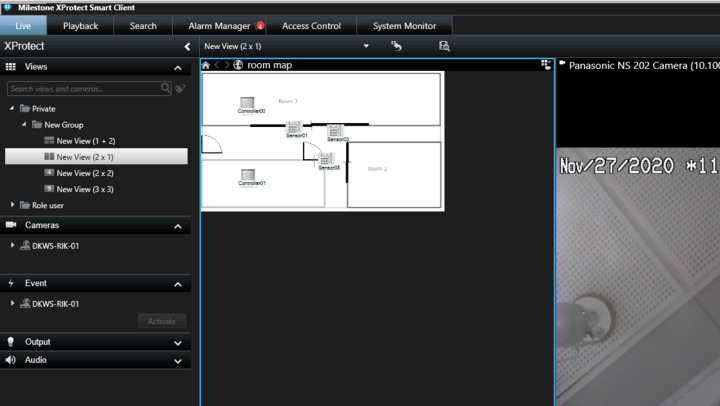
2020R3: default MAP in SmartClient...

Hi All.

I have just updated my lab milestone with 2020R3 to check compatibility with my own plugin. Generally when starts SmartClient, in AlarmManager tab is shown default Map with icons to select home map and to choice other maps. After upgrade to 2020R3, opening Smart Client, no more map icons appairs also if no alarms are active. Exists some options to set up and activate default map ?

In attachents some screenshot of my patology.

Thanks.

Ciao.

Gigi

Your picture shows us there is no alarms in the alarm list, that’s why you cannot see anything in the map area.

Hi Rie.

The problem is this: the behavior of the Smart Client is different from that of previous versions of Milestone XP. The possibility for the operator to choose a map even in the absence of alarms is required for sensor management even without alarms. If the smart client does not show the map, the operator cannot manage the sensors until an alarm is shown. One of the main features of our plugin is that the operator can give commands to the sensors directly from the commands of the customized context menu. Without a map … it’s a bit difficult :slight_smile:

I hope I was clear.

Ciao.

Gigi

If you do not have an alarm the Alarm Manager workspace will neither show Alarm Preview nor Map, this is the behavior and in my opinion it would be very confusing if changed. The workaround is to make a view that includes Map. In this way the user can always reach the map even if there are no alarms, or there are alarms using a different map.

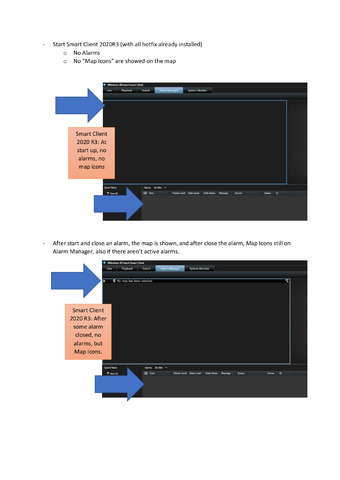
  1. The behavior that you say is different from previous version of Milestone XP.
  2. In the 2020R3, under Alarm Manager tab, I can’t nomore create or modify maps. In previous versions I could do it.
  3. After remove all alarms, map icons is always showed (see my screenshot).
  4. If I change view and returns to Alarm Manager, map icons are hided.

After this points, I think that simply is a bug and not a desired behavior.

Best regards.

Ciao.

Gigi

What I see in your screen shot #2 is that an Alarm is picked

What I see in your screen shot #3 is that no Alarm exists

Did you make a new screen shot showing something else?

Hi Bo.

I’m a little bit depressed because I can’t find a way to explain my self. I retry with a pdf in attach where I describe my issue.

Let me know.

Ciao.

Gigi

If you want to see your map please go to Live tab, you will always see your map.

In order to see the map in the Live Workspace, you will have to create the view and assign Map to it.

We tested 2020 R2 Smart Client Map and 2020 R3 Smart Client map. There is a different behavior as you mentioned.

Regarding the differences between 2020 R2 and 2020 R3, we will discuss with Milestone Development. Let me get back to you later.

At the time, I’m already using Live Tab custom view as good workaround. In any case I hope that standard behavior will be restored.

Thanks.

Ciao.

Gigi