(413) Request Entity Too Large with ServerTask addAlarmServerTask = alarmFolder.AddAlarmDefinition(...)

Hello,

I need to load alarms in bulk (2157 exactly), i’m using the sdk to add the alarms i read from a csv file but when the code reached the 1173 alarms, it blocked with the error code (413) Request Entity Too Large.

ServerTask addAlarmServerTask = alarmFolder.AddAlarmDefinition(name,description,eventTypeGroup,eventType,sourceList,enableRule,timeProfile,enableEventList,disableEventList,managementTimeoutTime,managementTimeoutEventList,relatedCameraList,relatedMap,owner,priority,category,triggerEventList);
            

Is there a way to increase this limit or too add alarms in a different way ?

It’s still possible to add the Alarms in the Management Client.

Regards,

Florent

We have a suspicion that it might not be the number of alarm definitions but rather one specific alarm definition that breaks this. When you reach to the alarm definition that cause the error could you please test if you can add another instead?

The one you cannot create might be too big, or in some way incorrect in a way that makes the system think it is too big. Please test and let us know what you find.

I already tried to add other alarm same result, and if i delete one other alarm the line doesn’t block and it block at the next so it seems to be related to the number of alarms.

Using the API to add the alarms worked perfectly :

        private static bool CreateAlarm(string parms, VideoOS.ConfigurationAPI.ConfigurationItem AlarmFolder)
        {
            try
            {
                string[] parameters = parms.Split(';');
                string name = parameters[0];
                string description = parameters[1];
                string eventTypeGroup = parameters[2];
                string eventType = parameters[3];
                string sourceList = parameters[4];
                string enableRule = parameters[5];
                string timeProfile = parameters[6];
                string enableEventList = parameters[7];
                string disableEventList = parameters[8];
                string managementTimeoutTime = parameters[9];
                string managementTimeoutEventList = parameters[10];
                string relatedCameraList = parameters[11];
                string relatedMap = parameters[12];
                string owner = parameters[13];
                string priority = parameters[14];
                string category = parameters[15];
                string triggerEventList = "";
                if (parameters.Length > 16)
                {
                    triggerEventList = parameters[16];
                }
                VideoOS.ConfigurationAPI.ConfigurationItem invokeInfoItem = client.InvokeMethod(client.GetItem("/AlarmDefinitionFolder"), AlarmFolder.MethodIds[0]);
                
                if (_alarmDefinition.Where(a => a.DisplayName.Equals(name)).Any())
                {
                    Console.WriteLine("Alarm: " + name + "already exist deleting");
                    foreach (VideoOS.ConfigurationAPI.ConfigurationItem configurationItem in _alarmDefinition.Where(a => a.DisplayName.Equals(name)).ToList()) 
                    {
                        
                        VideoOS.ConfigurationAPI.ConfigurationItem invokeDeleteItem = client.InvokeMethod(client.GetItem("/AlarmDefinitionFolder"), AlarmFolder.MethodIds[1]);
 
                        invokeDeleteItem.Properties.Where(p => p.Key == "ItemSelection").Single().Value = configurationItem.Path;
 
                        VideoOS.ConfigurationAPI.ConfigurationItem invokeDeleteItem2 = client.InvokeMethod(invokeDeleteItem, AlarmFolder.MethodIds[1]);
 
                    }
 
 
                }
 
 
                AlarmInfo alarmInfo = new AlarmInfo();
                alarmInfo.name = name;
                alarmInfo.description = description;
                alarmInfo.eventTypeGroup = eventTypeGroup;
                alarmInfo.eventType = eventType;
                alarmInfo.sourceList = sourceList;
                alarmInfo.priority = priority;
                alarmInfo.category = category;
 
                FillAlarmProperties(invokeInfoItem, alarmInfo);
 
                String nextMethodId = invokeInfoItem.MethodIds[0];
 
                invokeInfoItem = client.InvokeMethod(invokeInfoItem, nextMethodId);
 
 
                alarmInfo.InvokeInfoItem = invokeInfoItem;
 
                alarmInfo.TaskPath = Util.GetPropertyValue(invokeInfoItem, VideoOS.ConfigurationAPI.InvokeInfoProperty.Path);


                alarmInfo.InvokeResultItem = client.GetItem(alarmInfo.TaskPath);


                VideoOS.ConfigurationAPI.ConfigurationItem addedAlarm = client.GetItem(alarmInfo.TaskPath);
          
                addedAlarm.EnableProperty.Enabled = true;
 
                VideoOS.ConfigurationAPI.ValidateResult validateResult = client.SetItem(addedAlarm);
                if (validateResult.ValidatedOk == false)
                {
                    Console.WriteLine(validateResult.ErrorResults);
                    return false;
                }
            }
            catch (Exception ex) 
            {
                Console.WriteLine(ex.Message);
                return false;
            }
            return true;
        }

Regards,

Florent

I want to try to reproduce the issue in our test servers here at Milestone.

Can you please share a development project that I can build and test directly? I have a feeling that with the snippets of code you already shared it is close to complete, but to ensure I use it correctly and is not missing anything I hope you will share such a test project. It could create dummy alarm definitions as long as it will make it possible for me to reproduce the issue you are seeing.

Here is my solution, you need to use the embeded AlarmesTest.csv as example and complete it with your own GUID one for a test analytic event and one GUID of a camera.

Regards,

Your code breaks for me doing the first Alarm Definition so none gets created.

This code works for me:

private void CreateAlarmDef(string name)
{
	string description ="";
	string eventTypeGroup = "a96692c8-51b1-4f87-b12c-0d3d9cbfc5a4";
	string eventType = "1131e701-ed95-4a53-8027-cb67012ccabc";
	string sourceList = "Camera[A3FA591D-0B64-488D-910D-1404FE631F1A]";
	string enableRule = "0";
	string timeProfile = "TimeProfile[00000000-0000-0000-0000-000000000000]";
	string enableEventList = "";
	string disableEventList = "";
	string managementTimeoutTime = "00:01:00";
	string managementTimeoutEventList = "";
	string relatedCameraList = "";
	string relatedMap = "";
	string owner = "";
	string priority = "8188ff24-b5da-4c19-9ebf-c1d8fc2caa75";
	string category = "00000000-0000-0000-0000-000000000000";
	string triggerEventlist = "";
 
	AlarmDefinitionFolder alarmDefinitionFolder = (new ManagementServer(EnvironmentManager.Instance.MasterSite.ServerId)).AlarmDefinitionFolder;
	alarmDefinitionFolder.AddAlarmDefinition(name, description, eventTypeGroup, eventType, sourceList, enableRule, timeProfile, enableEventList, disableEventList, managementTimeoutTime, managementTimeoutEventList,
		relatedCameraList, relatedMap, owner, priority, category, triggerEventlist);
}
		
private void button2_Click(object sender, EventArgs e)
{
	for (int i = 0; i < 2200; i++)
	{
		string name = NAMEPREFIX + i.ToString();
		CreateAlarmDef(name);
	}
}

Your code must be close as I was unable to see the wrongs. I am pressed for time for doing the deep debug so I hope by sharing my code you will be able to find what it is that breaks it by comparison and single-step debugging..

(Values must be replaced. I believe i did that part right when debugging your test app.)

Ok so i tried your code it works fine but it doesn’t check if the alarm already exist or not, i do that by ckecking the name.

  private static void CreateAlarmDef(string name)
        {
            AlarmDefinitionFolder alarmDefinitionFolder = (new ManagementServer(EnvironmentManager.Instance.MasterSite.ServerId)).AlarmDefinitionFolder;
            if (alarmDefinitionFolder.AlarmDefinitions.Where(a => a.Name.Equals(name)).Any())
            {
                Console.WriteLine("Alarm: " + name + "already exist deleting");
                AlarmDefinition alarmDefinition = alarmDefinitionFolder.AlarmDefinitions.Where(a => a.Name.Equals(name)).Single();
                ServerTask deleteAlarmServerTask = alarmDefinitionFolder.RemoveAlarmDefinition(alarmDefinitionFolder.RemoveAlarmDefinition().ItemSelectionValues.Where(k => k.Key == name).Select(k => k.Value).Single());
                while (deleteAlarmServerTask.State != StateEnum.Error && deleteAlarmServerTask.State != StateEnum.Success)
                {
                    System.Threading.Thread.Sleep(100);
                    deleteAlarmServerTask.UpdateState();
                }
                Console.WriteLine("Alarm remove task: " + deleteAlarmServerTask.State);
                if (deleteAlarmServerTask.State == StateEnum.Error)
                {
                    Console.WriteLine("Alarm remove error: " + deleteAlarmServerTask.ErrorText);
 
                }
            }
            string description = "";
            string eventTypeGroup = "a96692c8-51b1-4f87-b12c-0d3d9cbfc5a4";
            string eventType = "56129b23-b8f5-4303-a0db-ecb641842ce5";
            string sourceList = "Camera[53AABA5F-2DBE-40E0-B537-13BCDC602407]";
            string enableRule = "0";
            string timeProfile = "TimeProfile[00000000-0000-0000-0000-000000000000]";
            string enableEventList = "";
            string disableEventList = "";
            string managementTimeoutTime = "00:01:00";
            string managementTimeoutEventList = "";
            string relatedCameraList = "";
            string relatedMap = "";
            string owner = "";
            string priority = "8188ff24-b5da-4c19-9ebf-c1d8fc2caa75";
            string category = "00000000-0000-0000-0000-000000000000";
            string triggerEventlist = "";
 
            //AlarmDefinitionFolder alarmDefinitionFolder = (new ManagementServer(EnvironmentManager.Instance.MasterSite.ServerId)).AlarmDefinitionFolder;
            alarmDefinitionFolder.AddAlarmDefinition(name, description, eventTypeGroup, eventType, sourceList, enableRule, timeProfile, enableEventList, disableEventList, managementTimeoutTime, managementTimeoutEventList,
                relatedCameraList, relatedMap, owner, priority, category, triggerEventlist);
        }

With this i get the same error as before, so it might be related to the way i delete the alarm ?

Regards

I must have done the first testing without ever deleting an alarm definition. Re-testing I find that RemoveAlarmDefinition always fails. If you set a breakpoint or singlestep debug is this the same you observe?

I think I will report this as a bug to Milestone Development but would like to know if my observation fits yours. Do you observe the same?

Yes, when a certain number of alarms is reached the RemoveAlarmDefinition always fails.

I will create a case with Milestone Support that RemoveAlarmDefinition fails if there are many alarm definitions. I will make instructions so that Development will have easy reproduction of this. Important for the case: Which version of XProtect are you using? Also, which version of the MIP SDK?

i’m using MIP SDK 2020R3 and Expert 2020R3

Thank you. I have created a case with Milestone Development. I will communicate here any questions and solutions that will come up.

The problem is that the ConfigurationItem contains all children and everything is included in the request. This means that the request will be much larger than the default allowed request size in IIS and thus IIS refuses the request. This leads to the error we have seen if there are many Alarm Definitions on the site. We have found a workaround.

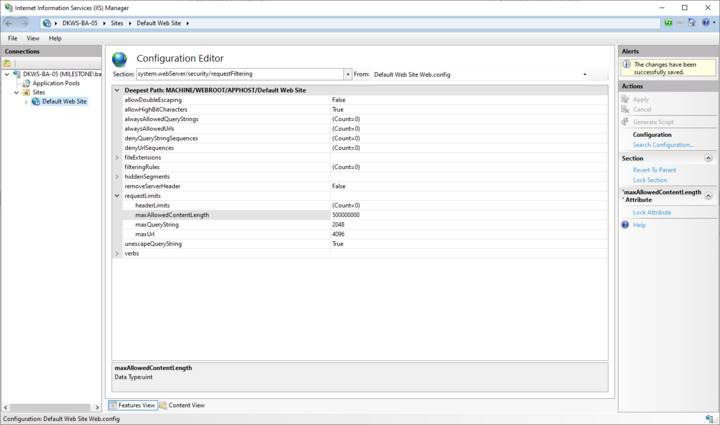
In the server hosting the Management Server service configure the IIS like this:

  • Open IIS Manager and pick the default website.
  • Start the Configuration Editor (in Management section of the window).
  • In the Section selector select system.webServer -security -requestFiltering
  • Expand the node “requestLimits”
  • Find the field “maxAllowedContentLength” and configure a higher value (I changed it from 30.000.000 to 500.000.000)
  • Restart Default Web Site

It is under consideration whether a design that does not include child items in this method and the big requests this leads to can be implemented. If this will be changed it is something that will come in future versions, for now please use the workaround.