After updating from Xprotect 2023 R3 to 2025 R2 all doors on maps are white. They will change the icon slightly but not being able to glance at the screen and see that all of the doors are green is a real pain. Is this a bug or did they remove the feature altogether? I’ve looked around the settings but can’t find where this config would be done (if it even exists anymore). We are using DNA Fusion (8.3.1.0) Plugin: (Version: 1.1.3.9, 1.1i)
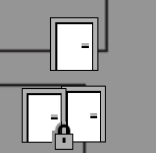
The design of the default icons for the different states of the doors have been changed in the R2 release. The icon for the locked state was made to show a padlock in the bottom right corner instead of changing colour.
Currently there is no option to switch back to the old design for the icons, but we will note the issue with visibility of the state at a glance. Unfortunately, it seems the change in design wasn’t documented, but we will update the relevant pages.
Thank you for the reply, I really hope this can be changed for the next version. Even an option to toggle between the two would be great.
I have a question - do all users want to see that “all of the doors are green” (which means the doors are unlocked)? Are there users who want to see the opposite - that all the doors are locked (so red)? Is green/unlocked the default desired state for all doors?
The way it used to work was Green meant the door was closed and locked, red meant the door was held open and an open green door meant the door was unlocked. So the front office could glance at the map and if there were any red doors they could investigate why they were still open.
In the library I have a Green door is closed and UNLOCKED. So that’s something we need to figure out first - what’s green for a closed door. Is glancing to see any RED doors enough or do we need to explicitly show the green ones too? Is it not a problem that Green can mean BOTH a locked door and an unlocked door?

I think I would prefer to be able to see both green and red. My understanding of the old system was that green meant the door was closed, red meant it was open and the door icon itself being open or closed meant unlocked or locked so you could have 4 variations based on the two options. In my eyes green means “safe” so closed makes the most sense. The way it used to be was perfect frankly.
The team would like to know which access control system integration are you using? Each integration uses the default icons that the ACM provides in their own way, so there could be differences depending on which one you are using.
We are using DNA Fusion (8.3.1.0) Plugin: (Version: 1.1.3.9, 1.1i)