Is it possible to access the details of an ACM configuration? For example, inside of my event handler in ACEventManager I’d like to fire off a MIP Message that includes the camera ID of the camera associated with the event that has just occurred. Since the association between the access control item and the camera is done with the management client this data is stored by Milestone. Is it possible to query this information using the config API or something else?
Hi James,
There’s a protocol integration call (through SOAP):
Available in VideoOS.EventServer.Communication.dll
namespace VideoOS.EventServer.Communication.AccessControl.Client
public GetAccessControlSystemConfigurationResp GetAccessControlSystemConfiguration(
string token,
GetAccessControlSystemConfigurationParams parameters)
{
return this.Channel.GetAccessControlSystemConfiguration(token, parameters);
}
This call will return the current configuration of the requested AC system, an example can be seen here (AC system used, DemoACPlugin).
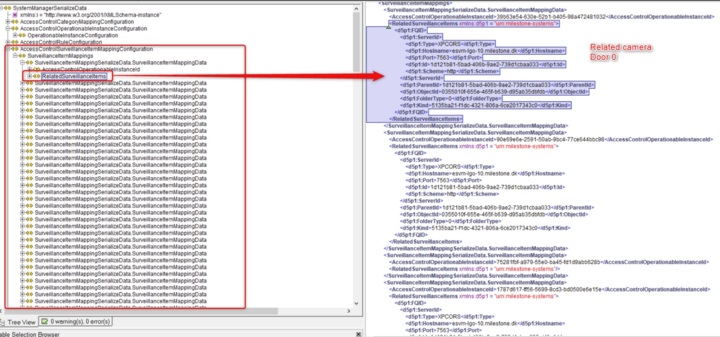
Then there’s a node which holds the relation between doors/AC_Units and cameras:
Namely, RelatedSurveillanceItems (Here’s the FQID of XPCO cameras)
MC uses this information to render & set doors and related cameras.
Hence, when raising an AC-Event we don’t provide the related the camera associated to a door/AC-unit, however, through a call to the AC Configuration API (as mentioned previously) you can retrieve at any moment the current binding/relation between any door and any camera (through its FQID).
Wow, thanks for all that detail. I’ve never used protocol integration so I would never have thought of it. I’ve got some research to do but once I figure out how this looks like exactly what I need.
Is this a supported MIP method call? None of this seems to be in the protocol documentation. Supported or not, how would I go about calling it?
Hi James,
I’ve added a small sample code here, showing how to retrieve your AC configuration. Check the readme file on how to use.
Cheers,
That was very helpful, thank you. I have a couple questions:
-
I’m curious, how did you find the service endpoint (/Central/AccessControlServiceToken)? I can’t find it documented anywhere. For the Management Server you can find all the service endpoints in IIS (or buried in Program Files), including ones that aren’t listed in the MIP documentation. But I can’t find any similar list for the Event Server.
-
In the XML that is retrieved (which looks like a copy of what is in the Central.ConfgiurationData SQL table), I can see the object ID of the camera in the RelatedItems section you highlighted. Unfortunately it does not list the ID of the door there, it lists an “OperationableInstanceId” instead. Further down the XML when it lists all the ACElements the Id there is the ID from the Access Control system. In the Management Client if you have developer options enabled you can find both:
The Element ID is the “OperationableInstanceId” from the XML. The External ID is the ID from the Access Control system that is listed under the ACElements section of the XML.
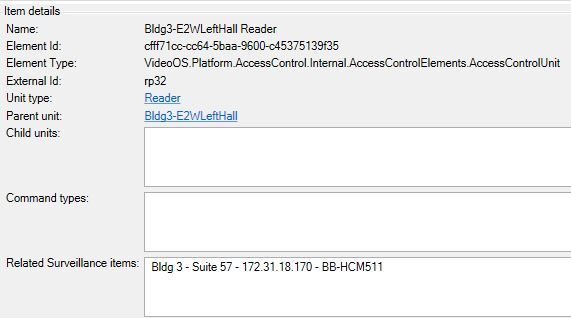
Is there place you can lookup the correlation between these two IDs?
Hi,
1 - Mainly, sniffing MC/SC, and also by reading other forums questions: for instance(https://developer.milestonesys.com/s/question/0D50O00003KCa78SAD/how-to-receive-alarm-from-event-server-via-protocol-integration )
2 - You’re right, the doorId is not there  . I believe what MC is doing is looping that collection and based on the its index is setting Door 0 (in/out) 1,2,3,4 … since I don’t see any other place where that relation (door + camera) may be defined.
One bump just to see if someone from Milestone to chime in. I’ve been all over this and even combed through the SQL DB looking for where Milestone could possibly store the correlation between these two IDs. I cannot find it anywhere. I don’t believe it’s index based because the order doesn’t seem to line up. I realize this would be completely unsupported but I’ll take anything at this point.