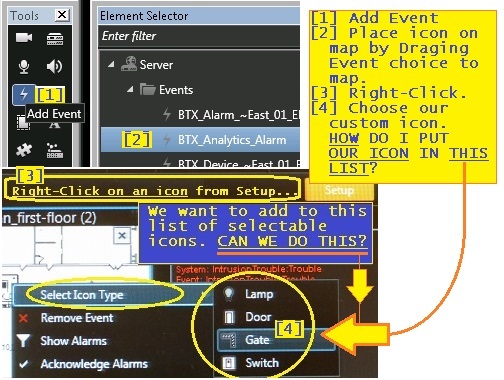
The Sensor Monitor sample which uses its own icons has got me started. Thanks.
- I now have my own icon, (thanks to the Sensor Monitor sample).
- How do I place my icon into List [4] drop-down-list (along with: ‘Lamp’, ‘Door’, ‘Gate’, and ‘Switch’? What would its Parent be ??
As far as I can see the events you are pointing to are build-in XProtect events (most likely analytics or user defined events). The list of icons available for these cannot be modified by a plugin.
Your own plugin items defined by your plugin will show up when clicking the puzzle piece in the Tools dialog. You define the Icon for these items yourself in your plugin (as you have already learned from the Sensor Monitor sample).
If you do it like it is done for the Sensor type in the sample, using the MapIconDictionary, you can define multiple icons for each type. Now, the UI support for the plugins do not support sub-menus so you will not be able to make a submenu for selecting an icon type, but you could make various menu entries for selecting different icons (even showing each icon) in the same way as has been done for e.g. activating the sensors. You would then have to react to each of those actions in the plugin in the server and store the icon to use in the configuration as well as setting it using the MapIconKey on the item in question (you can see an example of that in the SensorItemManager.TriggerReceiver method).
In the interest of guaranteed success first time around, we simply compiled the MIP SDK Sensor sample app, then deployed it on the server. The sensor system shows up in the MIP Plug-ins subsection of the Management App, and also within the Users’ properties, as expected.
However, we do not get any of its content in the Smart Client (after selecting the Puzzle object). What is the trick to getting it to become visible in the Smart Client?
We’ve dropped the plug-in into the management server, smart client, and also the shared plug-in folders, and the “def” file contains references to Administration and SmartClient.
Dave
did you restart the Event Server after compiling the senser monitor plugin?
The SensorMonitor will not work if not running in the Event Server.
The plugin.def for that sample is..
<plugin>
   <file name="SensorMonitor.dll"/>
   <load env="Service, Administration"/>
</plugin>
You must have changed the plugin.def file.
Maps actually “live” in the Event Server and no Smart Client plugin is necessary (but Event Server plugin is).