-
I try to use "[Protocol Integration Sample - Analytics Event Trigger via XML](https://eur01.safelinks.protection.outlook.com/?url=https%3A%2F%2Fdoc.developer.milestonesys.com%2Fhtml%2Findex.html%3Fbase%3Dsamples%2Fanalyticseventxml.html%26tree%3Dtree_3.html&data=04%7C01%7C%7Cdba10bb36e35471b83e208d89ce0bb2a%7C4744e4b2072d4754be71250b45e049fe%7C0%7C0%7C637431836433898688%7CUnknown%7CTWFpbGZsb3d8eyJWIjoiMC4wLjAwMDAiLCJQIjoiV2luMzIiLCJBTiI6Ik1haWwiLCJXVCI6Mn0%3D%7C1000&sdata=7OpjRCKwYcOYryeV39mFM%2B40hKoAYD8ouYEn1zN43WM%3D&reserved=0 "https://eur01.safelinks.protection.outlook.com/?url=https%3A%2F%2Fdoc.developer.milestonesys.com%2Fhtml%2Findex.html%3Fbase%3Dsamples%2Fanalyticseventxml.html%26tree%3Dtree_3.html&data=04%7C01%7C%7Cdba10bb36e35471b83e208d89ce0bb2a%7C4744e4b2072d4754be71250b45e049fe%7C0%7C0%7C637431836433898688%7CUnknown%7CTWFpbGZsb3d8eyJWIjoiMC4wLjAwMDAiLCJQIjoiV2luMzIiLCJBTiI6Ik1haWwiLCJXVCI6Mn0%3D%7C1000&sdata=7OpjRCKwYcOYryeV39mFM%2B40hKoAYD8ouYEn1zN43WM%3D&reserved=0")" to send the analysis event to Milestone Event server.
I has successful to create the analysis event with the bounding box but I can’t find the way to append other extra attributes to analysis event(Ex: “name”, “age”, “group”, thumbnail image … etc ).
I has try to add the “CustomTag” to the event xml, but it doesn’t display in the Alarm Manager.
I has found the demo from Milestone Systems Learning(https://www.youtube.com/watch?v=KKSKEFoe6A8&t=704s)
I found it can add the extract attributes “Tag” on the event and it can search on alarm manager.
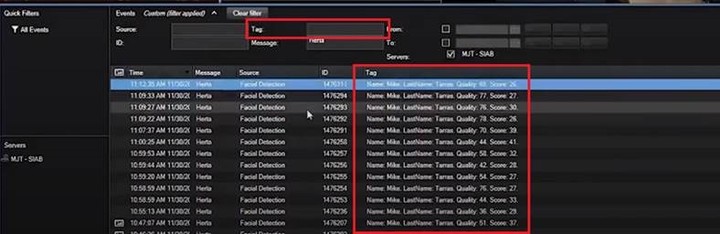
I want to add extra attributes like the “Tag” and append the person thumbnail like the sample on above.
Would you please tell me what should I do then we can do the same thing like below demo ?
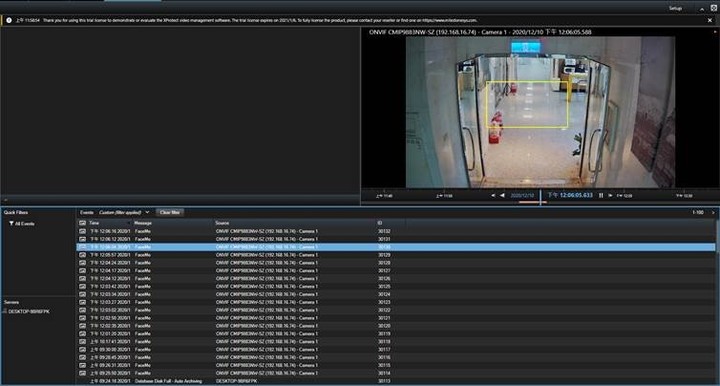
I has attach my testing xml on the end of the question and below is the snapshot of my XProtect Smart Client Alarm Manager.
-
Continue the previous question, if it can add extra attributes to the analysis event.
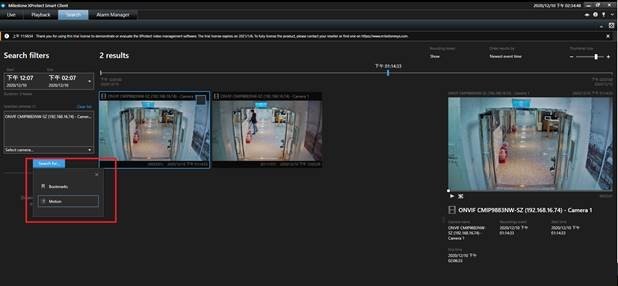
Can it be searched at the XProtect Smart Client Search filter ?
What should I do to make the user can search video clip by the person attribute ?
Or what is your suggest for the facial recognition best practice to define the search filter ?
-
I use **Test Analysis Event.txt** to send the analysis event.(The xml body contain overlap object)
But I can’t found the overlap bounding box or name on XProtect Smart Client live streaming or playback, it can only be seem on the Alarm Manager in my environment.
I has found the demo (https://www.youtube.com/watch?v=1TsRGHnm8lw) form the internet but I can’t reproduce on my environment.
Can the analysis event draw the overlap bounding box and name to the XProtect Smart Client live streaming or playback ?
-
Continue the previous question, can I control the stay time of overlap bounding box ? -
I has reference the sample code to send the [analytics event](https://eur01.safelinks.protection.outlook.com/?url=https%3A%2F%2Fdoc.developer.milestonesys.com%2Fhtml%2Findex.html%3Fbase%3Dsamples%2Fanalyticseventxml.html%26tree%3Dtree_3.html&data=04%7C01%7C%7Cdba10bb36e35471b83e208d89ce0bb2a%7C4744e4b2072d4754be71250b45e049fe%7C0%7C0%7C637431836433938672%7CUnknown%7CTWFpbGZsb3d8eyJWIjoiMC4wLjAwMDAiLCJQIjoiV2luMzIiLCJBTiI6Ik1haWwiLCJXVCI6Mn0%3D%7C1000&sdata=uBtT44SMbbgI2kFvfBmFCytliJmOlQ17Kj8TVg%2B9%2BRw%3D&reserved=0 "https://eur01.safelinks.protection.outlook.com/?url=https%3A%2F%2Fdoc.developer.milestonesys.com%2Fhtml%2Findex.html%3Fbase%3Dsamples%2Fanalyticseventxml.html%26tree%3Dtree_3.html&data=04%7C01%7C%7Cdba10bb36e35471b83e208d89ce0bb2a%7C4744e4b2072d4754be71250b45e049fe%7C0%7C0%7C637431836433938672%7CUnknown%7CTWFpbGZsb3d8eyJWIjoiMC4wLjAwMDAiLCJQIjoiV2luMzIiLCJBTiI6Ik1haWwiLCJXVCI6Mn0%3D%7C1000&sdata=uBtT44SMbbgI2kFvfBmFCytliJmOlQ17Kj8TVg%2B9%2BRw%3D&reserved=0") , but I can’t found the any way to append the access token (get from login API).
Is analytics event need to append the access token ?