I need assistance integrating a live stream from XProtect with an on-premises Edge server that runs our proprietary computer vision model. While I understand that an OS-agnostic platform like AI Bridge would be ideal, it seems to be available only on certain NVIDIA servers. My goal is to integrate it with my Edge server to capture bounding boxes and other alarms and overlay them on the live stream channel. Our analytic model covers both process and safety, so with AI Bridge, any metadata can be selected based on end-user requirements, whether for operators or safety personnel. I am aware of alternative methods, such as sending metadata XML from a third-party application developed with the SDK, but I am not interested in a Windows-based .NET application. I am specifically looking for an OS-agnostic method. Could anyone guide me on how to integrate AI Bridge with my analytics application, which we have developed from scratch?
The AI Bridge could be a good choice if your analytics application is utilizing Docker containers / can run inside a Kubernetes cluster (or Docker Compose).
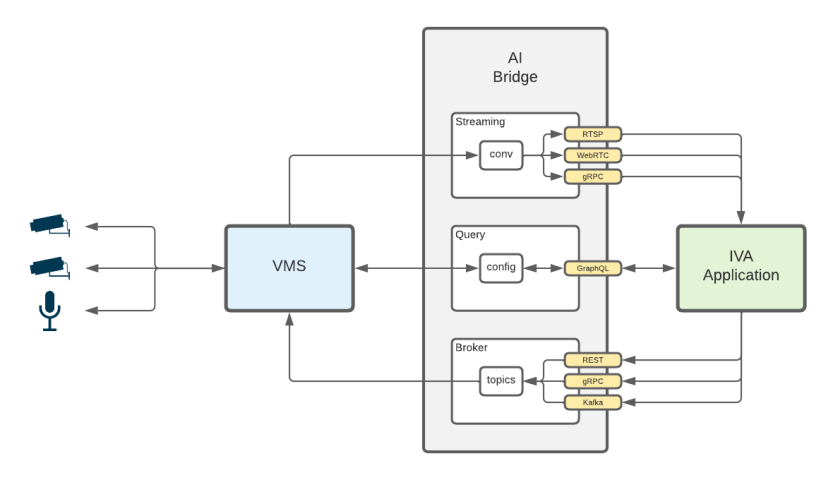
Typically, AI Bridge provides your analytics application with an RTSP video stream from any of the cameras connected to XProtect, and your application post back Analytics Events and ONVIF Metadata with bounding boxes, object classifications etc., for further use with XProtect.
AI Bridge is currently available in a private repository at NGC but is as such not bound to NVIDIA technologies; software or hardware (though it works well together).
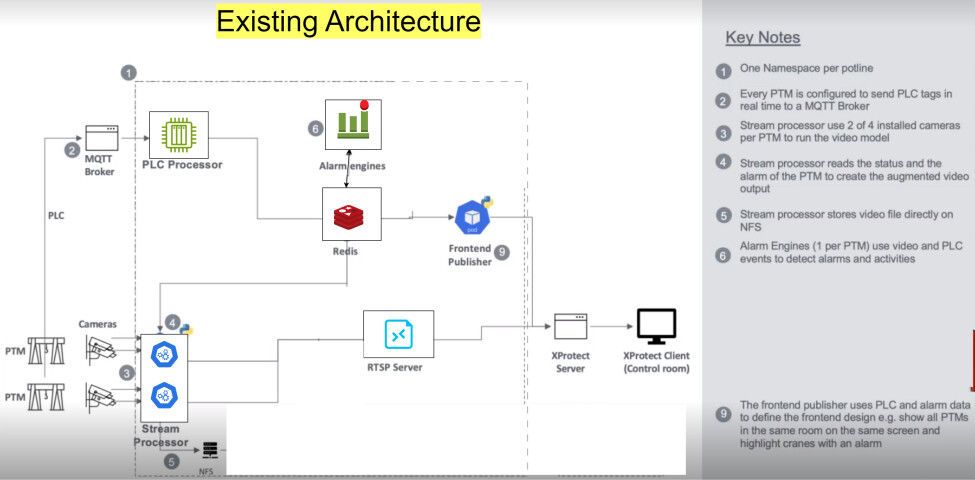
Thank you. We are using Kubernetes with Docker containers. Our system does not include an NVIDIA GPU, and the provided document primarily focuses on the NVIDIA platform. How can we register it with my on-premises Edge server? Currently, we are capturing an RTSP stream from a camera, generating metadata using our model developed on the edge server, and then embedding alarms and bounding boxes in the video frames. A new RTSP stream is then created using an RTSP server on the edge and send to XProtect corporate application. We have some performance issue on this. We need to simplify this process.
The AI Bridge seems as a good choice. Please request access to the AI Bridge repository with Docker containers and detailed documentation by sending an email to Developer@milestonesys.com, stating the email address that will be used to give you access to NGC.
From AI Bridge, you can capture an RTSP stream from any camera managed by XProtect VMS, and then posting events (that can be promoted to alarms in XProtect) and bounding boxes related to the video frames, back to XProtect corporate application.
Thank you, Hans, for your reply. I would like to get more clarity on this. Do we need an NGC account as necessary for this? Please see our architecture. Our production edge server is completely offline (on-premises cloud). There is no Nvidia component in it. From the camera, the RTSP stream is directly connected to the stream processor and generates bounding boxes and metadata using an ML model. At the same time, PLC alarms will be combined with this data and embedded in the same frame. After that, it is sent to the RTSP Server for RTSP link generation, and finally, it will be sent to the XProtect Server. Our cloud setup is completely offline. My question is, how can I implement AI Bridge without an NGC account?. If this is complicated in this forum, I would like to setup a meeting to discuss this.
AI bridge is not dependent on NVIDIA hardware or software, but it can be downloaded from NGC.
Please request access to the AI Bridge repository with Docker containers and detailed documentation by sending an email to developer@milestonesys.com, stating the email address that will be used to give you access to NGC. You can also request a meeting to discuss the best solution for your scenario.
Using the AI Bridge, you can
get video from XProtect - for example using RTSP
send (modified) video with overlays, redactions etc. to XProtect
send bounding box metadata to XProtect, which the XProtect Smart Client will draw on top of the video
send Analytics Events to XProtect - Events can trigger rules and be promoted to Alarms in XProtect