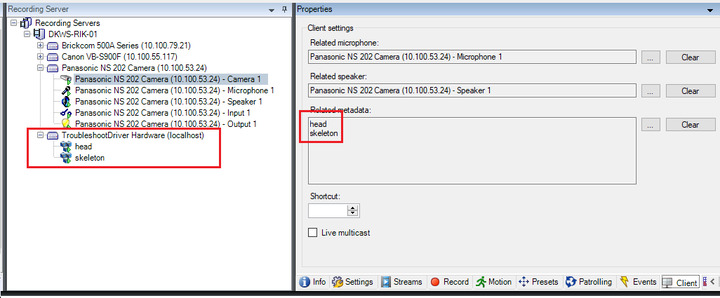
When I’m using the alarm manager, and one of my cameras which have 2 metadata devices from my MIPDriverFramework developed driver, the whole UI freeze almost every time the manager loads. Note that the metadata does NOT store onvif-compliant XML data, it’s 100% custom text.
Let me ask you a few questions for making this symptom clear.
Can you see the metadata from your device in Metadata Playback Viewer and Metadata Live Viewer?
One more question, can you see the metadata through the normal view in Smart Client? (Perhaps with a plugin you have developed?)
Do you see the issue in the Live or Playback workspace of the Smart Client?
I’ve developed a overlay plugin which is triggered by the NewImageViewerAddOn event. This event does not fire in the Alarm Manager, so no, I can’t visualize the metadata.
It works as expected in the live and playback tab though.
Sorry, let me repeat the question that I had asked because this is very important to know. Can you see the metadata from your device in Metadata Playback Viewer and Metadata Live Viewer?
Yes I can.
@Rie Kiuchi (Milestone Systems) Bumping for visibility.
If it’s relevant, the custom metadata DFW channels contain 3 MetadataTypeDefinitions, 1 native, MetadataType.BoundingBoxTypeId, and two custom ones.
Please give us the raw data of the metadata for us to experiment and try to reproduce. Perhaps even better you could give us a small project that sends the metadata you have, to make it easy and make sure we can reproduce the exact issue.
Here’s a project with a driver that causes this issue. This is just one metadata channel, the issue occurs more frequent on the ‘real’ project which contains more channels. I added a video where I demonstrate the issue in the root folder.
Thank you for the project with a driver, we could see Smart Client freeze. Milestone development will start investigation.
Have you patched fully the system? If not, can you please install following patches and see if it works? There are two relevant fixes.
- 22/11/2019 - SC slow alarm handling - include improvement into 13.3 cumulative fixes
- 23/12/2019 - Smart Client, Alarm tab crash
XProtect 2019 R3 cumulative patch installers:
XProtect Smart Client 2019 R3 cumulative patch installers:
It seems to have done the trick. One thing I didn’t mention earlier is that the Smart Client can still freeze in my overlay plugin:
        public override void OnMetadataRecieved(string data)
        {
            if (System.Windows.Forms.Application.OpenForms.Count > 0)
            {
                if (System.Windows.Forms.Application.OpenForms[0].InvokeRequired)
                {
                    ClientControl.Instance.CallOnUiThread(() => OnMetadataRecieved(data)); // <- freeze sometimes when the user switches tabs
                }
                else
                {
                        ...
                }
        }
Following code should be removed.
if (System.Windows.Forms.Application.OpenForms.Count > 0)
{
        if (System.Windows.Forms.Application.OpenForms[0].InvokeRequired)
It is not needed because the call to “ClientControl.Instance.CallOnUiThread” will internally check if invoke to the UI thread is needed. And soon the Smart Client will not have any WinForms windows so System.Windows.Forms.Application.OpenForms will be empty.
But that will not solve the freeze problem. We have not seen that before.
So we will try to reproduce the same issue. Can you please give me your source code for a plugin to reproduce the issue?
I removed this code. I’m attaching a zip with a updated troubleshootDriver project and a overlay plugin. I use the same code structure in my real overlay plugin (with the BaseVisualizer) as parent. Install the driver, name it to “metadata test” and associate it with a camera. Install the DebugSCOverlay plugin and try it out. See the demonstration video in the DebugSCOverlay zip.
Thank you for sharing your code. Unfortunately, we have not reproduced the same issue despite of following your video.
We are wondering if we are missing something for reproducing, do you have any ideas to be able to reproduce it?
I’m still getting the error quite frequently. Perhaps we can schedule a remote session and I can show you with my solution?
That sounds a good idea and I created a case for this issue (Case number is MSC424958).
You will soon receive an email then please let me know your candidate schedules and teamViewer ID and password in the case (Please don’t write your ID and password here in Developer Forum).