Alarm Search fail...

Hi all.

I have developed some plugin (cliend and server). Server side, when receive an event from external source, I search if already exist an alarm about the event. If already exist, external event is skipped. Generally all works fine, but randomically, the AlarmClient.GetAlarmLines(…) returns no alarm while alarm exists. Effect side is thata a new alarm is created for error.

To search alarms, I use AlarmFilter with condition Equals on CustomTag (that is my key).

All work fine…but as said, sometimes search return empty list.

My search is in a server plugin that search, minimum, every second.

Some ideas ?

Thanks.

Ciao.

Gigi

How old is the first alarm when you do the search? I wonder; if there might be a timing issue that the alarm is still in the process of being written in the system when you do the GetAlarmLines.

Maybe a scheme where you search every second but search for alarms that are one to two seconds old would ensure better results. You might be able to figure out a better or more reliable design.

Thinking of a different design, you might want to subscribe to the NewAlarmIndication and use that as a different mechanism for acknowledging that the alarm has been created.

If you dismiss the idea that this is timing on new events, I would like to see your code for the GetAlarmLines including the condition(s), I might be able to see if something is amiss.

Hi Bo.

You are right. I don’t like actual polling solution, but at the time I can’t change it. I have in roadmap to change as your suggestion. My actual code is very simple:

My code that runs in event server context, just a bit simplified is:

public AlarmLine[] SearchAlarms(string customTag, FQID sourceEventServer)
{
	AlarmClientManager alarmClientManager = new AlarmClientManager();
	IAlarmClient alarmClient = alarmClientManager.GetAlarmClient(sourceEventServer);
 
	List<VideoOS.Platform.Proxy.Alarm.Condition> cList = new List<VideoOS.Platform.Proxy.Alarm.Condition>();
 
	cList.Add(new Condition() { Operator = Operator.Contains, Target = Target.Type, Value = "MyTargetType"});
	cList.Add(new Condition() { Operator = Operator.NotEquals, Target = Target.State, Value = 11 }); // Only opened state...I can't find constant for close state :)
	cList.Add(new Condition() { Operator = Operator.Equals, Target = Target.CustomTag, Value = customTag }); // Some limitation on CustomTag ?
 
	AlarmFilter af = new AlarmFilter();
	af.Conditions = cList.ToArray();
 
	var a = alarmClient.GetAlarmLines(0, 100, af );
	
	...
}

The code snippet look correct. I guess it also works correctly most of the time. Can you comment on the timing?

Question on timing. -Have you ever seen the alarm on the Alarm List in the Smart Client and observed that your SearchAlarms returns a result without the alarm?

Hi Bo.

I have inserted some more detailed logs and, “fortunatly”, the error was repeted. As you can see by my log extraction:

1. First part where search return correct values.

2. Then, for me absolutely randomly, search always returns 0 results.

3. Search fails and so I push new events and new alarms are created.

4. I restart Event Server

5. After restart, search came back to return values

My ipotesis is that in a too little time, I call to many times the SearchAlarms (One call for every sensor event…wrong). So I have improved a bit my logic making only one call for all sensor…in my use cases this is correct. And now, I’m checking on site.

As last thing, I notice that the probem at point 2, starts when I start Smart Client…is possibile that while I’m searching (many time in a second), another call (this time by SmatClient) move EventServer in some error state (after restart works fine)?

I do not know. What do you think about it ?

Point 1. All works fine

2020-02-11 17:52:12.9551 ------ SEARCH START [“0”|“i32_desktop-ehj2n5k”~“1”|“2”~“2”|“2”~“3”|“zone-violation”] ----

2020-02-11 17:52:12.9621 1.[Door opened][“0”|“i32_desktop-ehj2n5k”~“1”|“2”~“2”|“2”~“3”|“zone-long-violation-trouble”]

2020-02-11 17:52:12.9621 2.[Zone in alarm][“0”|“i32_desktop-ehj2n5k”~“1”|“2”~“2”|“2”~“3”|“zone-alarm-memory”]

2020-02-11 17:52:12.9621 No alarm was found with CustomTag: “0”|“i32_desktop-ehj2n5k”~“1”|“2”~“2”|“2”~“3”|“zone-violation”

2020-02-11 17:52:12.9621 ------ END SEARCH [32 msec][2MA][2SA] ----

2020-02-11 17:52:13.2204 ------ SEARCH START [“0”|“i32_desktop-ehj2n5k”~“1”|“2”~“2”|“2”~“3”|“zone-alarm-memory”] ----

2020-02-11 17:52:13.2204 1.[Door opened][“0”|“i32_desktop-ehj2n5k”~“1”|“2”~“2”|“2”~“3”|“zone-long-violation-trouble”]

2020-02-11 17:52:13.2204 2.[Zone in alarm] >>>> FOUND IT! <<<<

2020-02-11 17:52:13.2204 Alarm already present CustomTag: “0”|“i32_desktop-ehj2n5k”~“1”|“2”~“2”|“2”~“3”|“zone-alarm-memory”

2020-02-11 17:52:13.2274 ------ END SEARCH [34 msec][2MA][2SA] ----

2020-02-11 17:52:15.3009 ------ SEARCH START [“0”|“i32_desktop-ehj2n5k”~“1”|“2”~“2”|“2”~“3”|“zone-alarm-memory”] ----

2020-02-11 17:52:15.3009 1.[Door opened][“0”|“i32_desktop-ehj2n5k”~“1”|“2”~“2”|“2”~“3”|“zone-long-violation-trouble”]

2020-02-11 17:52:15.3009 2.[Zone in alarm] >>>> FOUND IT! <<<<

2020-02-11 17:52:15.3049 Alarm already present CustomTag: “0”|“i32_desktop-ehj2n5k”~“1”|“2”~“2”|“2”~“3”|“zone-alarm-memory”

2020-02-11 17:52:15.3049 ------ END SEARCH [47 msec][2MA][2SA] ----

Point 2. Search fails (maybe, at this point, I have started Smart Client)

2020-02-11 17:52:16.5012 ------ SEARCH START [“0”|“i32_desktop-ehj2n5k”~“1”|“2”~“2”|“2”~“3”|“zone-long-violation-trouble”] ----

2020-02-11 17:52:16.5012 No alarm was found with CustomTag: “0”|“i32_desktop-ehj2n5k”~“1”|“2”~“2”|“2”~“3”|“zone-long-violation-trouble”

2020-02-11 17:52:16.5012 ------ END SEARCH [23 msec][0MA][0SA] ----

2020-02-11 17:52:53.3725 ------ SEARCH START [“0”|“i32_desktop-ehj2n5k”~“1”|“2”~“2”|“2”~“3”|“zone-long-violation-trouble”] ----

2020-02-11 17:52:53.3725 No alarm was found with CustomTag: “0”|“i32_desktop-ehj2n5k”~“1”|“2”~“2”|“2”~“3”|“zone-long-violation-trouble”

2020-02-11 17:52:53.3725 ------ END SEARCH [14 msec][0MA][0SA] ----

2020-02-11 17:52:53.9789 ------ SEARCH START [“0”|“i32_desktop-ehj2n5k”~“1”|“2”~“2”|“2”~“3”|“zone-violation”] ----

2020-02-11 17:52:53.9789 No alarm was found with CustomTag: “0”|“i32_desktop-ehj2n5k”~“1”|“2”~“2”|“2”~“3”|“zone-violation”

2020-02-11 17:52:53.9789 ------ END SEARCH [17 msec][0MA][0SA] ----

2020-02-11 17:52:57.4551 ------ SEARCH START [“0”|“i32_desktop-ehj2n5k”~“1”|“2”~“2”|“2”~“3”|“zone-long-violation-trouble”] ----

2020-02-11 17:52:57.4551 No alarm was found with CustomTag: “0”|“i32_desktop-ehj2n5k”~“1”|“2”~“2”|“2”~“3”|“zone-long-violation-trouble”

2020-02-11 17:52:57.4551 ------ END SEARCH [20 msec][0MA][0SA] ----

Point 3. Search fail and so I push event to Event Server that create always same allarm

2020-02-11 17:54:37.8293 ------ SEARCH START [“0”|“i32_desktop-ehj2n5k”~“1”|“2”~“2”|“2”~“3”|“zone-violation”] ----

2020-02-11 17:54:37.8293 1.[Door opened][“0”|“i32_desktop-ehj2n5k”~“1”|“2”~“2”|“2”~“3”|“zone-long-violation-trouble”]

2020-02-11 17:54:37.8293 2.[Zone in alarm][“0”|“i32_desktop-ehj2n5k”~“1”|“2”~“2”|“2”~“3”|“zone-alarm-memory”]

2020-02-11 17:54:37.8293 3.[Door opened][“0”|“i32_desktop-ehj2n5k”~“1”|“2”~“2”|“2”~“3”|“zone-long-violation-trouble”]

2020-02-11 17:54:37.8293 4.[Zone in alarm][“0”|“i32_desktop-ehj2n5k”~“1”|“2”~“2”|“2”~“3”|“zone-alarm-memory”]

2020-02-11 17:54:37.8683 41.[Door opened][“0”|“i32_desktop-ehj2n5k”~“1”|“2”~“2”|“2”~“3”|“zone-long-violation-trouble”]

2020-02-11 17:54:37.8683 42.[Door opened][“0”|“i32_desktop-ehj2n5k”~“1”|“2”~“2”|“2”~“3”|“zone-long-violation-trouble”]

2020-02-11 17:54:37.8683 43.[Zone in alarm][“0”|“i32_desktop-ehj2n5k”~“1”|“2”~“2”|“2”~“3”|“zone-alarm-memory”]

2020-02-11 17:54:37.8683 No alarm was found with CustomTag: “0”|“i32_desktop-ehj2n5k”~“1”|“2”~“2”|“2”~“3”|“zone-violation”

2020-02-11 17:54:37.8683 ------ END SEARCH [253 msec][43MA][43SA] ----

Point 4. I restart Event server and all works fine again.

2020-02-11 18:00:29.6239 ------ SEARCH START [“0”|“i32_desktop-ehj2n5k”~“1”|“2”~“2”|“2”~“3”|“zone-long-violation-trouble”] ----

2020-02-11 18:00:29.6239 1.[Door opened] >>>> FOUND IT! <<<<

2020-02-11 18:00:29.6239 Alarm already present CustomTag: “0”|“i32_desktop-ehj2n5k”~“1”|“2”~“2”|“2”~“3”|“zone-long-violation-trouble”

2020-02-11 18:00:29.6239 ------ END SEARCH [25 msec][1MA][1SA] ----

2020-02-11 18:00:30.2443 ------ SEARCH START [“0”|“i32_desktop-ehj2n5k”~“1”|“2”~“2”|“2”~“3”|“zone-violation”] ----

2020-02-11 18:00:30.2443 1.[Door opened][“0”|“i32_desktop-ehj2n5k”~“1”|“2”~“2”|“2”~“3”|“zone-long-violation-trouble”]

2020-02-11 18:00:30.2443 No alarm was found with CustomTag: “0”|“i32_desktop-ehj2n5k”~“1”|“2”~“2”|“2”~“3”|“zone-violation”

2020-02-11 18:00:30.2443 ------ END SEARCH [28 msec][1MA][1SA] ----

I tried to reproduce but could not. I would like to see the code that generate the events (that you later search for in the code you provided above) and an example of the “customTag”.

Please clarify, when the alarm is not found by your code can you see the alarm in the Smart Client Alarm List?

My code:

...
	EventHeader eventHeader = new EventHeader()
	{
		ID = Guid.NewGuid(),
		Class = "Operational",
		Type = "MyCustomType",
		Timestamp = DateTime.Now,
		Message = message,
		Name = controllerName,
		Source = new EventSource
		{
			FQID = zoneItem.FQID,
			Name = zoneItem.Name
		},
		CustomTag = customTag
	};
 
	Vendor v = new Vendor
	{
		Name = partitionFieldInfo
	};
 
	AnalyticsEvent eventData = new AnalyticsEvent
	{
		EventHeader = eventHeader,
		Location = locationFieldInfo,
		Vendor = v
	};
 
	EnvironmentManager.Instance.SendMessage(new Message(MessageId.Server.NewEventCommand) { Data = eventData });
	EventServerControl.Instance.ItemStatusChanged(zoneItem);
...

My CustomTag Example:

0|i32_desktop-ehj2n5k~1|2~2|2~3|zone-violation

Please clarify, when the alarm is not found by your code can you see the alarm in the Smart Client Alarm List?

Yes. Infact when my search returns empty list, I re-send event and Milestone create new alarm, so effect is that the same alarm is continuously generated. You can see and example by point 3 in my prevous post.

Thanks.

Gigi

I guess in that case what I tested was the right stuff, I do not need to retest..

I think this is purely timing.

If you for a test introduce that if you do not find the alarm you wait and redo the search (once or twice) does it solve the issue?

I think it is important to introduce code that ensure that you do not make hundreds of events that in themselfes could cause the event server to get too busy.

Hi Bo.

I develop this “second chance algorithm” :grinning_face: and check if solve the problem.

Next we improve our logic to reduce generated events number.

Thanks.

Ciao.

Gigi

Hi Bo.

I’m depressed. Second Chance don’t work. If 0 alarms, sleep and retry. But nothing, Event server returns non empty list, only after restart :sob:

A very simple question: in my code, every time that search alarms, I do: new AlarmClientManager().GetAlarmClient() but never close the AlarmClient. AlarmClient must be closed every time ? Can be the reason for some resource saturation on the server ? What do AlarmClientManager.Clear() ?

Thanks.

Ciao.

Gigi

When you do not get alarm and only an empty list, can you see the alarm in Smart Client Alarm List? The question is to determine whether the event server does not work in a global way or it is only your plugin’s request that is wrongly answered..

On your question I will return after doing a little research.

Yes. As alrady wrote, when my search returns empty list, my code re-send event and Milestone create new alarm, so effect is that the same alarm is continuously generated. You can see and example by point 3 in my prevous post. The problem in only for my background plugin. At that point, I must restart EventServer and Search come back to works fine.

About best practice in use of AlarmClient, I have to close after search or can use without close it everetime ?

Thanks.

Gigi

I am sorry, I keep repeating the question but I should clarify what I am really asking… If you test where you do not submit the event over and over, but submit (your program or something else does this) the event one time, when alarm search fails does Smart Client Alarm List also fail to show the alarm?

Hi Bo. Yes. When my search fail (event server side), Smart Client show the alarms and works fine.

Starting from first search fail, I must restart Event Server and Search works fine again.

About AlarmClientManager question: in my code, every time that search alarms, I do: new AlarmClientManager().GetAlarmClient() but never close the AlarmClient. AlarmClient must be closed every time ? Can be the reason for some resource saturation on the server ? What do AlarmClientManager.Clear() ?

Thanks for your support and your patience :slight_smile:

Ciao.

Gigi

Hi Bo. We are changing our logic and we are implementing listener solution by MessageId.Server.NewAlarmIndication for new alarm. About catching the deletion of alarm, we use MessageId.Server.ChangedAlarmIndication. Is correct ?

  • We have only to test if ChangedAlarmData have state == 11 (closed). Right ?
  • Exist some constants to map alarm state ?
  • How to get UserSid that have closed alarm ?

Thanks.

Ciao.

Gigi

Yes, right.

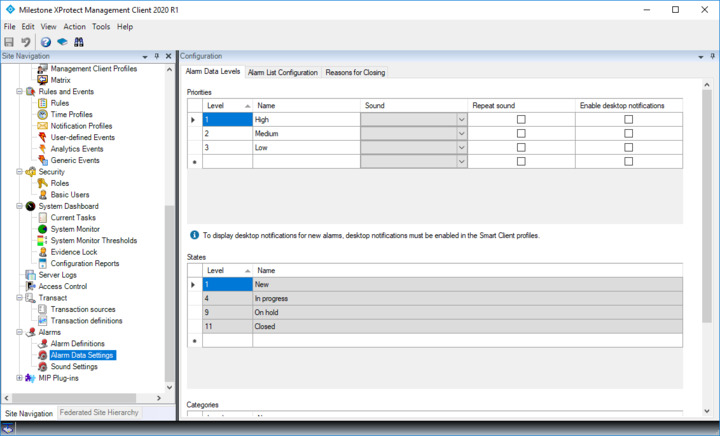
You can see the states in the Management Client -

The information on who closed an alarm can be found using GetAlarmHistory()

Hi Bo.

I’m having a trouble with my MessageId.Server.NewAlarmIndication listener: when I reboot my Windows Server, I don’t know why, my listener is not registered and not receive new alarm event. I register my listener in BackgroundPlugin derived class in Init() method. I start MessageCommunication and then invoke RegisterCommunicationFilter with my listener. Is correct ? I have to wait a few seconds before ? Please help me. For me is very critical issue.

UPDATE:

After started MessageCommunication, I register my listener and wait to be sure of registration, but Event Server hangs with this log:

2020-03-05 17:54:45.920 UTC+01:00 Info CommunicationClient background thread Now starting…

2020-03-05 17:54:50.904 UTC+01:00 Info Registering new alarm indication filter. Please wait…

2020-03-05 17:55:28.579 UTC+01:00 Info ConfigurationChangedDelayThread End delay - Send message

This is my code:

        _logger.info("Registering new alarm indication filter. Please wait...");
 
        CommunicationIdFilter NewAlarmCommunicationFilter = new CommunicationIdFilter(MessageId.Server.NewAlarmIndication);
 
        NewAlarmCommunicationFilterObject = _messageCommunication.RegisterCommunicationFilter(NewAlarmRecivedHandler, NewAlarmCommunicationFilter, null, EndPointType.Server);
        
 _messageCommunication.WaitForCommunicationFilterRegistration(NewAlarmCommunicationFilter);
 
_logger.info("New alarm indication filter registered");

Ok. Thanks.

Gigi