Hey Guys, I am having a issue displaying overlay data on my WPF ‘ImageViewerWpfControl’.
I currently have a custom WPF application, which displays a live feed from a camera that has been placed on my recording server. This works fine.
I have another C# application which sends out Analytics events for the same camera. I used one of the examples located in the SDK. This Analytics event is just a simple bounding box.
If I load the Milestone XProtect Smart Client and look at my camera feed, I can see my bounding box appear so I can safely presume my event is getting sent somewhere!
Is it possible to display Analytics Data / Overlay data on the camera feed using the WPF Control?
Cheers,
Chris.
If already showing in the Smart Client in live view I am guessing you are using the Bounding Box Metadata sample. Milestone destinguish between meatadata and analytics events, where metadata is most useful with a constant stream of information analytics event might be better if you have less frequent events. On analytics events I would like to show you this: http://download.milestonesys.com/MIPSDK/Samples/TriggerAlarmFromExternal-ConceptSolution.pdf
Narrowing in on the last question; see the Video Overlay samples: Analytics Overlay, Smart Client Overlay on Event, Smart Client Overlay Graph on Event
Thanks @Bo Ellegård Andersen (Milestone Systems) for your reply.
I used the AnalyticsEventTriggerViaLibrary example, within the ComponentSamples solution. The example just has a Polygon with points.
Someone else will be making the decision on how we get our data across (either a Analytics Event or MetaData). I just wanted to make sure my WPF Application can display it.
I will take a look at the examples you have suggested.
@Bo Ellegård Andersen (Milestone Systems) I have tried implementing the BoundingBox example, to give Metadata a try as it will be a constant stream of data.
Using the sample applications I can send Metadata to the server, I know this works because I can use the live Metadata Viewer to see it coming through.
Within the Smartclient, I have all the options set to show bounding boxes, yet I see no metadata bounding boxes within the video. Am I missing something??
Another question, what would be the best approach within my WPF Control to overlay the metadata.
Thanks for your help.
Chris
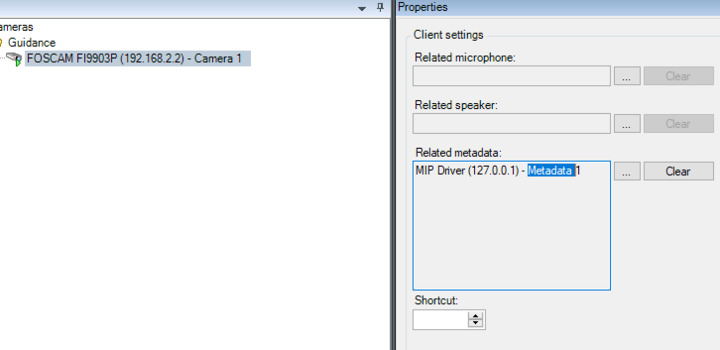
Metadata should show automatically in the Smart Client. You need to associate the metadata with the camera, my guess is that this is missing. In the Management Client pick the camera and on the properties pane pick the Client tab. Add to the Related metadata the Bounding Box metadata provider you just added to the system.
Whereas this is automatic in Smart Client you will have to add the fuinctionality when using your own WPF Control. Use the ShapesOverlayAdd method as you see it in the overlay samples. Read the metadata as you see in the MetadataLiveViewer and MetadataPlayback viewer samples.
@Bo Ellegård Andersen (Milestone Systems) Thank you for your reply. I have already added the MIP Driver as a client on the camera (the documentation said to do this).
I have also restarted my development laptop (that runs the recording server and client).
Within the smart client, I have also made sure the camera propeties says display bounding boxes and within the function settings, I have placed bounding boxes as Available.
Am I missing something out?
Works for me.
MetadataLiveViewer still give you the data? Is there a difference between live and playback (requires that you record)? Everything running in the same PC?
What is the XProtect product and version? What is the Smart Client version? MIP SDK version?
Hey @Bo Ellegård Andersen (Milestone Systems)
I am using:
- 2017 R3 MIP SDK
- 2017 R3 Milestone XProtect Smart Client (11.3a)
- 2017 R3 Milestone XProtect Management Client (11.3a)
- Milestone XProtect Recording Server 11.3a
All software is installed on the same PC. Applications are running on the same PC.
I have managed to receive metadata via my WPF application by butchering the code from the MetadataLiveViewer sample. However I still don’t see the bounding box in the smart client.
I had a really good look through the examples you pointed out but no one them show taking a MetadataLiveContent and getting it to display as a overlay, the LiveMetadataViewer just takes the string and displays it. Other examples I have found show using the AnalyticsOverlayBuilder to build a overlay with Analytics Events, but not metadata.
With Metadata it is build into the Smart Client to show Bounding Boxes (not other forms or shapes) but there is no MIP SDK sample showing how to extract metadata and create overlays based on it. At little to the contrary the analytics events are not shown by built-in functionality in live mode in the Smart Client but there are samples in the MIP SDK.
If you are running the Bounding Box metadata provider unmodified, all in the same PC, see the data is there by the LiveMetadataViewer, but does not see the bounding boxes in the Smart Client, this is a new situation I have not seen before.
For a start I would look for error messages in the Smart Client log, Smart Client logging would first need to be enabled. See instructions in Plug-in development -Getting Started or https://force.milestonesys.com/support/articles/en_US/How_To/Enable-XProtect-Smart-Client-logging-automatically-and-manually