I used Analytics Event Trigger via library and after pressing the send button, I did not see the alert in the client alert manager tab. However, when I used XProtect Server to send the event, I could see it. BaseEventHandlerBaseEventHandler () appeared in the program detection to confirm that the message was safe. An error occurred during sex. How to explain?
I would as a first check whether the Analytics Event is created having the correct name, and the Alarm Definition is using that analytics event.
Basically I would start by double-checking that the setup is in line with the instructions. https://doc.developer.milestonesys.com/html/index.html?base=samples/componentsamples/analyticseventtriggervialibrary/readme.html&tree=tree_2.html
I am in doubt whether you see an error or not. If you see an error maybe you could do a screen capture and show it here.
我的程式碼
using System;
using System.Windows.Forms;
using VideoOS.Platform.UI;
using VideoOS.Platform;
using VideoOS.Platform.Data;
using VideoOS.Platform.Messaging;
using System.Linq;
namespace TriggerAnalyticsEventSDK
{
public partial class MainForm : Form
{
Item _selectedItem = null;
public MainForm()
{
InitializeComponent();
}
private void btnSelectEventSource_Click(object sender, EventArgs e)
{
ItemPickerWpfWindow itemPicker = new ItemPickerWpfWindow();
  itemPicker.SelectionMode = SelectionModeOptions.AutoCloseOnSelect;

  itemPicker.Items = Configuration.Instance.GetItemsByKind(Kind.Camera, ItemHierarchy.SystemDefined);
if (itemPicker.ShowDialog().Value)
{
_selectedItem = itemPicker.SelectedItems.First();
btnSelectEventSource.Text = _selectedItem.Name;
}
}
private void btnSendAnalyticsEvent_Click(object sender, EventArgs e)
{
if (_selectedItem == null)
{
MessageBox.Show(“Please select an event source first…”);
return;
}
EventSource eventSource = new EventSource()
{
    // Send empty - it is possible to send without an eventsource, but the intended design is that there should be a source

    // the FQID is primamry used to match up the ObjectId with the a camera.

    FQID = \_selectedItem.FQID,

    // If FQID is null, then the Name can be an IP address, and the event server will make a lookup to find the camera

    Name = \_selectedItem.Name
};
EventHeader eventHeader = new EventHeader()
{
ID = Guid.NewGuid(),
Type = “MyType”,
Timestamp = DateTime.Now,
Message = txtAnalyticsEventName.Text,
Source = eventSource,
CustomTag = “TagFromC#”
};
AnalyticsEvent analyticsEvent = new AnalyticsEvent();
analyticsEvent.EventHeader = eventHeader;
analyticsEvent.Location = “Event location 1”;
analyticsEvent.Description = “Analytics event description.”;
analyticsEvent.Vendor = new Vendor();
analyticsEvent.Vendor.Name = “My Smart Video”;
if (chkIncludeOverlay.Checked)
{
analyticsEvent.ObjectList = new AnalyticsObjectList();
analyticsEvent.ObjectList.Add(GetRectangle());
}
EnvironmentManager.Instance.SendMessage(
new VideoOS.Platform.Messaging.Message(MessageId.Server.NewEventCommand)
{ Data = analyticsEvent });
  Console.WriteLine("分析事件已發送: " + txtAnalyticsEventName.Text + "/" + DateTime.Now);

}
private static AnalyticsObject GetRectangle()
{
AnalyticsObject aObject;
TPolygon tPolygon;
TColor tColor;
aObject = new AnalyticsObject();
aObject.Name = “SuspectArea”;
aObject.AlarmTrigger = true;
aObject.Value = “A suspect item”;
aObject.Confidence = 0.9;
aObject.Description = “Object description”;
tPolygon = new TPolygon();
aObject.Polygon = tPolygon;
tColor = new TColor();
tColor.A = 255;
tColor.R = 255;
tColor.G = 255;
tColor.B = 0;
tPolygon.Color = tColor;
PointList pointList = new PointList();
TPoint tPoint;
tPoint = new TPoint();
tPoint.X = 0.3D;
tPoint.Y = 0.3D;
pointList.Add(tPoint);
tPoint = new TPoint();
tPoint.X = 0.6D;
tPoint.Y = 0.3D;
pointList.Add(tPoint);
tPoint = new TPoint();
tPoint.X = 0.6D;
tPoint.Y = 0.6D;
pointList.Add(tPoint);
tPoint = new TPoint();
tPoint.X = 0.3D;
tPoint.Y = 0.6D;
pointList.Add(tPoint);
tPoint = new TPoint();
tPoint.X = 0.3D;
tPoint.Y = 0.3D;
pointList.Add(tPoint);
tPolygon.PointList = pointList;
return aObject;
}
}
}
附上偵錯的照片
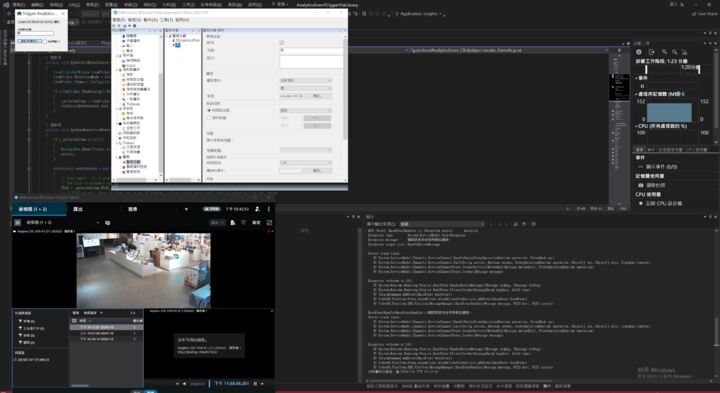
If you use MyAnalyticsEvent01 does it work? But then it fails when you use the Chinese name for the event (instead of English characters)?
If yes, could you send the event name as text so that it will allow me to test in my test server? (I have no language skills when it comes to Chinese, I would need your help..)
不管使用MyAnalyticsEvent01或是中文都沒辦法接收到訊息,但我可以選擇攝影機,這樣我應該不需要指定客戶端
Please write in English in this forum.
No matter I use (MyAnalyticsEvent01) or (Chinese), I can’t receive the message, but I should choose the camera so that I don’t need to specify the client.
Do you use the Analytics Event Trigger via Library sample from https://github.com/milestonesys unmodified?
Are you building the sample using the latest NuGet from https://www.nuget.org/profiles/milestonesys ?
What is version your XProtect VMS?