I am trying to create an alarm viewer plugin. I need to integrate Map view of alarm in my plugin, like Default alarm viewer Map view. How can I achieve it?
It is possible to do it using normal VMS functionality, so you don’t need to integrate it. Please see following instructions.
How to set up:
As this example, I use an analytics event as a trigger. If you want to use Analytics Event as a trigger of a new alarm, then please read the link answer and follow the instruction there. You will need to set up the event first.
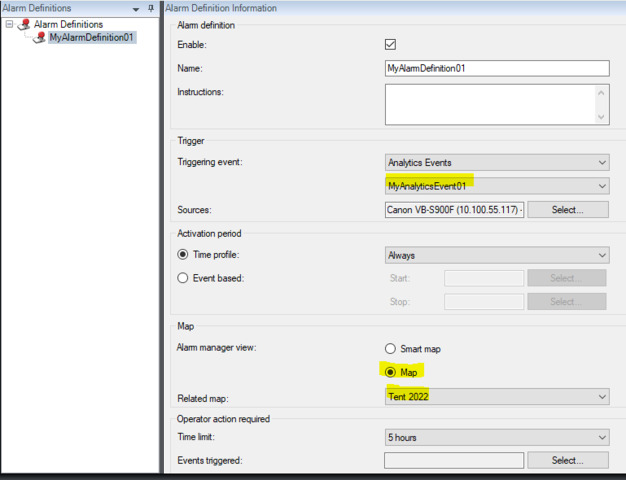
Start Management Client – Alarms – Add new alarm definition.
Select the event as Triggering event, and setup Related map. Then save the alarm definition.
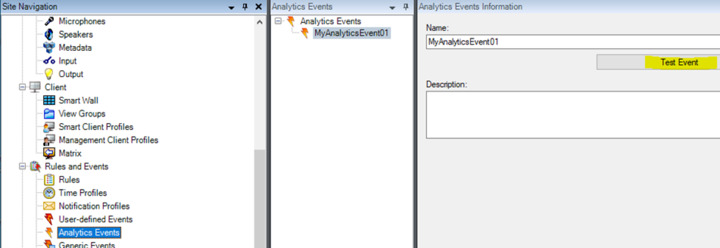
Go to Analytics Events and trigger Test Event from the event that you set up on the alarm definition in Alarms.
Start Smart Client. Go to Alarm Manager and you will see Map view of alarm.
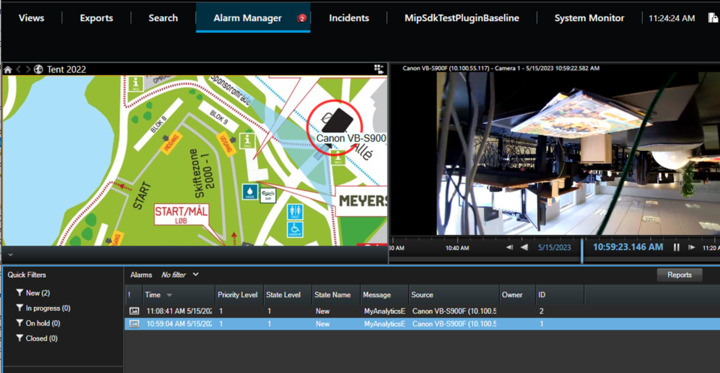
I need c# code to get this alarm map details to show in a plugin
You can show the map by using the MapBuiltinId. Ref. https://doc.developer.milestonesys.com/html/index.html?base=miphelp/class_video_o_s_1_1_platform_1_1_client_1_1_view_and_layout_item.html&tree=tree_search.html?search=mapbuiltinid
I did an experiment, I used the SCInsertCamera sample and replaced SCInsertCameraSidePanelWpfUserControl.xaml.cs lines 126-130 with..
properties.Add("mapguid", "1519a815-a44c-4066-9f0f-90cad8e13b4e");       // Map
viewAndLayoutItem.InsertBuiltinViewItem(0, ViewAndLayoutItem.MapBuiltinId, properties);
Then it showed my Map when using the “Create 1,5,1 layout” button.
Finding the Id of my map was tricky. I achieved it through using the VideoWallController sample, when the sample was running and listening I then in the Smart Client sent my Map to the Smart Wall. I could then extract the mapguid from the XML listed in the sample.
Samples:
Better way to find the mapguid. Use the ConfigAPIClient and read a view where the map is used.
https://doc.developer.milestonesys.com/html/index.html?base=samples/componentsamples/configapiclient/readme.html&tree=tree_2.html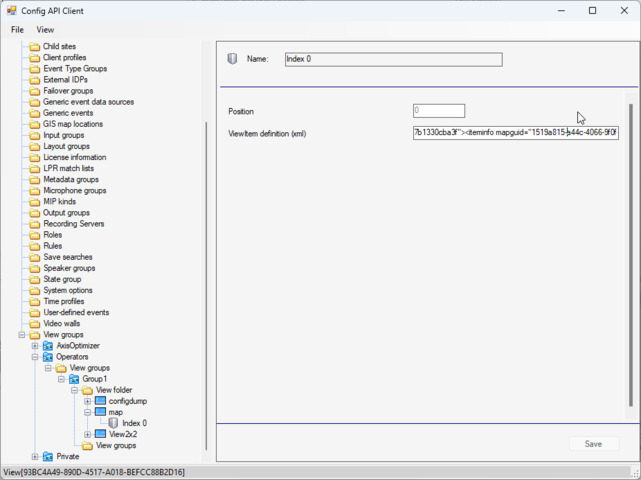
I am not able to get Map id or map related data associated with the alarm definition while fetching alarm details through alarmlines call. How else can i get the Map Id?
There is more to it that I first thought, please see also my next answer..
GetAlarmLines returns a subset of the alarms, but from the information in the GetAlarmLines call you can make a Get call and find the full alarm..
Let me illustrate this by pointing to the AlarmeventViewer sample, LoadClientAlarm() method, line 324-350 -
..
IAlarmClient alarmClient = _alarmClientManager.GetAlarmClient(EnvironmentManager.Instance.MasterSite.ServerId);
AlarmLine[] alarms = alarmClient.GetAlarmLines(0, 10, new VideoOS.Platform.Proxy.Alarm.AlarmFilter()
..
foreach (AlarmLine line in alarms)
{
	Alarm alarm = alarmClient.Get(line.Id);
..
You might want to explore the sample deeper as it gives a good understanding of handling Alarms both real-time and reading historic data..
In the Alarm there is a RuleList, it will contain the ID of the Alarm Definition. You can lookup the AlarmDefinition by using the Configuration API. This snippet of code uses the strongly typed classes.
private void ListAlarmDefinitions()
{
	ManagementServer ms = new ManagementServer(EnvironmentManager.Instance.MasterSite.ServerId);
	var alarmDefinitions = ms.AlarmDefinitionFolder.AlarmDefinitions;
	foreach (var alarmDefinition in alarmDefinitions)
	{
		label1.Text += alarmDefinition.Name + alarmDefinition.RelatedMap + Environment.NewLine;
	}
}
As an extended test I introduced this code in the AlarmEventViewer sample, MainForm.cs, Line 336 ff (please make sure you introduce null checks etc. this was a very fast test)
using Conf = VideoOS.Platform.ConfigurationItems;

foreach (AlarmLine line in alarms)
{
	Alarm alarm = alarmClient.Get(line.Id);
	if (alarm.RuleList[0] != null)
	{
		string alarmId = alarm.RuleList[0].ID.ToString();
		Conf.ManagementServer ms = new Conf.ManagementServer(EnvironmentManager.Instance.MasterSite.ServerId);
		Conf.AlarmDefinition alarmDefinition= ms.AlarmDefinitionFolder.AlarmDefinitions.FirstOrDefault(x => x.Id.Equals(alarmId));
		MessageBox.Show(alarmDefinition.RelatedMap ,alarmDefinition.Name);
	}
Thank you for this reply. will try this