thanks for the reply / answer.
That is a bit frustrating as it goes against the purpose of an API (ie you should be able to do everything via the api , as you can in the gui, within reason - Especially when it comes to something like configuration. I see this was listed as a limitation as of milestone 2021 R3, so that should have been addressed/added by 2024 r1 (in my opinion).
also, ive never seen that doc you linked to stating the limitation (lots of great info in there, thank you for that!) A limitation like this should be stated in the actual rest api docs, or at leaste have a link to this more detailed api doc , somewhere on the rest api docs.
im referring to this as the “actual rest api docs”:
https://doc.developer.milestonesys.com/mipvmsapi/api/config-rest/v1/#section/Introduction/Configuration
In case it helps others: what I was trying to do for the past day or so is a client wanted to be able to mute their audible alarms on motion from their crestron panels → milestone (ie for when having a party or an event with alot of trusted motion). the setup is axis cameras → object analytics (line cross) → milestone XP 2024 (which triggers a XP rule which sends an audio alert sound to several axis network cabinet speakers around the location).
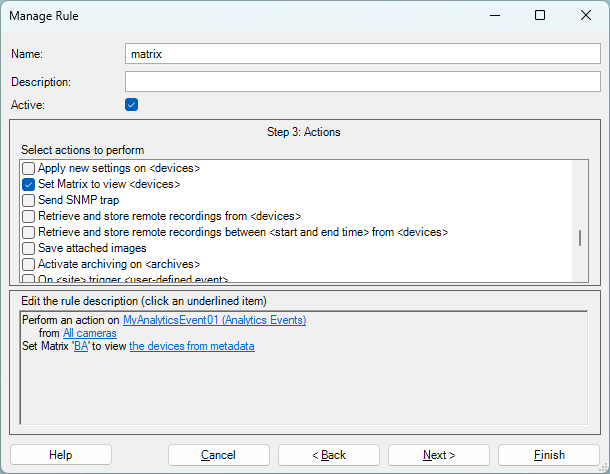
my plan was to use the XP api to toggle a enable/disable the 3x XP rules, when a button pressed on the Crestron panels. (i obviously ran into this issue as you cant modify XP rules that use audio alerts, via the API).
work-around solution; the axis speakers are in a Speaker group, so pull the IDs of any speakers in XYZ speaker group, and set them to enabled=false. (then when button is toggled again, do the same, but set enabled=true on each speaker). (also had to work around the api not showing the ids of disabled devices, via adding ?disabled  ).
).
it all worked out, and i also have the script send a alert tone (out of the speakers) via user-events when the script runs (as a confirmation that command was run)
here is script if it helps anyone (this runs on a local server against a local milestone 2024r1, not over internet) (i would like to see more CURL based examples in the API docs, this is a common practice in api documentation) :
#!/bin/bash
#
# set -x


USERNAME="SpeakerScript"
PASSWORD="XXX"
BASE_URL="http://XXX9/API/rest/v1"

# Check if an argument is passed
if [ -z "$1" ]; then
  echo " ------- "
  echo "Usage: $0 {enable|disable}"
  echo " ------- "
  exit 1
fi
# Set the action based on the argument above
ACTION=$1

getAuthToken() {
    # Define headers and body
    headers="Content-Type: application/x-www-form-urlencoded"
    body="grant_type=password&username=SpeakerScript&password=XXXX&client_id=GrantValidatorClient"

    # Make the POST request and store the response
    response=$(curl -s -X POST -H "$headers" -d "$body" 'http://x.x.x.x:8081/idp/connect/token')

    # Output the response in JSON format
	authTOKEN=$(echo "$response" | jq -r .access_token)
}

# Play alert noise when rules are ENABLED or DISABLED via a milestone User-defined Event
play_sound_alert() {
local user_event_ID="2abc090b-87ab-4691-8349-XXXXXX"
  curl -X POST "${BASE_URL}/events" \
    -H "Authorization: Bearer ${authTOKEN}" \
    -H "Content-Type: application/json" \
    -d "{
      \"type\": \"${user_event_ID}\",
      \"datatype\": \"none\"
    }"
}

disable_speakerOnly() {
local speaker_id="$1"
  curl -X PATCH "${BASE_URL}/speakers/${speaker_id}" \
    -H "Authorization: Bearer ${authTOKEN}" \
    -H "Content-Type: application/json" \
	-d '{"enabled":false}'
}

enable_speakerOnly() {
local speaker_id="$1"
  curl -X PATCH "${BASE_URL}/speakers/${speaker_id}" \
    -H "Authorization: Bearer ${authTOKEN}" \
    -H "Content-Type: application/json" \
	-d '{"enabled":true}'
}

list_speakersGroup() {
  curl -X GET "${BASE_URL}/speakerGroups/7d607f3d-8c2f-461a-9872-XXXXXX/speakers?disabled" \
    -H "Authorization: Bearer ${authTOKEN}" \
    -H "Content-Type: application/json"
}

# this worked:  disableing Speaker ID: 26edf44e-d5e8-46d6-b9eb-XXX

getAuthToken

json_data=$(list_speakersGroup)		# Get the JSON data

speaker_ids=$(echo "$json_data" | jq -r '.array[].id')	# Extract the speaker IDs using jq

# for speaker_id in $speaker_ids; do
  # echo "Enabling Speaker ID: $speaker_id"
# done


# Check the action and run the corresponding function
if [ "$ACTION" == "enable" ]; then
	echo "-------- enable RUNNING"
		for speaker_id in $speaker_ids; do
		  echo "Enabling Speaker ID: $speaker_id"
		  enable_speakerOnly "$speaker_id"
		done
	sleep 5
	play_sound_alert

elif [ "$ACTION" == "disable" ]; then
	echo "-------- disable RUNNING"
	sleep 5
	play_sound_alert
		for speaker_id in $speaker_ids; do
		  echo "disableing Speaker ID: $speaker_id"
		  disable_speakerOnly "$speaker_id"
		done
else
  echo "Invalid action. Usage: $0 {enable|disable}"
  exit 1
fi
thanks