Audio with RTSP, RTP/RTCP and Open Network Bridge

Hello,

I understand that Open Network Bridge (f.k.a. ONVIF Bridge) is required to request a video stream using RTSP.

Is it the only way to use RTSP rtsp://… ?

I also understand that audio is not possible using RTSP by Open Network Bridge. I can get any audio channel this way in the RTP stream.

Is it true ?

So either I use RTSP and can’t get any audio or I shall do something else.

Milestone Open Network Bridge does not support audio.

There is a sample on how to get audio in the MIP SDK here. https://doc.developer.milestonesys.com/html/index.html?base=samples/componentsamples/videoviewer2wayaudio/readme.html&tree=tree_2.html

Hi Jean-Jacques,

We are trying to understand better your use case in order to find out how to prioritize audio support in the ONB (something we are considering).

I have few question though.

  • What audio do you need in the RTSP/RTP stream ?
  • Is it audio from microphones, related to given camera ?
  • Or audio for speakers ?
  • Do you need Audio out or Audio in (listen to audio or speaking to the system) ?
  • What would be needed audio codecs supported (G.711, G.726, AAC, etc) ?

Hello Petar,

  • Is it audio from microphones, related to given camera ?

Yes it is the audio from the embedded mike on the camera synchronous with the video

  • Do you need Audio out or Audio in (listen to audio or speaking to the system) ?

We need to listen to ambiant noise from the camera environment

  • What would be needed audio codecs supported (G.711, G.726, AAC, etc) ?

We are not set on this but the camera does G.711/G.722.1/G.726/MP2L2/PCM so anything in this list is OK

BR

Thank you for the fast response, Jean-Jacques!

Actually what you describe is something we are currently working on.

We could provide you version for beta-testing.

It passed initial manual and automatic tests, but of course there could be unexpected behaviors :slight_smile:

It supports related microphones with G.711 and AAC.

Audio could be fetched in same RTSP connection as the camera one, or on separate address, dedicated for audio only.

Official release will be no earlier than 2022 R3.

Hello Petar,

Thank you for your help. And sorry to be so late answering you this time :frowning: .

I have a final question about Open Network Bridge : how many cameras RTSP streams can be simultaneously handled by a single instance of the Bridge ?

And also how can we get the beta release you are talking about ?

Thanks.

Hello Jean-Jacques,

RTSP server is written on C++ and has very good performance.

Our internal tests have shown that when fetching 100 FullHD video streams from the RTSP service, it uses around 7 to 12 % CPU (I7 based machine, 4C/8T, 7th generation) and around 6 to 8 GB RAM. Of course this depends on the particular camera settings like GOP size, FPS, target bitrate etc. In the same case however output bandwidth could easily go from 200 to 500 Mbps (and upper). And you have almost the same as input from the RS.

So usually the Network is the limit here.

What most of our customers are doing is to create multiple VMs on a Xeon based server and install separate instances of the ONB on those VMs. With this separation every instance is responsible for serving for example around 100 streams. For such instance 4 cores and 12 GB of RAM are usually enough. Such scenario introduces some protection in case something happens with one of the instances - not everything is going down. Of course you have to manually distribute the clients in that case.

As absolute hard limitation, RTSP server cannot serve more than 1000 streams (simultaneously). It is hardcoded and cannot be increased. The reason behind this hardcoded limitation is that we were not able to test it further internally and therefore cannot guarantee it is working with bigger load.

As for the audio, if you want to test it, just drop me a mail and we’ll figure it out.

KR

Petar

Hello Petar,

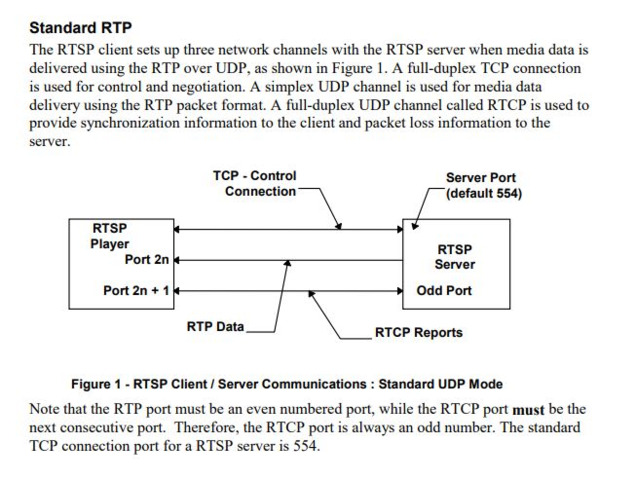
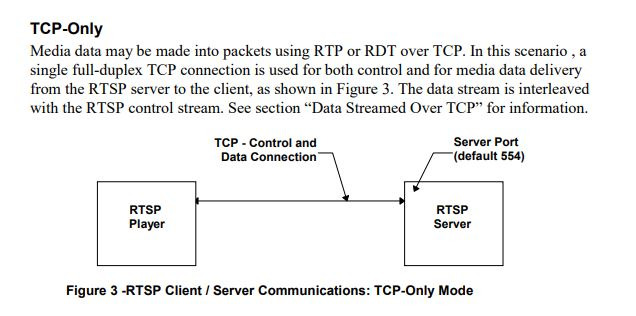
Reading on RTSP I saw that there are two modes :

Standard RTP

TCP Only

Which one(s) do to use in Open Network Bridge ?

Thanks,

JJ

Hi Jean-Jacques ,

RTSP server of the ONB (Open Network Bridge) supports both of them.

It is up to you to decide what to use.

Using UDP as transport usually allows lower delay as well as better network utilization on the cost of some (eventual) packet (frame) lost.

Using TCP (interleaved mode) as a transport aims for NO data loss, but on the cost of higher network consumption and higher delay.

You should consider which one fits better for your use case. For example if the stream is consumed only to be previewed on screen, you should freely use UDP.

Opposite, if the aim is to feed the media in the Analytic Application (AI, ML, etc) you probably would want to use TCP.

Of course underlying network should also be taken into account. Some corporate networks don’t allow UDP traffic and in that case you will be forced of using UDP.

In general, if there are no specific requirements and the Network’s capacity and quality are enough for the media streams you want to fetch, it should not matter at all.