Hello everyone.
I seem to be having an issue when trying to authorize a basic user using the following endpoint:
/ManagementServer/ServerCommandServiceOAuth.svc
My credentials are correct as I’ve used them to sign into the management client however I seem to get a 401 error when trying to authorize to this endpoint.
Here are the settings I am using.
XML body:
<?xml version="1.0" encoding="utf-8"?>
<soap:Envelope xmlns:xsi=http://www.w3.org/2001/XMLSchema-instance xmlns:xsd="http://www.w3.org/2001/XMLSchema"
  xmlns:soap="http://schemas.xmlsoap.org/soap/envelope/">
  <soap:Body>
    <Login xmlns="http://videoos.net/2/XProtectCSServerCommand">
      <instanceId>95d088f2-73e6-4cbb-9718-dc16942b337a</instanceId>
    </Login>
  </soap:Body>
</soap:Envelope>
Current headers
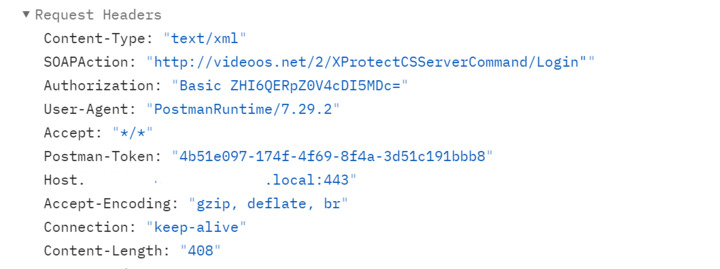
The response I’m getting back is the following:
<!DOCTYPE html PUBLIC "-//W3C//DTD XHTML 1.0 Strict//EN" "http://www.w3.org/TR/xhtml1/DTD/xhtml1-strict.dtd">
<html xmlns="http://www.w3.org/1999/xhtml">
<head>
<title>IIS 10.0 Detailed Error - 401.1 - Unauthorized</title>
<style type="text/css">
<!--
body{margin:0;font-size:.7em;font-family:Verdana,Arial,Helvetica,sans-serif;}
code{margin:0;color:#006600;font-size:1.1em;font-weight:bold;}
.config_source code{font-size:.8em;color:#000000;}
pre{margin:0;font-size:1.4em;word-wrap:break-word;}
ul,ol{margin:10px 0 10px 5px;}
ul.first,ol.first{margin-top:5px;}
fieldset{padding:0 15px 10px 15px;word-break:break-all;}
.summary-container fieldset{padding-bottom:5px;margin-top:4px;}
legend.no-expand-all{padding:2px 15px 4px 10px;margin:0 0 0 -12px;}
legend{color:#333333;;margin:4px 0 8px -12px;_margin-top:0px;
font-weight:bold;font-size:1em;}
a:link,a:visited{color:#007EFF;font-weight:bold;}
a:hover{text-decoration:none;}
h1{font-size:2.4em;margin:0;color:#FFF;}
h2{font-size:1.7em;margin:0;color:#CC0000;}
h3{font-size:1.4em;margin:10px 0 0 0;color:#CC0000;}
h4{font-size:1.2em;margin:10px 0 5px 0;
}#header{width:96%;margin:0 0 0 0;padding:6px 2% 6px 2%;font-family:"trebuchet MS",Verdana,sans-serif;
color:#FFF;background-color:#5C87B2;
}#content{margin:0 0 0 2%;position:relative;}
.summary-container,.content-container{background:#FFF;width:96%;margin-top:8px;padding:10px;position:relative;}
.content-container p{margin:0 0 10px 0;
}#details-left{width:35%;float:left;margin-right:2%;
}#details-right{width:63%;float:left;overflow:hidden;
}#server_version{width:96%;_height:1px;min-height:1px;margin:0 0 5px 0;padding:11px 2% 8px 2%;color:#FFFFFF;
background-color:#5A7FA5;border-bottom:1px solid #C1CFDD;border-top:1px solid #4A6C8E;font-weight:normal;
font-size:1em;color:#FFF;text-align:right;
}#server_version p{margin:5px 0;}
table{margin:4px 0 4px 0;width:100%;border:none;}
td,th{vertical-align:top;padding:3px 0;text-align:left;font-weight:normal;border:none;}
th{width:30%;text-align:right;padding-right:2%;font-weight:bold;}
thead th{background-color:#ebebeb;width:25%;
}#details-right th{width:20%;}
table tr.alt td,table tr.alt th{}
.highlight-code{color:#CC0000;font-weight:bold;font-style:italic;}
.clear{clear:both;}
.preferred{padding:0 5px 2px 5px;font-weight:normal;background:#006633;color:#FFF;font-size:.8em;}
-->
</style>
</head>
<body>
<div id="content">
<div class="content-container">
<h3>HTTP Error 401.1 - Unauthorized</h3>
<h4>You do not have permission to view this directory or page using the credentials that you supplied.</h4>
</div>
<div class="content-container">
<fieldset><h4>Most likely causes:</h4>
<ul> <li>The username supplied to IIS is invalid.</li> <li>The password supplied to IIS was not typed correctly. </li> <li>Incorrect credentials were cached by the browser.</li> <li>IIS could not verify the identity of the username and password provided.</li> <li>The resource is configured for Anonymous authentication, but the configured anonymous account either has an invalid password or was disabled.</li> <li>The server is configured to deny login privileges to the authenticating user or the group in which the user is a member.</li> <li>Invalid Kerberos configuration may be the cause if all of the following are true:</li> <ul> <li>Integrated authentication was used.</li> <li>the application pool identity is a custom account.</li> <li>the server is a member of a domain.</li> </ul> </ul>
</fieldset>
</div>
<div class="content-container">
<fieldset><h4>Things you can try:</h4>
<ul> <li>Verify that the username and password are correct, and are not cached by the browser.</li> <li>Use a different username and password.</li> <li>If you are using a custom anonymous account, verify that the password has not expired.</li> <li>Verify that the authenticating user or the user's group, has not been denied login access to the server.</li> <li>Verify that the account was not locked out due to numerous failed login attempts.</li> <li>If you are using authentication and the server is a member of a domain, verify that you have configured the application pool identity using the utility SETSPN.exe, or changed the configuration so that NTLM is the favored authentication type.</li> <li>Create a tracing rule to track failed requests for this HTTP status code. For more information about creating a tracing rule for failed requests, click <a href="http://go.microsoft.com/fwlink/?LinkID=66439">here</a>. </li> </ul>
</fieldset>
</div>
<div class="content-container">
<fieldset><h4>Detailed Error Information:</h4>
<div id="details-left">
<table border="0" cellpadding="0" cellspacing="0">
<tr class="alt"><th>Module</th><td> BasicAuthenticationModule</td></tr>
<tr><th>Notification</th><td> AuthenticateRequest</td></tr>
<tr class="alt"><th>Handler</th><td> svc-Integrated-4.0</td></tr>
<tr><th>Error Code</th><td> 0x8007052e</td></tr>
</table>
</div>
<div id="details-right">
<table border="0" cellpadding="0" cellspacing="0">
<tr class="alt"><th>Requested URL</th><td> https://milestone-1.deeprec.local:443/ManagementServer/ServerCommandServiceOauth.svc</td></tr>
<tr><th>Physical Path</th><td> C:\Program Files\Milestone\XProtect Management Server\IIS\ManagementServer\ServerCommandServiceOauth.svc</td></tr>
<tr class="alt"><th>Logon Method</th><td> Not yet determined</td></tr>
<tr><th>Logon User</th><td> Not yet determined</td></tr>
</table>
<div class="clear"></div>
</div>
</fieldset>
</div>
<div class="content-container">
<fieldset><h4>More Information:</h4>
This error occurs when either the username or password supplied to IIS is invalid, or when IIS cannot use the username and password to authenticate the user.
<p><a href="https://go.microsoft.com/fwlink/?LinkID=62293&IIS70Error=401,1,0x8007052e,17763">View more information »</a></p>
<p>Microsoft Knowledge Base Articles:</p>
<ul><li>907273</li><li>871179</li><li>896861</li></ul>
</fieldset>
</div>
</div>
</body>
</html>
I’ve noted that this is an IIS issue and I’m wondering if there are some settings I need to configure for it to get SOAP requests to authenticate.