I am testing the new export method added to AVIExporter in MIPSDK 2017 R3
I have created an Evidence Lock for 2 Cameras, the first one with no video in the selected time.
Exporting failed with a message: No video in selected time period for camera: park.102, No video exported.
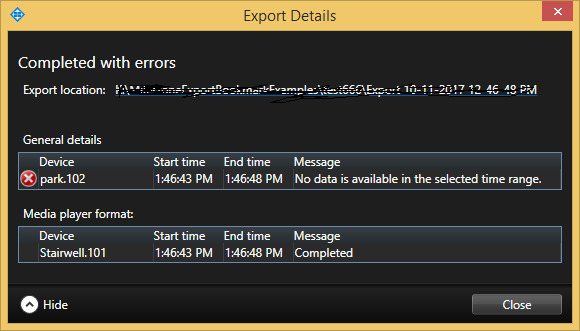
Exporting that EL using Smart Client completed with error. so I got the second video in this case. How can I fix/work around this ?
see the attached image
Thanks for your support.
I might misread or misunderstand your explanation. You say you have no video in the selected time. In that case the error is expected.
Can you please explain what you would like to do when there is no video to export?
(If I have misunderstood, I am sorry, please try to explain the issue in other words.)
There is a video content in the second Camera, so exporting such EL gives error (no avi exported), if we export same EL using Smart Client then we got an avi file containing the video from the 2nd Camera (expected result), sorry for poor explanation.
Thanks @Bo Ellegård Andersen (Milestone Systems)
The functionality of the Smart Client is different, it will when exporting from two cameras (or two periods) create two export files. Here it is natural that if one export fails the others will still be exported.
-virtual bool StartExport (IEnumerable< SequenceAviExportElement > sequences)
This functionality is designed that if any of the elements in the sequence fail the whole export should fail.
In order to make your integration robust you should first probe if there is footage to export. One way of doing this could be to use VideoOS.Platform.Data.JPEGVideoSource.GetAtOrBefore (DateTime dateTime )
Use the end time and if nothing is returned or an image older that begin time is returned there is no images to export.