I’m developing a plugin which will receive sound alarms from Axis cameras.
I can’t find the way how to differentiating the sound alarms from a camera (gunshot, aggression and glass break).
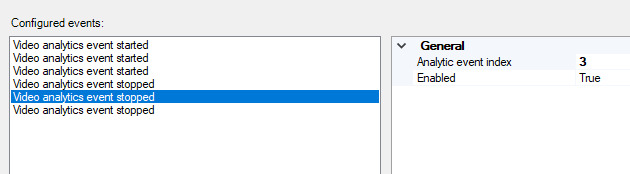
To receive events from a camera I set up events in Management Cliente like this:
In code I’ve added Receiver:
obj1 = _messageCommunication.RegisterCommunicationFilter(NewEventIndicationMessageHandler,
       new CommunicationIdFilter(VideoOS.Platform.Messaging.MessageId.Server.NewEventsIndication), null, EndPointType.Server);
When I launch test alert eg. Gunshot from camera I receive a message with type 'AnalyticsStart`. When I next trigger test Aggression alert from camera I receive almost identical message 'AnalyticsStart`. The message does not contain ‘Analytic event index’, so I cannot differentiate what event type was triggered.
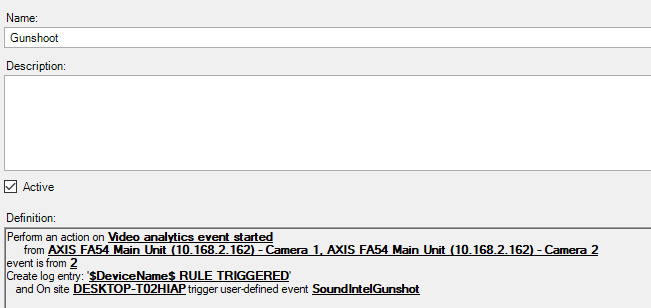
My other approach was to create Rules like this:
but then, when I receive a message in code Source property is “Kind.TriggerEvent” and I lost information which camera triggered the event.
Can someone provide me with any tips how to differentiating sound events?
I need to know in my code which camera sent event and what type of event it was.
The NewEventsIndication misses the information about the “Analytics event index”. The functionality to include this information was never implemented.
The same issue can be see Motion Started (HW) events from the camera, here you can configure up to four “Motion Window” that you can use in rules, but you cannot get the information from NewEventsIndication.
The issue was raised with Milestone Development recently and I am happy to say that development work has been done to enhance the product and the NewEventsIndication mechanism. With XProtect Event Server 2018R2 you will be able to convert the NewEventsIndication’s Message.Data to AnalyticsEvent and get the information from AnalyticsEvent.ObjectList[0].Name and AnalyticsEvent.ObjectList[0].Value
XProtect 2018R2 is planned to release in the beginning of June.
Until the release the only workaround I can see is the rule you outline, but you will have to make one user-defined event and one rule for each camera, so that when you get the user-defined event you know both the camera and the “Analytics event index”.
Thank you for answer Bo. It seems it’s a good time for a long holiday for me and finish my job in June 
Hi Bo, Thanks for your explanation. I have two questions on the new release:
will you be able to change the name "Video analytics events” to “Analytics events”?
will you implement more than 3 event id’s? (we have already 4 now which is growing).
Many thanks, Maarten
It was possible to make the improvement on the NewEventIndication without development work on the drivers. What you request now will require development work in the driver.
I will forward this as a request for enhancement to the Milestone Product Management.
Hi Bo, thank you for your answer. I am not sure which of my questions would require the extra development work in the drivers. Is that both or only the name change?
Btw, the change that you will implement for next release will help us already a great way.
Kr, Maarten
Both will require driver development work, we are talking about hard-coded name and hardcoded list with three members in the driver code.
I hope the implemented change (which releases in 2018R2) will be a great help.