Axis Perimeter Defender, Milestone Xprotect, and user-defined alarms

Hello, Milestone community.

I have an issue with User-Defined Alarms.

They don’t work, and don’t appear on Xprotect Smart Client or in Server logs.

Could you please guide me on where to check and how to troubleshoot the issue?

I use Milestone Xprotect Corporate 2023 R3.

Axis Perimeter Defender 2.7.4.32628.

Axis Perimeter Defender Bridge to Milestone Xprotect 4.1.0.1255.

AXIS Q1941-E Thermal Network Camera with AXIS Perimeter Defender 2.7-4 application.

The firmware of the camera is 9.80.105.

To the current moment, I have only completed Scenarios and Calibration of AXIS Q1941-E through Axis Perimeter Defender 2.7.4.32628.

Metadata is okay, I see in Milestone Xprotect Client Overlays, and everything looks okay.

But I am not able to receive user-defined alarms for my scenarios.

My goal is to use these alarms in Milestone XProtect to control PTZ camera when user-defined alarms occur on AXIS Q1941-E.

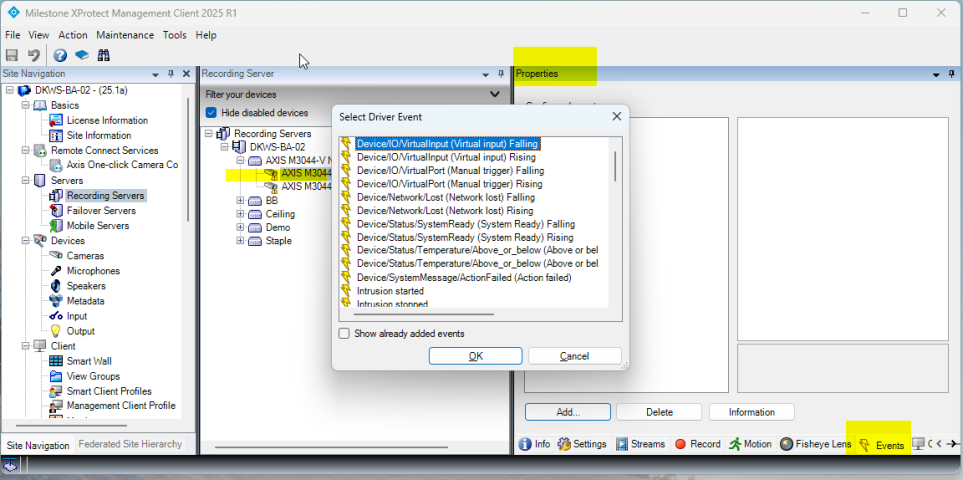
When you see the camera in XProtect Management Client, in the Properties panel there is an Events tab. There you find an add button. Using this you can add camera events to XProtect.

From your description it is my suspicion that what you want isn’t user-defined events but special camera events.

I hope you find the right events using this, if not, please describe further the nature of the events.

Hello Bo,

Thank you for your attention.

The goal is:

Cam115 and CAM118 thermal cameras, to do monitoring of zone front of Obect A with zone crossing scenarios.

If APD detects prohibited zone crossing in this area, automatically move PTZ camera CAM 151 to watch the monitored area.

Also Intruder message has to be displayed somewhere in the display.

Calibration and zone crossing scenarios have been implemented in thermal cameras.

But we do not receive alarms from thermal cameras in Milestone Xprotect.

1 I chose to do tests with CAM115 regarding alarm issues.

2 I upgraded the firmware of CAM115 to the latest version.

3 I upgraded the APD Bridge to VMS to the latest version 4.4.0 in MNG server.

4 I upgraded APD Software in MNG server to the latest version 3.7.0.

5 I tried to upgrade APD in CAM115 but without success.

6 I removed APD from CAM115.

7 I tried from APD software in MNG server to install APD in CAM115 but without success.

8 I did find an eAP package of APD for CAM115 and tried to install it from the web interface of the camera but without success, I received an error message.

9 In points 7 and 8, I noticed that the latest version of APD is not compatible with our thermal cameras AXIS Q1941-E.

10 I downgraded APD Software in MNG server from 3.7.0 to 2.7.4.

11 I installed APD 2.7.4 in CAM115 successfully.

12 Now I have an issue with the License key, to be able to do troubleshooting, I used a free license for 60 days, and contacted our local Milestone partner to reactivate our license.

13 For CAM115 I did implement calibration and zone crossing scenarios from scratch.

14 In one of the recording servers, I installed APD Bridge to VMS for future use, it’s not configured.

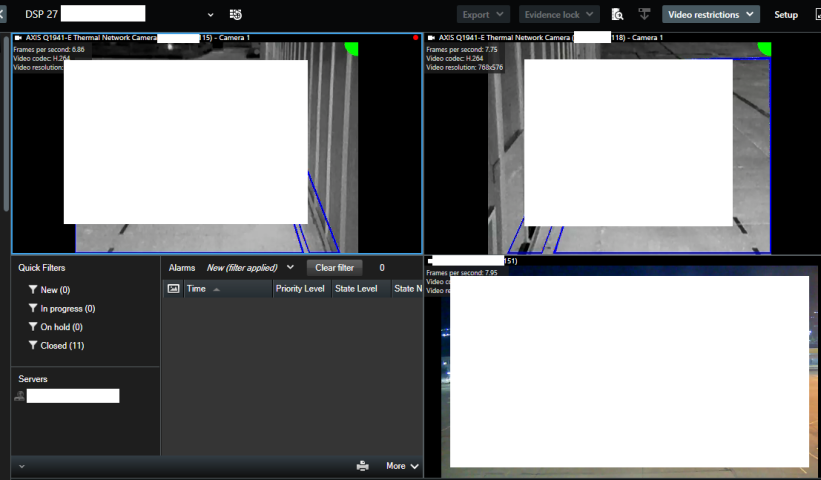
The two cameras and alarm panel are in Display 27 Obect A Thermal.

Note:

I did read the documentation of APD to Bridge VMS and checked the user-defined alarm syntax, the rules and etc.

And I did realise that everything seems okay.

I tested user-defined alarms from the management server successfully for CAM115 and CAM118, but when thermal camera events occurred, nothing happened in the alarms.

And this is the blocking point to implement Automatic PTZ tracking and Intruder message with rules, because I am not able to use in-camming alarms from thermal cameras.

My motives to upgrade APD and to put my focus in APD are:

In the last Upgrade of Milestone Xprotect to 2023 R3 we had issues with APD Bridge to Milestone with old versions of APD, the APD Bridge did not work correctly.

We did fix APD Bridge, but we missed user-defined alarms to check deeply.

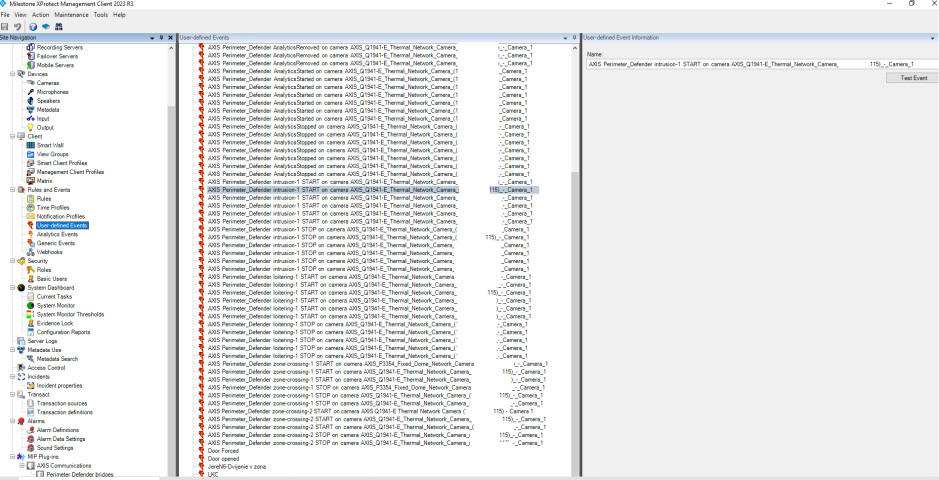
From APD Bridge to VMS I did scan CAM115 and I did export the user-defined-alarms correctly and I did import then in Milestone Xprotect (I mean user-defined events):

AXIS Perimeter_Defender zone-crossing-2 START on camera AXIS_Q1941-E_Thermal_Network_Camera_(CAM115)_-_Camera 1

AXIS Perimeter_Defender zone-crossing-2 STOP on camera AXIS_Q1941-E_Thermal_Network_Camera_(CAM115)_-_Camera_1

AXIS Perimeter_Defender zone-crossing-1 START on camera AXIS_Q1941-E_Thermal_Network_Camera_(CAM115)_-_Camera_1

AXIS Perimeter_Defender zone-crossing-1 STOP on camera AXIS_Q1941-E_Thermal_Network_Camera_(CAM115)_-_Camera_1

AXIS Perimeter_Defender loitering-1 START on camera AXIS_Q1941-E_Thermal_Network_Camera_(CAM115)_-_Camera_1

AXIS Perimeter_Defender loitering-1 STOP on camera AXIS_Q1941-E_Thermal_Network_Camera_(CAM115)_-_Camera_1

AXIS Perimeter_Defender intrusion-1 START on camera AXIS_Q1941-E_Thermal_Network_Camera_(CAM115)_-_Camera_1

AXIS Perimeter_Defender intrusion-1 STOP on camera AXIS_Q1941-E_Thermal_Network_Camera_(CAM115)_-_Camera_1

When I do tests from Milestone with these User-defined events I see alarm messages in alarm panel in Milestone Xprotect.

But when events are generated in CAM115 nothing is come as an alarm in Milestone Alarm panel.

And I am not able to determine what is wrong.

I need these alarms to make PTZ camera work in the automatic PTZ tracking mode when something is happening in the monitored area.

I didn’t try Analytics events, this is what I will test soon .

I tried Analytics events:

I created these analytics events in Analytics Events:

AXIS Perimeter_Defender zone-crossing-2 START

AXIS Perimeter_Defender zone-crossing-1 START

AXIS Perimeter_Defender intrusion-1 START

In Alarms, in Alarm definitions, I created 3 records.

Let’s see one of them:

For the source, I select the Cameras and APD Bridge.

But doesn’t work.

I even tried in CAM115 from the web interface to configure in System, Events, Rules and Recipients:


Even though I defined a Generic Event, nothing is happening.

When I generate fake alarms, nothing happens.

When real events occur, nothing happens.

When I test Events from Milestone Management Server I see them in Xprotect Client.

Something I miss or somewhere I make a mistake in the configuration.

I have never tried using Axis Perimeter Defender, if other readers of this thread has experience please chip in.

I think that either should the events be created by the Axis plugin automatically or you should use camera events instead, but I guess the manual says which is the events and how to get them… This is what I mean when referring to camera events…

Hello, yes, I did see this option, but it’s not for my scenario.

I need to receive alarms from Analytics or User-Defined events from Axis Perimeter Defender in Milestone.

Something is wrong with the Rules or with the Alarm Definitions.

I only knew before Upgrades of APD and Milestone that the alarms from APD were fine.

I read this guide now, but I didn’t see any alarms.

AXIS Perimeter Defender with Milestone VMS - User manual

Also I did read this:

How to set up Axis Perimeter Defender with XProtect events and alarms

I did configure it but I am not sure is it correct and stabile, but it’s work for now.

In MNG Client in Tools->Options-> Alarm and Events I enabled Enable verbose logging. I am not have to be enabled or no.

In MNG Client in Tools->Options-> Generic Events->International-> Here I used port 1238 TCP and UDP, Separator bytes 13.10, Unicode UTF8, Echo statistics. And for Allowed external IPV4 Addresses I added CAM115 and CAM118.

In Generic Events I did create new Generic Event with Name Test, I enabled it, for expression I did write “Test115” OR “Test118”, expression type Match, data source International, Priority 1.

In Alarms → Alarm Definitions → I created Test_Alarm_Definition, I enabled it, for triggering event I did select External Events, for source I did select Test, for time profile I did select Always, Time Limit 1 Minute, for related cameras I did select thermal cameras CAM115 and CAM118, initial alarm priority 1:High, Alarm assignable to Administrators enabled.

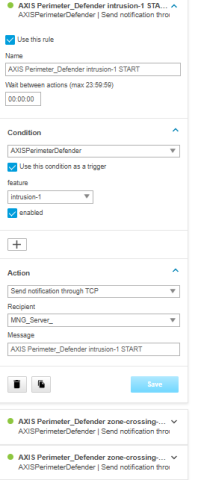
In the web interface of the CAM115 in Settings ->System - >Events-> I created Rule Test with these parameters:

Use this rule enabled,

Name Test,

Conditions - AXISPerimeterDefender,

Use this condition as a trigger enabled,

Feature ALL_SCENARIOS,

enabled yes,

Action Send Information through TCP.

Recipient IP address of Milestone MNG Server,

Message Test

In the web interface of the CAM118 in Settings ->System - >Events-> I created Rule Test with these parameters:

Use this rule enabled,

Name Test,

Conditions - AXISPerimeterDefender,

Use this condition as a trigger enabled,

Feature ALL_SCENARIOS,

enabled yes,

Action Send Information through TCP.

Recipient IP address of Milestone MNG Server,

Message Test2

For Recipients on both cameras I did set these parameters:

Name Milestone_MNG_Server

Type TCP

Host IP address of Milestone MNG Server

Port 1238.

And now CAM 115 and CAM 118 when they detect something they generate alarms for all scenarios in one event , then they send these events to the Milestone Xprotect MNG server at port 1238, then Alarms are visible in Smart Client.

Now I configure preset position in the CAMPTZ with name Hangar.

Now in Rules I create Rule Hangar with this logic:

Perform an action on Test

from External

Move CAMPTZ (IP address of CAM) to position Hangar immediately with PTZ priority 1

Now when CAM115 and CAM 118 send Alarm Test to the MNG server CAMPTZ change his positions to preset Hangar.

Now I fight with Smart Wall, I am not able to understand how Smart Wall works and how to configure it.

I have Computer with 4x55 inches Displays.

I did read the documentation but I am not able to understand the logic.
My MIP drivers were in offline state I reinstalled APD Bridge and I did new rescan of thermal cameras and I added them back again and they changed their status to state active, but this is not the issue.

I did understand how Smart Wall works and now the Smart Wall is okay and usable.

The issue here is that the APD Bridge to the Milestone is installed in wrong place.

APD Bridge to Milestone have to be installed in Recording Servers not in Management Server.

When it’s installed in Management Server analytics or user defined alarms from APD doesn’t work.

Only external alarms work as I described in my previous posts.

I don’t know why APD Bridge to Milestone is installed in MNG Server but it’s wrong, I will plan to migrate it to Recording Servers.

When APD Bridge is installed in Recording servers, alarms coming successfully from APD.

When APD Bridge is installed in Management server, Alarms not work from APD.

The alternative is to use external alarms and events as described in my previously posts. where the Cameras send events to the Management server directly.