Bounding Box not display in Alarm Playback

I’m using XProtect Essential+ 2018 R2

I posted below XML & it shown in Alarm Listing table.

But the bounding box is not display in Alarm Video Playback. Pls advise.

<AnalyticsEvent xmlns:i="http://www.w3.org/2001/XMLSchema-instance" xmlns="urn:milestone-systems">
  <EventHeader>
    <ID>00000000-0000-0000-0000-000000000000</ID>
    <Timestamp>2018-10-16T01:11:18</Timestamp>
    <Type>MyType</Type>
    <!-- Insert Event Message here -->
    <Message>MyAnalyticsEvent01</Message>
    <CustomTag>TagFromXML</CustomTag>
    <Source>
      <FQID>
      <ObjectId>d5906459-f0e5-4773-a936-7fea757f9369</ObjectId>
      </FQID>
    </Source>
  </EventHeader>
  <Description>
    Analytics event description.
  </Description>
  <Location>
    Event location 1
  </Location>
  <!-- Overlay data. -->
  <ObjectList>
    <Object>
      <Name>Rectangle</Name>
      <Value>A suspect item</Value>
      <AlarmTrigger>true</AlarmTrigger>
      <BoundingBox>
                <Top>0.42</Top>
                <Left>0.23</Left>
                <Bottom>0.54</Bottom>
                <Right>0.55</Right>
      </BoundingBox>
    </Object>
  </ObjectList>
  <Vendor>
    <Name>My Smart Video</Name>
  </Vendor>
</AnalyticsEvent>

HTTP/1.1 200 OK

Connection: Close

Content-Length: 0

Thanks
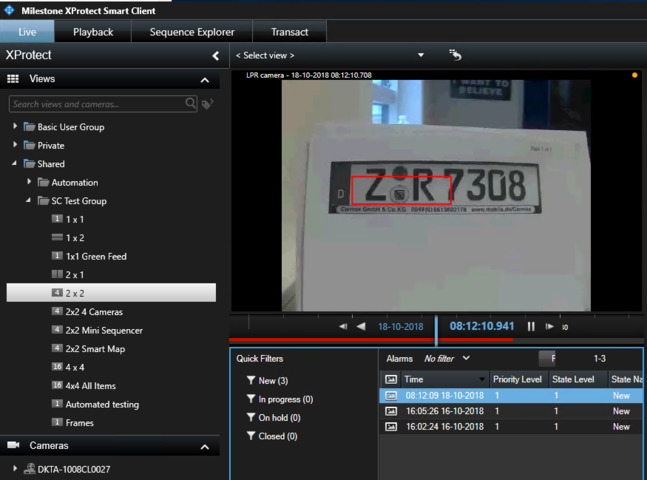
This works for me when testing in my test system which is an XProtect Corporate. You should not be able to use Alarm Manager and use Alarm Preview in the XProtect Essential+.

https://www.milestonesys.com/solutions/platform/product-index/

My answer might not have been the right one. While I am correct that XProtect Essential+ does not have an Alarm Manager workspace you can use Alarm List and Alarm Preview in XProtect Essential+.

Realizing this I tested with XProtect Essential+ and it works for me.

I see the alarm with the overlay, but as playback advances I have to be quick, the overlay is removed again in 4-5 seconds.

Please add a little more information. You see the alarm but it has no overlay? No overlay even briefly?

Hi Andersen,

Now I test it again & it works. Btw, it is possible that the overlay display for longer?

I guess playback start some seconds before the actual event timestamp … by the time the video play at the actual event timestamp, the overlay already disappear.

There is no way to modify the period of time the overlay from the AnalyticsEvent is displayed.

I can really see the usefulness of being able to modify (most often extend) this period of display. I will based on your question here make a request for enhancement to Milestone Product Management. Perhaps this can then be a new feature in a future version of XProtect.