I am trying to pull the list of cameras information from Milestome vsom and get the individual camera health status using Protocol integration. Based on the integration with the local Milestone support team we got to know we have to sue the following SOAP APIs to get this information. Unfortunately from the below list i can able to fetch the list of cameras using ServerCommandService API and rest of the APIs are not working/ not opening.
Working
http://10.10.11.90/serverapi/ServerCommandService.asmx?wsdl
Not Working
http://10.10.11.90:7563/recorderstatusservice/recorderstatusservice2.asmx?wsdl
http://10.10.11.90:22331/Central/AlarmService?wsdl
http://10.10.11.90:22331/Central/AlarmServiceToken?wsdl
Please suggest the best solution to get this integration. I not an expertise in .NET to build the middle ware to listen the camera events.
I just checked and the recorderstatusservice URI you write is working fine. Please be aware that while the servercommandservice is on the Management Server machine, the recorderstatusservice is on the recording server machine - depending on your installation that might not be the same machine.
The AlarmService ones should also work, but they are on the Event Server machine and also they don’t really provide the status information you are asking about, so I think you should focus on the recorderstatusservice.
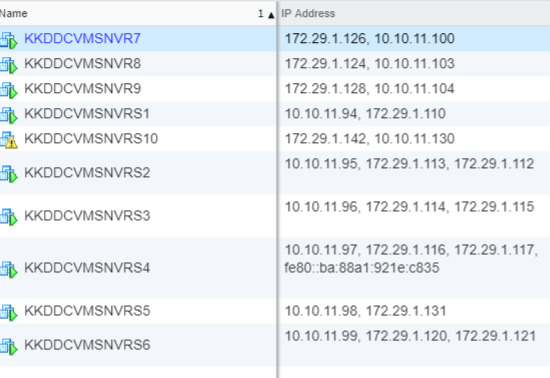
Hi @Peter Posselt Vergmann (Milestone Systems) Thanks for sharing the details. We have total 5 recording servers in my setup and configured with 400 cameras in these servers. I am having the following queries in executing the recorderstatusservice2.asmx?wsdl.
- I would like get health status of all 400 cameras do i need to access recorderstatusservice2.asmx?wsdl from each and every recording server?
- What is the SOAP method which will provide the camera connected /disconnected status.
- Can i use the GetCurrentDeviceStatus method?
- How can get the guid values for all cameras?
- Please find the below JSON link which is having the sample camera object received from GetConfiguration method of ServerCommandService.asmx?wsdl
https://jsoneditoronline.org/?id=7b414472bdf74d559c9cb4011f2d78a9
@Syed Adil (Milestone Systems) @Kakinada Smart city
@Peter Posselt Vergmann (Milestone Systems)
Thanks for sharing the details.
- ServerCommandService.GetConfiguration is giving the following parameters in response. Which one i have to use as GUID in recorderstatusservice2. GetCurrentDeviceStatus
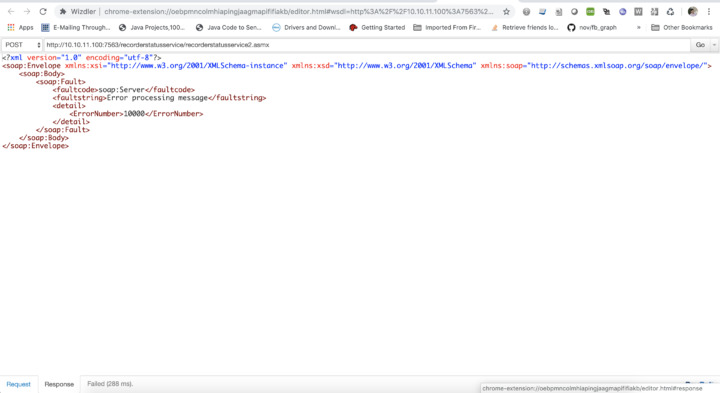
When i am trying to make a request to recorderstatusservice2. GetCurrentDeviceStatus receiving below error message.
@Syed Adil (Milestone Systems) @Kakinada Smart city
Yes, token was generated using the user that was added in the VMS.
Yes, token was generated using the user that was added in the VMS.
@Syed Adil (Milestone Systems) @Kakinada Smart city
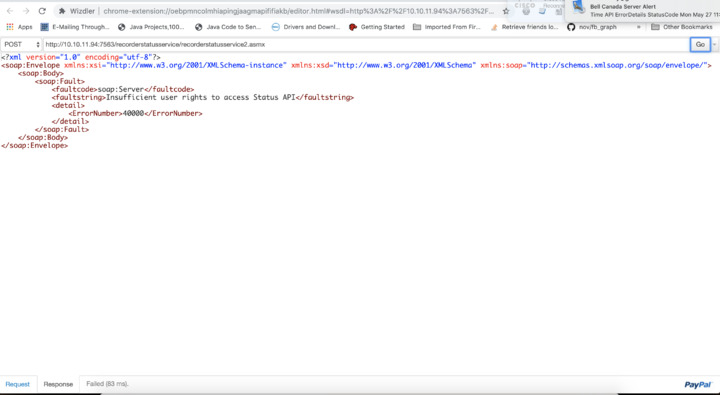
The user needs to have access rights for the Status API. So either he will have to be an admin or you can provide the rights under Roles//Overall security/Management Server/Status API
@Peter Posselt Vergmann (Milestone Systems)
After updating the user privileges getting below error.
Based on the error I would assume that you are missing or have some incorrect parameters, but without know your actual request it is hard to say.
ServerCommandService.Login Request

<Envelope xmlns="http://schemas.xmlsoap.org/soap/envelope/">
    <Body>
        <Login xmlns="http://videoos.net/2/XProtectCSServerCommand">
            <instanceId>f496e88c-4422-4a72-b1d5-7ccde2abc132</instanceId>
            <currentToken>99ef7d79-7b3e-4cd6-9f7f-3d1f37836a80</currentToken>
        </Login>
    </Body>
</Envelope>

ServerCommandService.Login Response

<?xml version="1.0" encoding="utf-8"?>
<soap:Envelope xmlns:soap="http://schemas.xmlsoap.org/soap/envelope/" xmlns:xsi="http://www.w3.org/2001/XMLSchema-instance" xmlns:xsd="http://www.w3.org/2001/XMLSchema">
    <soap:Body>
        <LoginResponse xmlns="http://videoos.net/2/XProtectCSServerCommand">
            <LoginResult>
                <Token>TOKEN#97e021c2-b929-4e2b-8b07-a73ed1691ce9#milestonecls.kkdsc.com//ServerConnector#</Token>
                <RegistrationTime>2019-05-28T05:51:50.677Z</RegistrationTime>
                <TimeToLive>
                    <MicroSeconds>14400000000</MicroSeconds>
                </TimeToLive>
                <TimeToLiveLimited>false</TimeToLiveLimited>
            </LoginResult>
        </LoginResponse>
    </soap:Body>
</soap:Envelope>


ServerCommandService.GetConfiguration Request

<Envelope xmlns="http://schemas.xmlsoap.org/soap/envelope/">
    <Body>
        <GetConfiguration xmlns="http://videoos.net/2/XProtectCSServerCommand">
            <token>TOKEN#97e021c2-b929-4e2b-8b07-a73ed1691ce9#milestonecls.kkdsc.com//ServerConnector#</token>
        </GetConfiguration>
    </Body>
</Envelope>

ServerCommandService.GetConfiguration Response (only for one camera)


<CameraInfo>
                                <RecorderId>29000933-958d-4705-8e56-db0e2945b852</RecorderId>
                                <HardwareId>4bde43c2-97fa-41fb-bf87-c8c84150448c</HardwareId>
                                <DeviceId>0a7ad234-4f7f-4d5b-bdff-1bb8d57e9de2</DeviceId>
                                <Name>RLVD 05 (10.43.1.15)</Name>
                                <Description />
                                <Shortcut />
                                <DeviceIndex>0</DeviceIndex>
                                <GisPoint>POINT EMPTY</GisPoint>
                                <ShortName />
                                <Icon>0</Icon>
                                <CoverageDirection>0</CoverageDirection>
                                <CoverageDepth>0</CoverageDepth>
                                <CoverageFieldOfView>0</CoverageFieldOfView>
                                <MaxFPS>0</MaxFPS>
                                <BrowsableStream>false</BrowsableStream>
                                <Streams>
                                    <StreamInfo>
                                        <StreamId>28dc44c3-079e-4c94-8ec9-60363451eb40</StreamId>
                                        <Name>Video stream 1</Name>
                                        <Default>true</Default>
                                    </StreamInfo>
                                </Streams>
                                <Tracks>
                                    <TrackInfo>
                                        <TrackId>5b3ed731-6a09-40f7-b304-f71f404a8be5</TrackId>
                                        <Edge>true</Edge>
                                    </TrackInfo>
                                    <TrackInfo>
                                        <TrackId>0a7ad234-4f7f-4d5b-bdff-1bb8d57e9de2</TrackId>
                                        <Edge>false</Edge>
                                    </TrackInfo>
                                </Tracks>
                                <CameraSecurity>
                                    <Live>true</Live>
                                    <Browse>true</Browse>
                                    <ExportAvi>true</ExportAvi>
                                    <ExportJpeg>true</ExportJpeg>
                                    <SmartSearch>true</SmartSearch>
                                    <GetSequences>true</GetSequences>
                                    <ExportDatabase>true</ExportDatabase>
                                    <StartRecording>true</StartRecording>
                                    <StopRecording>true</StopRecording>
                                    <PtzSecurity>
                                        <ManualControl>true</ManualControl>
                                        <PresetControl>true</PresetControl>
                                        <ReserveControl>true</ReserveControl>
                                    </PtzSecurity>
                                    <BookmarkView>true</BookmarkView>
                                    <BookmarkAdd>true</BookmarkAdd>
                                    <BookmarkEdit>true</BookmarkEdit>
                                    <BookmarkDelete>true</BookmarkDelete>
                                    <RetentionView>true</RetentionView>
                                    <RetentionCreate>true</RetentionCreate>
                                    <RetentionRemove>true</RetentionRemove>
                                    <ManagePresets>true</ManagePresets>
                                    <ManagePatrollingProfiles>true</ManagePatrollingProfiles>
                                    <ManagePresetLocks>true</ManagePresetLocks>
                                    <RetrieveEdgeRecordings>true</RetrieveEdgeRecordings>
                                </CameraSecurity>
                                <PtzSettings>
                                    <PtzEnabled>false</PtzEnabled>
                                    <Capabilities />
                                    <IsCenterOnPositionInViewSupported>false</IsCenterOnPositionInViewSupported>
                                    <IsPtzCenterAndZoomToRectangleSupported>false</IsPtzCenterAndZoomToRectangleSupported>
                                    <IsPtzHomeSupported>false</IsPtzHomeSupported>
                                    <IsPtzDiagonalSupported>false</IsPtzDiagonalSupported>
                                    <EditPreset>false</EditPreset>
                                </PtzSettings>
                                <IpixSettings>
                                    <IpixEnabled>false</IpixEnabled>
                                    <CeilingMounted>false</CeilingMounted>
                                </IpixSettings>
                                <PanoramicLensSettings>
                                    <PanoramicLensEnabled>false</PanoramicLensEnabled>
                                </PanoramicLensSettings>
                                <MulticastEnabled>false</MulticastEnabled>
                                <EdgeStorageSupported>true</EdgeStorageSupported>
                                <EdgeStoragePlayback>false</EdgeStoragePlayback>
                                <StopManualRecordingSeconds>300</StopManualRecordingSeconds>
                            </CameraInfo>

recorderstatusservice2.GetCurrentDeviceStatus Request

<Envelope xmlns="http://schemas.xmlsoap.org/soap/envelope/">
    <Body>
        <GetCurrentDeviceStatus xmlns="http://videoos.net/2/XProtectCSRecorderStatus2">
            <token>TOKEN#97e021c2-b929-4e2b-8b07-a73ed1691ce9#milestonecls.kkdsc.com//ServerConnector#</token>
            <!-- Optional -->
            <deviceIds>
                <guid>[string?]</guid>
            </deviceIds>
        </GetCurrentDeviceStatus>
    </Body>
</Envelope>


recorderstatusservice2.GetCurrentDeviceStatus response

<?xml version="1.0" encoding="utf-8"?>
<soap:Envelope xmlns:xsi="http://www.w3.org/2001/XMLSchema-instance" xmlns:xsd="http://www.w3.org/2001/XMLSchema" xmlns:soap="http://schemas.xmlsoap.org/soap/envelope/">
    <soap:Body>
        <soap:Fault>
            <faultcode>soap:Server</faultcode>
            <faultstring>Error processing message</faultstring>
            <detail>
                <ErrorNumber>10000</ErrorNumber>
            </detail>
        </soap:Fault>
    </soap:Body>
</soap:Envelope>
@Peter Posselt Vergmann (Milestone Systems) @Kakinada Smart city @Syed Adil (Milestone Systems)
Please review the attached code snippet.
Why does it say “[string?]” where the device guid should be supplied? You need to provide the actual guid of a device.
@Peter Posselt Vergmann (Milestone Systems) @Syed Adil (Milestone Systems) @Kakinada Smart city
In the documentation as it mentioned as optional i just leave it as it is. Let me try to use the actual guid and try once.
Can you please help how to use recorderstatusservice2.StartStatusSession to get the camera health status. If we have any flow please share it with us.
Please have a look at StatusDemoConsole component sample.
@Peter Posselt Vergmann (Milestone Systems)
StatusDemoConsole is component based integration right it is not protocol based integration.
As mentioned in one of the above answers: “It is using a pre-generated soap proxy client, but the methods are the same as if you access the status api yourself.”
Do we have any sample for this or reference links with the complete flow.
Hi @Peter Posselt Vergmann (Milestone Systems)
ServerCommandService.asmx?wsdl is asking from basic auth and my application doesn’t support this feature in the integration. Is there a way to disable this on temporary basis in Milestone system?
 Not sure what is the question here then?