Is there any way to get the IP address and MAC address of each individual camera using the Milestone SOAP APIs? I saw reference to this question in another post (https://developer.milestonesys.com/s/question/0D50O00003ngy6hSAA/how-can-i-get-camera-mac-address-from-management-server) in which they were told that info could be found using VideoOS.Platform.ConfigurationItems. Is this service available for the SOAP APIs, and, if so, is there a place where the WSDL for this service can be found?
You do not have to use the MIP Library. Configuration API is a SOAP protocol implementation.
Since then MIlestone has also developed the Rest API, might be even more to your liking.
Bo,
Thanks for your help! I used the Hardware[]/HardwareDriverSettingsFolder path to find the MAC address.
In this other post below, I see that I should be able to retrieve the camera’s IP address as well in a similar manner; however, I don’t see the ‘Address’ property in the HardwareDriverSettingsFolder. I’m using Python so cannot use the SDK code verbatim, and the properties I see are: Product ID, MacAddress, FirmwareVersion, SerialNumber, DetectedModelName, etc.
Is there another path where I can locate the Address property so that I can also get each camera’s local IP address?
I am confused for two reasons.
You seem to be using the MIP Library and VideoOS.Platform.ConfigurationItems where I was getting the impression that you would prefer not to.
I think the link you include does answer the question you ask.
My answer will be a general tip. There is a sample that is more a tool than a sample. If you run the Config API Client sample you get an overview of the structure of configuration. I was quickly able to find the following which might be the best answer to your question..
https://doc.developer.milestonesys.com/html/index.html?base=samples/componentsamples/configapiclient/readme.html&tree=tree_2.html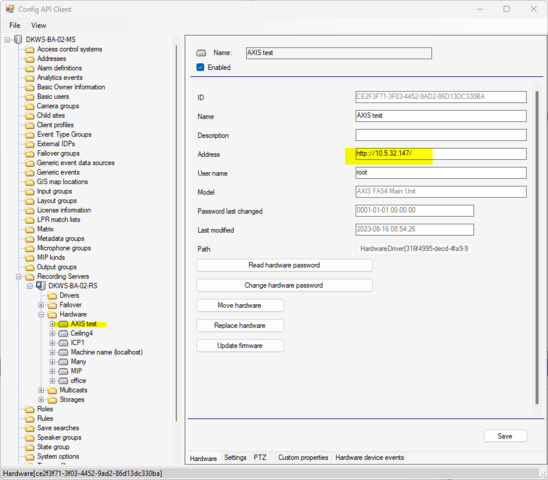
If I have misunderstood please bear with me. If you don’t think the answer fits or you have follow-up questions please let me know.
Bo,
Sorry for any confusion – I’m only using the SOAP APIs available and I was able to get the MAC address. However, the result returned from that operation does not provide the camera’s IP address.
Is there another path that I can pass to the GetItems operation where I can find the camera’s local IP address? I would prefer it to be through a SOAP API rather than from the config client if at all possible.
Thanks for your help!
The Config API Client sample does use the Configuration API, it cheats and uses so MIP Library for a few of the things it shows, but for the large part of it, it is pure soap protocol.
I am curious, what do you get if not the IP address?
I suppose it could be setup using a hostname instead, is that what you get?
Bo,
I’m using /ManagementServer/ConfigurationApiService.svc?wsdl to create the service, and then I am calling GetChildItems(path=“Hardware[]/HardwareDriverSettingsFolder”). The result I’m getting has the following information:
- ProductID
- MacAddress
- FirmwareVersion
- SerialNumber
- DetectedModelName
- HTTPSPort
- HTTPSEnabled
- PasswordChangeSupported
- PasswordChangeMinLength
- PasswordChangeMaxLength
- PasswordChangeRequirements
I’m wondering if the camera local IP is found in a different path potentially? Hopefully this info helps clear things up!
HardwareDriverSettingsFolder is wrong. What you are looking for is a property on the Hardware itself.
What is the command to get a property for the Hardware itself for a protocol integration/using the SOAP API?
.GetItem(“Hardware[f2cc9aa1-717e-461a-99a3-fea87e4e3a98]”); (with correct GUID)
You will get an object containing Address in the Properties.
The response when I do that is like so, with child paths but no IP-related properties:
[{
    "Children": None,
    "ChildrenFilled": False,
    "DisplayName": "Cameras",
    "EnableProperty": {
        "DisplayName": None,
        "Enabled": None,
        "TranslationId": None,
        "UIToFollowEnabled": None
    },
    "ItemCategory": "Group",
    "ItemType": "CameraFolder",
    "MethodIds": None,
    "ParentPath": "Hardware[<deviceID>]",
    "Path": "Hardware[<deviceID>]/CameraFolder",
    "Properties": {
        "Property": []
    },
    "ServerCookie": None,
    "SortKey": 100,
    "UIHint": "DirectionHorizontal"
}, {
    "Children": None,
    "ChildrenFilled": False,
    "DisplayName": "Microphones",
    "EnableProperty": {
        "DisplayName": None,
        "Enabled": None,
        "TranslationId": None,
        "UIToFollowEnabled": None
    },
    "ItemCategory": "Group",
    "ItemType": "MicrophoneFolder",
    "MethodIds": None,
    "ParentPath": "Hardware[<deviceID>]",
    "Path": "Hardware[<deviceID>]/MicrophoneFolder",
    "Properties": {
        "Property": []
    },
    "ServerCookie": None,
    "SortKey": 100,
    "UIHint": "DirectionHorizontal"
},
........
Please double-check..
I must suspect that you are not doing a .GetItem(“Hardware[]”)
I do suspect that you are doing a .GetItem(“Hardware]/CameraFolder”), which is not what you need.
I am doing .GetItem(“Hardware[]”) but the result just lists all of the child paths. As you see above this includes Hardware]/CameraFolder, Hardware]/MicrophoneFolder, etc. I chose not to list all of them out but it includes all child paths of Hardware[] and their properties
My new theory.
I must suspect that you are not doing a .GetItem(“Hardware[]”)
I do suspect that you are doing a .GetChildItems(“Hardware]”) (which is not what you need).
Are we getting closer?
Bo, that theory was correct! My apologies for the confusion and simple mistake, thanks for your help!
@Bo Ellegård Andersen (Milestone Systems) I do have one more question, though! Is there a way to get this information using ASMX? Currently I’m able to get a response using:
ServerCommandService.asmx?op=GetConfiguration
But I do not see anything related to MAC/IP in the response and was wondering if there’s anything I need to add to my request?
The configuration you get from ServerCommandService does not include MAC/IP because clients generally don’t need this info, e.g. the Smart Client does not know the MAC/IP and never needs to know, it just needs to know which recording server to connect for getting camera video.
There is a workaround, and that is the Configuration API which is what we are working with above..
So the conclusion must be that ServerCommandService and ConfigurationAPI are two different things, and no, you cannot get MAC/IP from ServerCommandService..