Hi,
If we create a view(e.g 2x2,4x4) with plugin, can we get the number of layout view from the plugin ?
If a view set 2x2, it is 4.
If a view set 4x4, it is 16.
Hi,
If we create a view(e.g 2x2,4x4) with plugin, can we get the number of layout view from the plugin ?
If a view set 2x2, it is 4.
If a view set 4x4, it is 16.
Is it because you have a view item plugin and want to know the nature of the view?
Perhaps you can use -
VideoOS.Platform.Client.WindowInformation Class Reference
This class provide information of the currently executing window. It is accessed from the ViewItemUserControl.WindowInformation.
-
If my answer does not fit please elaborate on the question, perhaps adding some context information.
Sorry for my late reply.
We want to resize resolution from the number of view.
Can I get the number of view if I create the view the following procedure
1. Create view (e.g 2x2).
2. Create the plugin to each area.
3. Live start.
-> We want get the number of view when No.3.
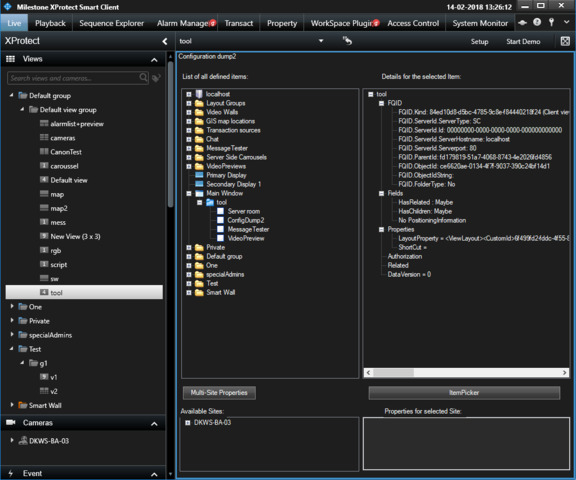
If I use the Config Dump tool plugin sample I can see..
There you have that currently the Main Window is displaying the view named tool and it has four view items.
I figure this is what you need. If it fits explore the sample.
Thank you Bo.
I understood you say but it is not the information I wanted.
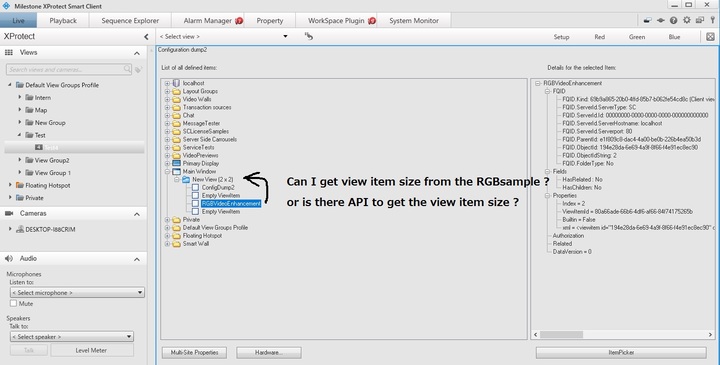
We are developing the new plugin by reference to RGBVideoEnhancement sample plugin.
If the plugin create one of four views is there API to get the view item size ?
Try this in your ViewItemUserControl
FQID fQID = WindowInformation.ViewAndLayoutItem.FQID;
Item item = Configuration.Instance.GetItem(fQID);
System.Collections.Generic.List<Item> list = item.GetChildren();
int count = list.Count;
I tried it in RGBVideoEnhancementViewItemUserControl and if I have not misunderstood what you try to achieve I think the code will work for you.
Thank you for your support!
This is the information we wanted.