Hello,
I would like to command the Smart client from an external app.
I would like to :
- set the playback on a particular time
- create an export of a sequence
I have some difficulties to point the relevant documentation.
So, if you can provide an example of a command and a the link to the related documentation, it would be fantastic !
Thank you,
Arnaud
So, I did some tests. here with what I did, and what I understood to do what I want :
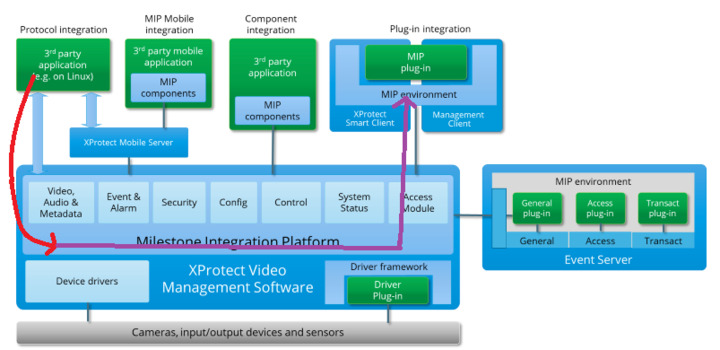
I created a Ptyhon script from what I found as exemple, to access to the MIP and get list of camera. (The red line).
Here is the script :
import requests
import json


def get_token_basic(server_url, username, password):
    url = f"{server_url}/API/IDP/connect/token"
    headers = {"Content-Type": "application/x-www-form-urlencoded"}
    payload = f"grant_type=password&username={username}&password={password}&client_id=GrantValidatorClient"
    response = requests.post(url, headers=headers, data=payload, verify=False)  # Disable verify in a trusted network

    print("username:", username)
    print("password:", password)

    print("data:", payload)


    if response.status_code == 200:
        return response.json()['access_token']
    else:
        print(f"Error: {response.status_code}, {response.text}")
        return None

def list_cameras(server_url, access_token):
    """
    List all cameras using the Management API.
    """
    api_url = f"{server_url}/ManagementServer/REST/cameras"  # Adjust the URL path if necessary
    headers = {'Authorization': f'Bearer {access_token}'}
    response = requests.get(api_url, headers=headers, verify=False)  # Disable verify in a trusted network
    return response.json()

# Replace the following values with your actual server URL, username, and password
server_url = "http://127.0.0.1"
#username = "AD_STREAM\\arnau"
#password = ""

username = "toto"
password = "titi"

# Press the green button in the gutter to run the script.
if __name__ == '__main__':

    # Obtain an access token
    access_token = get_token_basic(server_url, username, password)

    # List all cameras
    cameras = list_cameras(server_url, access_token)
    print(json.dumps(cameras, indent=2))
But now, as far as understood, I have to use “Access Module” to access to the “MIP environment” and communicate with the “Samrt client”… Purple line.
Is that correct ?
How to do that ?
Thank you,
Arnaud
Access Control Module is a framework for integrating Access Control into XProtect. I believe it is not what you want for the task at hand.
For the task of making the Smart Client (SC) do stuff that is not done by the end-user it will require that you develop a Smart Client plugin. I think you should have a look at the Smart Client View and Windows tool plugin sample for that.
https://developer.milestonesys.com/s/article/Exploring-the-MIP-SDK-Tool-View-and-Window-Tool
https://doc.developer.milestonesys.com/html/index.html?base=samples/pluginsamples/scviewandwindow/readme.html&tree=tree_1.html
https://github.com/milestonesys
Next step you then need to communicate with your SC plugin to command from the outside. Here you can use you favorite method, or you can use Message Communication. The Chat sample shows how to use this.
https://doc.developer.milestonesys.com/html/index.html?base=samples/pluginsamples/chat/readme.html&tree=tree_1.html
https://doc.developer.milestonesys.com/html/index.html?base=samples/pluginsamples/chatwithwebsockets/readme.html&tree=tree_1.html
For doing an export: When you do not use the user interface of the SC for doing export I think you should avoid using the SC and instead develop an standalone application. The Export sample will then be the sample to explore.
https://doc.developer.milestonesys.com/html/index.html?base=samples/componentsamples/exportsample/readme.html&tree=tree_2.html
Hi Bo,
Thanks a lot.
Very interesting. As far as I can see it fit perfectly with what I want to do.
For now, I use mouse automation from a Python script.
But I will work on it more deeply next week. So, I will maybe have other question.
However, I’m wondering if I should not work with a freelance. I have additional things to do more complicated, and it could be wiser :-). I fear to lost time with Visual studio…
Have a good day,
Arnaud