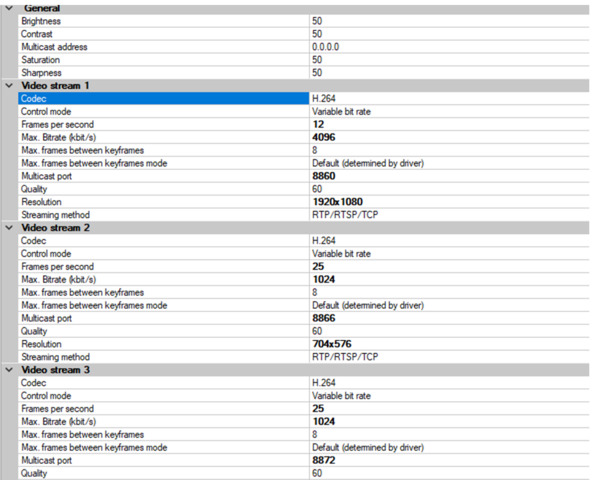
Hi
Can anyone advise please. I’m getting an error when I try to display a Live Stream via the Uwp Samples
ComponentSamples.VideoViewer and UwpSamples.VideoStreamingSample are both failing to load a live stream. I’ve tried it on 2 different Milestone systems. Milestone web client is working fine.
UwpSamples.VideoStreamingSample is firing the MediaFailed event with error “The byte stream type of the given URL is unsupported. (Exception from HRESULT: 0xC00D36C4)”
I’ve had to tweak the VideoParams slightly because the Sample was geared towards a Camera with Audio…
private static VideoParams GetRequestStreamParams(StreamParamsHelper.SignalType signalType, Guid cameraId)

{

  var videoParams = new VideoParams()

  {

    ItemId = cameraId,

    MethodType = StreamParamsHelper.MethodType.Push,

    SignalType = StreamParamsHelper.SignalType.Live,

    StreamType = StreamParamsHelper.StreamType.Transcoded,

    FragmentDuration = TimeSpan.FromMilliseconds(-1000),

    DestWidth = 860,

    DestHeight = 640,

    FPS = 25,

    CompressionLvl = 71,

    StreamHeaders = StreamParamsHelper.StreamHeaders.NoHeaders,

  };

  return videoParams;

}
The Cameras are H264
Any ideas/suggestions gratefully received.
Thanks
Hi Ric
Please set StreamType = StreamParamsHelper.StreamType.FragmentedMP4 as shown in our VideoStreamingSample.
Best regards,
Nikolay
Hello,
We did try this, but it didn’t work as there is no audio on the cameras.
It seems to me that there’s some kind of a misunderstanding here so let me try to make it clear:
VideoStreamingSample has nothing to do with audio - it’s meant to illustrate how to obtain video from a H.264 camera through Mobile Server.
Camera may or may not have audio set-up in the VMS. In both cases you have to use StreamType.FragmentedMP4.
If for some reason our sample is not working for you in its original form, please provide the error you get so we try to help you troubleshoot the issue.
Ok, thanks for the response.
Your supplied UwpSample.VideoStreamingSample throws an error message “Microphone not available” if I use FragmentedMP4
And tbh, whatever I use (Transcoded**,** FragmentedMP4, Unknown) , I get a MediaFailed event and error:
“The byte stream type of the given URL is unsupported. (Exception from HRESULT: 0xC00D36C4)”
Please advise. Thanks
Hmmm… I must admit that we’ve put an incorrect message in the sample (“Microphone not available”). I will make sure that we fix this in the next version.
Nevertheless, I can only get this error if I set StreamType.Unknown (which of course is invalid). So, can you please go and check what’s value in
response.ErrorCode when you call RequestStream call with FragmentedMP4?
Now, running on a different desktop than usual, I see error code: ErrorCodes.FeatureIsDisabled
And if I comment out the return and let the method continue, I see a media failed with “Exception from HRESULT: 0xC00D2EFC”
Previously I have seen ErrorCodes.InternalError and the error message mention originally: “The byte stream type of the given URL is unsupported. (Exception from HRESULT: 0xC00D36C4)” - but that was probably with the stream type set to Transcoded
Let’s try to forget about Transcoded for a moment 
Now, ErrorCodes.FeatureIsDisabled indicates that direct streaming (= StreamType.FragmentedMP4) is not available for some reason.
To verify that’s the problem, can you give us some more info:
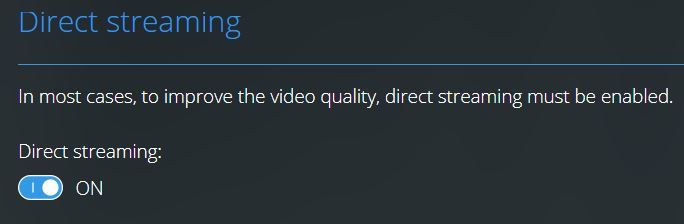
- when you open WebClient and go to settings page, do you see ‘Direct streaming’ and is the toggle On, as shown in the attached image?
- when both ‘Direct streaming’ and ‘Video diagnostics overlay’ are enabled in WebClient, what is the codec and streaming type that you see in camera thumbnails in WebClient?
Ok. Direct streaming is not even an option under settings
Good, we’re slowly progressing…
Now can you tell me what XProtect distribution do you use - Corporate, Essential or some other?
According to our documentation, ‘Direct streaming’ is only available in Expert and Corporate so if you don’t have it there’s no way to make that particular sample working.
Ah ok. Thanks. So it appears we don’t have Corporate or Expert. Without either, what are our options for UWP? Do we just need to use RAW mobile protocol & web request each frame?
If you cannot use ‘Direct streaming’ feature you can preview Transcoded stream in similar manner to VideoPlaybackUwpSample. Here are some guidelines:
- In the xaml you’ll have Image control bound to a BitmapImage (see how it’s done in VideoPlaybackUwpSample)
- In the viewmodel you just copy/paste ImageViewSource and OnVideoFrame from VideoPlaybackUwpSample without modifications
- change video parameters to
var videoParams = new VideoParams
            {
                CameraId = cameraId,
                MethodType = StreamParamsHelper.MethodType.Push,
                SignalType = StreamParamsHelper.SignalType.Live,
                StreamType = StreamParamsHelper.StreamType.Transcoded,
                FragmentDuration = TimeSpan.FromMilliseconds(-1000),
                DestWidth = 860,
                DestHeight = 640,
                FPS = 15,
                CompressionLvl = 90,
                StreamHeaders = StreamParamsHelper.StreamHeaders.AllPresent,
            };
- And finally modify existing LoadLiveStream method like this
private void LoadLiveStream()
        {
            var streamingParams = GetRequestStreamParams(StreamParamsHelper.SignalType.Live, SelectedCamera.CameraId);

            var response = _connection.Video.RequestStream(streamingParams, null, DefaultTimeout);

            if (response.ErrorCode != ErrorCodes.Ok)
            {
                ShowErrorMessage($"Incorrect request: Error code '{response.ErrorCode}'");
                return;
            }

            var _video = _connection.VideoFactory.CreateLiveVideo(new RequestStreamResponseLive(response));
            _video.NewFrame = OnVideoFrame;
            _video.Start();
        }
Please be aware - using this approach instead of the one provided in our original VideoStreamingSample is considered sub-optimal because it puts much more load on the Mobile Server.
Hello Nikolay,
We have professional + 2020 and we are looking to stream 16 camera to about 12 different screens so we need to know the best way to achieve this. From your last comment, i feel that using the mobile server is not going to work for 200 streams.
We do not want to have to install expert or corporate in order to achieve the same integration levels as we did with the older professional version.
So can you please tell us the best method to integrate with the milestone platform.
Thanks
Hi Ric,
You should be able to “achieve the same integration levels as we did with the older professional version” with the latest version of course. If you have a working system, upgrading XProtect should not break it.
MobileServer is not slower than before, it’s just that ‘Direct streaming’ mode is up to 10 times more capable than ‘Transcoding’, in terms of simultaneous streams. So I doubt you were ever able to run 200 streams at a time with the older version through it.
This is now a totally different topic though. I hope you have your sample up and running already
The existing solution is based around WinForms & uses an AxImageViewerLib.AxImageViewerDotNet control. It connects using ConnectUsingCameraConfigurationXml() and the XML is pulled directly from Milestone.
Performance-wise, it’s ok but obviously the tech is getting a little dated and we were wanting to freshen up the user experience - hence looking at UWP.
Thanks for the guidance on the VideoPlaybackUwpSample approach. Can you confirm whether that would likely have worse performance than our legacy Winforms approach? And if so, could you recommend a strategy going forward (we don’t think Corporate/Expert is a viable option right now). UWP is our preferred front-end platform, but WPF is an option.
Thanks for all your help
Hi Ric,
Seems to me you need to keep the way you set-up connection to XProtect in your existing solution and only change your viewer in client’s code. MobileServer will not be able to handle simultaneous 200 streams without 'Direct streaming;.
Unfortunately I’m not aware how ConnectUsingCameraConfigurationXml works because it has nothing to do with MobileServer/WebClient and our UWP samples for the MobileServer.
Please post a new thread and copy/paste your last thoughts and questions so a more appropriate colleague will take it and try to guide you.
Thanks for your cooperation.