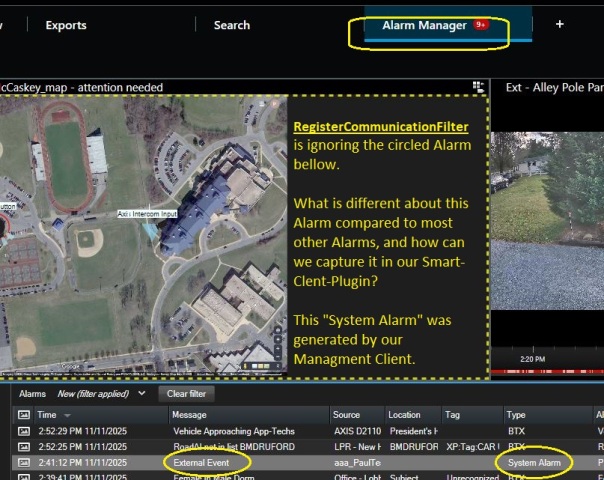
We have a Smart Client plug-in that monitors alarms using …
_objCFilter_NewAlarm = _messageCommunication.RegisterCommunicationFilter(
NewAlarmMessageHandler,
  new VideoOS.Platform.Messaging.CommunicationIdFilter(
VideoOS.Platform.Messaging.MessageId.Server.NewAlarmIndication));
The plug-in works fine for “regular” alarms, but our NewAlarmMessageHandler()
never receives the circled “System Alarm” (JPG bellow). This Alarm is generated from an Alarm Definition with an Event-Button in the Management Client.
How can we detect such an Alarm?
Please review the Yellow notes added to this Smart-Client screen shot.
You will have to add some detail about how the alarm is triggered, it is unclear to me. Please give me the details on how the event and alarm definition are setup. I would like to test with your instructions to make sure I do the same. If I can reproduce I can analyze.
Please also mention which version the XProtect VMS and Smart Client is.
I goggled it … This might be adequate …
I’ll need to figure out usage of SOAP, or maybe RESTful …
Google Answer: “To programmatically retrieve the camera ID associated with a Milestone XProtect alarm, you need to use theMilestone Integration Platform
(MIP) SDKand leverage either theRESTful Alarms APIor theAlarm Client
Protocol(SOAP interface), depending on your specific integration
requirements and programming environment.”
David Gradwell
dgradwell@app-techs.com
717-735-0848 ext. 151 App-Techs
505 Willow Lane
Lancaster, PA 17601
www.app-techs.com Follow us on:LinkedIn
[https://www.linkedin.com/company/app-techs/posts/?feedView=all]
Find us via:Google
[https://www.google.com/search?q=App-Techs+Lancaster+PA&oq=App-Techs+Lancaster+PA]
From: “Dave Gradwell” <DGradwell@app-techs.com>
To: “Reply to Developer Forum”
<1i8mldpdavc8etg8.ur0jn5z0fsn29mqp@bzbxkxj583mimf2i.smkw9.2-8uideae.deu108.chatter.salesforce.com>,
“Milestone Developer Forum” <noreply@milestonesys.com>, “Dan Fritsch”
<dfritsch@app-techs.com>
Cc: “David Gradwell” <dgradwell@app-techs.com>, “Paul Dillon”
<PDillon@app-techs.com>
Date: Fri, 14 Nov 2025 17:05:13 -0500
Subject: Re: Bo Ellegård Andersen answered you: Capture incoming alarm,
generated by Management Cient [Event] button
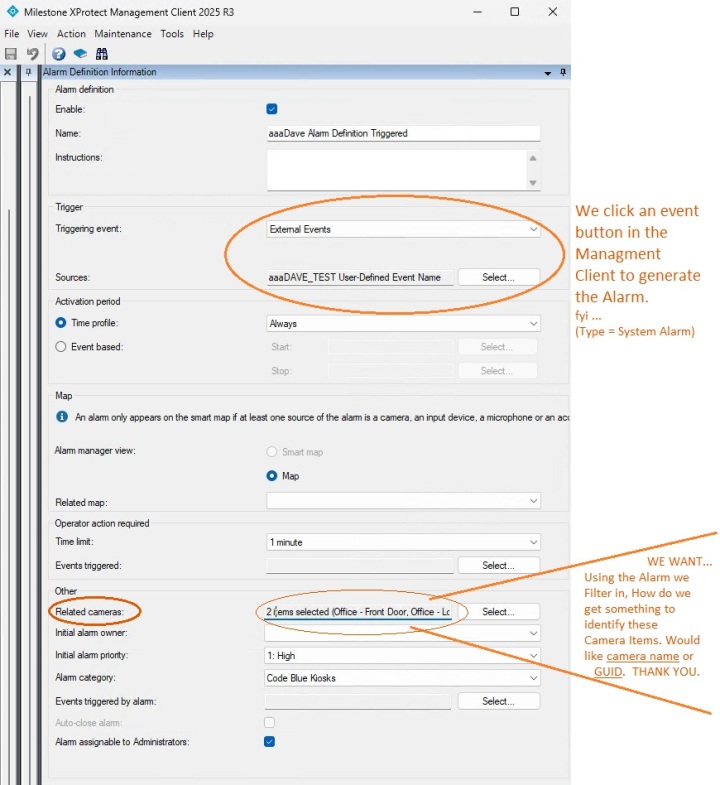
Adding to my recent email to you Bo, is this Alarm Definition screen shot
…
David Gradwell
dgradwell@app-techs.com
717-735-0848 ext. 151 App-Techs
505 Willow Lane
Lancaster, PA 17601
www.app-techs.com Follow us on:LinkedIn
[https://www.linkedin.com/company/app-techs/posts/?feedView=all]
Find us via:Google
[https://www.google.com/search?q=App-Techs+Lancaster+PA&oq=App-Techs+Lancaster+PA]
To retrieve all the cameras mentioned in the Alarm Definition’s "OtherRelated Cameras"is the goal.
Using the REST API to retrieve all these cameras might be perfect.
Hoping to get all the cameras, not just one.
“CameraId” might not be the right thing.
We’re looking for ALL the “Related Cameras”, camera names or GUIDs.
David Gradwell
dgradwell@app-techs.com
717-735-0848 ext. 151 App-Techs
505 Willow Lane
Lancaster, PA 17601
www.app-techs.com Follow us on:LinkedIn
[https://www.linkedin.com/company/app-techs/posts/?feedView=all]
Find us via:Google
[https://www.google.com/search?q=App-Techs+Lancaster+PA&oq=App-Techs+Lancaster+PA]
From: “Dave Gradwell” <DGradwell@app-techs.com>
To: “Reply to Developer Forum”
<1i8mldpdavc8etg8.ur0jn5z0fsn29mqp@bzbxkxj583mimf2i.smkw9.2-8uideae.deu108.chatter.salesforce.com>,
“Milestone Developer Forum” <noreply@milestonesys.com>, “Dan Fritsch”
<dfritsch@app-techs.com>
Cc: “David Gradwell” <dgradwell@app-techs.com>, “Paul Dillon”
<PDillon@app-techs.com>
Date: Fri, 14 Nov 2025 17:05:13 -0500
Subject: Re: Bo Ellegård Andersen answered you: Capture incoming alarm,
generated by Management Cient [Event] button
Adding to my recent email to you Bo, is this Alarm Definition screen shot
…
David Gradwell
dgradwell@app-techs.com
717-735-0848 ext. 151 App-Techs
505 Willow Lane
Lancaster, PA 17601
www.app-techs.com Follow us on:LinkedIn
[https://www.linkedin.com/company/app-techs/posts/?feedView=all]
Find us via:Google
[https://www.google.com/search?q=App-Techs+Lancaster+PA&oq=App-Techs+Lancaster+PA]
I recently discovered: we have been receiving the System Alarm all along in our Smart-Client’s RegisterCommunicationFilter.
But we still need a way to look up the camera item from Alarm-data.
(For better info, look at the screen shot preceeding this post above)
Here is the info you requested …
=== How the event and alarm definition are setup ?
We are using a user-defined event to trigger an alarm definition.
=== Which version of XProtect VMS ?
Professional + version 2025 R2
=== Which version ofSmart Client ?
It is also, version 2025 R2
The problem was the camera lookup was failing. And we are now trying to find out how to get the CameraID (or other camera identifier) from the Alarm. The bug I discovered was that we were trying to look up the camera from the alarm-source field where we usually get the camera name. But the System Alarm’s Source field contains something other than the camera name in this Alarm.
Clarification.
The Analytics Event can have one source, if the source is a user-defined event then it cannot be a camera. I have an idea that if you say it works for some and not for others, those that it works for might have the camera as source directly.
That the Source cannot be used directly leaves Related Cameras and these can be read on the Alarm as ReferenceList. (I am assuming you have used the MIP library and not need to switch to RestAPI.)
https://doc.developer.milestonesys.com/mipsdk/?base=MIPhelp%2Fclass_video_o_s_1_1_platform_1_1_data_1_1_alarm.html&tree=tree_Search.html
For a view of how it looks try to run the Alarm and Event Viewer sample, put a breakpoint where it has gotten the Alarm object in line 336 (MainForm.cs), and see the Alarm object and the ReferenceList on an alarm that has this. You might be able to skip this and just put a breakpoint in your plugin code, but as I do not know your plugin code there is an element of guessing here.