I want to use my own icons in smart client maps for access points. I want to be able to specify an icon for normal state, and then change to other icons depending on the category for the event. How would I accomplish this in my access control plugin?
I found a similar question on the forum, so please see the question link –
Thanks for the reply and the link. The question and answer in the link relates to Doors and Statuses. What I want to do, is for the Access Points. When an event is received from the access control system, I want to indicate a successful or failed transaction by momentarily changing the icon for the Access Point to a custom icon and then back to the default / normal icon.
Milestone Development will start an investigation.
Hi there,
I’m afraid it is not possible to change the icon of Access Points, or even associate them with a door state.
Looking at the DemoPlugin tool code (which you an find here: https://github.com/milestonesys/mipsdk-samples-plugin) we can see that it is really easy to cheange the DOOR icon for a given state (Class TypeConverter.cs, line 140)
However it is not possible to change the Access Point icon based on the state of the door, as can be seen by the comment on the StateManager.cs class:
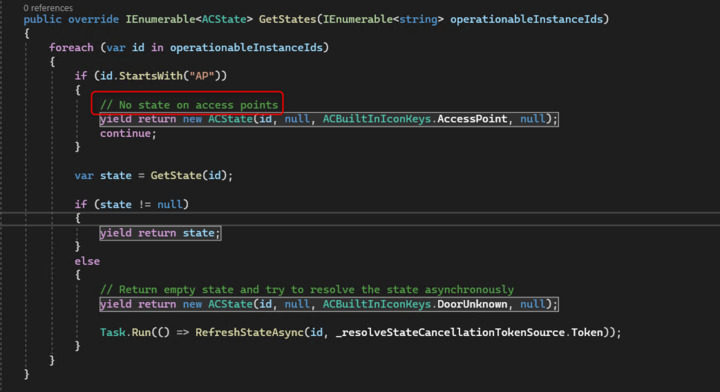
This is because, as the comment suggests there are no “states” associated with the access Point.
Please let me know if you have any further questions