We want to use the Role entity to control certain permissions of functions in our plugin. Therefore we want to check whether the logged-in user is member of a specific Role. Currently we have a method that solves this:
The method takes the Role by friendly name (string).
We list all Roles in the system using IConfigurationService.GetChildItems(RoleFolderPath)
Find the specific Item representing the specific Role (by comparing the DisplayName)
Use SecurityAccess.IsMember to check whether the user is member of this role.
This works well on Corporate and Expert but not on the plus-versions since a non-admin user doesn’t have permissions to list all Roles on the system.
Yes, we know about the possibility of creating SecurityActions - we actually already use it for other things, but in some cases it is not optimal to use. I will give you some examples:
It quite simple to use for overall permissions, but harder and less user-friendly to use on device level.
Unsure if it is possible to use SecurityActions for our own custom entities, e.g. a specific licence-plate list that we store ourself.
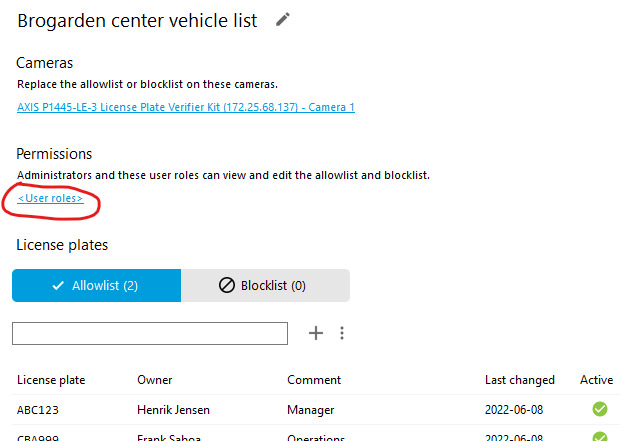
It is also nice sometime to be able to handle permissions directly in our own configuration UI.
Here is an example of how we use the Role entity with a custom entity directly in our own UI (Management client plugin). This works fine on Corporate and Expert but on plus-versions we get an permission-excpetion when trying to check if a non-admin is member of a specific Role.
Thank you for the sample and for your support! It is now clear to me that it is possible to create security settings also for custom items.
I’m still interesting if there is a solution for checking the Role membership on plus-versions. That would help a lot!
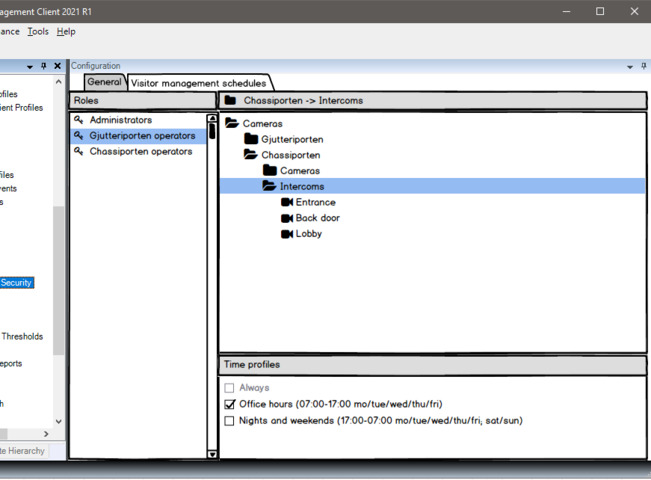
I also want to share another specific use-case we have. In this example we want to assign “Time profile” for a group of cameras and for a specific Role. The problem with security-actions is that it is only allow&deny - in this case we want to attach a time-profile instead. Is there a solution for this?
Hi, Below is some code you could run in any plugin sample to check if the user is member of a specific Role. This works on my Corporate, but not on Professional+.
// Enter a Role name you want to test
string roleToTest = "LocalLicencePlateAdmin";
MessageBox.Show($"Is logged on user member of \"{roleToTest}\": {IsMemberOfRole(roleToTest)}");
@Rie Kiuchi (Milestone Systems) - any news about this. Have you tested the code I provided on Professional+?
We are about to make a decision about whether or not to go on with the planned integration. Since many customers, that request this integration are running Professional+, the only workable solution at this point is to invent our own user/role system, which is a path I really want to avoid.
We have consulted Milestone Development regarding your code and was suggested we use the strongly typed classes, ConfigurationItems class, and we then changed your code to:
        public bool IsMemberOfRole(string roleName)
        {
            var role = GetRole(roleName);
            if (role != null)
            {
                return SecurityAccess.IsMember(
                    Configuration.Instance.ServerFQID.ServerId,
                    LoginSettingsCache.LoginSettings[0].UserIdentity,
                    role.Id);
            }

            return false;
        }

        public Role GetRole(string roleName)
        {
            string roleFolderPath = string.Format("/{0}", VideoOS.ConfigurationAPI.ItemTypes.RoleFolder);
            return new ManagementServer(EnvironmentManager.Instance.CurrentSite.ServerId).RoleFolder.Roles
                .FirstOrDefault((r) => r.DisplayName == roleName);
        }
We tested above sample on XProtect Corporate and XProtect Professional+.
When we run the sample using a user that is also member of the Administrators role the sample works fine.
When we run the sample using a user that is only member of the role we used for testing, we got an VideoOS.ConfigurationApi.ClientService.UnauthorizedAccessFault exception.
This result is the same both on Corporate and Professional+ and there are no differences between them.
While we are unable to see any difference between using XProtect Corporate and using XProtect Professional+, we are unsure if we have tested the scenario as you see it. Can you please comment on this?
I am so sorry for delayed reply. Regarding the issue, Milestone Development said that this is by design, so Professional+ is not available on setting for Read permission, it is available in Corporate as we saw. Therefor the work around would be to put the user in Administrator group if you use Professional plus.
This is a side Note - You might think that there would be the Read permission setting in SQL in each edition, and yes there is. But the problem is: if you change it then the entire system might be broken. Because the setting is connected to its system license, and you cannot change it without a proper license. Pro+ license does not provide Read, so, if you change it to available, then the license does not fit for the real functionality and then system would not work as a result.
We have ask Milestone Management to put it on the wish-list for future enhancement development work. A prioritization needs to be made by Milestone Product Management, so it is not possible to say when, or even if, this will be developed.
In general Security Actions on Roles is, as you also point out, only allow and deny. There are exceptions, one example is; if you give permission to a role to be able to see live video on a camera you can specify a time profile. It is not possible to make the same kind of functionality on other objects that today are allow-deny only, neither by configuration in the Management Client nor by methods in the MIP SDK.