I want to make a web service from component sample CameraStreamResolution.
I created a asp.net web application - MVC (framework .NET 4.5)
i then added references to the needed dll:
VideoOs.Platform, VideoOs.Platform.SDK, VideoOs.Platform.SDK.Export, VideoOs.Platform.SDK.Media
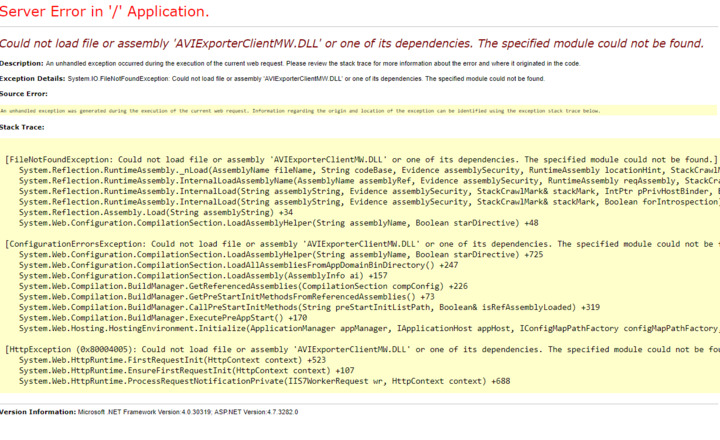
I get an error:
Could not load file or assembly ‘AVIExporterClientMW.DLL’ or one of its dependencies. The specified module could not be found.
what i tried:
i followed the instructions from:
https://developer.milestonesys.com/s/question/0D50O00004LlBR7SAN/i-am-trying-to-load-my-cameras-using-the-mip-sdk-2018-on-an-asp-net-mvc-web-api-could-not-load-file-or-assembly-videoosdatabaseutilitycommon-or-one-of-its-dependencies-an-attempt-was-made-to-load-a-program-with-an-incorrect-format
and:
https://developer.milestonesys.com/s/article/Dependent-files-in-MIP-SDK
i used: CopyMedia.bat, CopyExportFiles.bat into project bin folder
(https://doc.developer.milestonesys.com/html/index.html?base=reference/architecture/net_library_initialization.html&tree=tree_2.html)
summary:
clean asp.net project, added references to dlls, changed to 64X, used 2 copy.bat.
what am i doing wrong?
i am not sure that i understood him.
i used CopyMedia.bat, CopyExportFiles.bat into bin folder,
and i changed between 64 and 32.
it didnot work. is that what he did?
We are speculating that you need these files in the current folder when you execute your service, we have seen issues where the current folder is no longer the expected folder, we suggest that you catch the exception, and when the exception is caught you get the current folder and logs it.
ok i get what you mean.
i can see now that the dll i put in the bin folder are not loaded correctly into the build.
but, i cant catch the exception. the programm fail before it reach the code.
do you have an idea what other folder might be the correct one?
i cant find anything.
i dont know if its releated but i notice something.
CopyMedia.bat doesnot copy VideoOS.Platform.SDK.Media.dll
how i use copyMedia.bat:
-
launch power shell
-
cd [C:\Program](file:C:/Program) Files\Milestone\MIPSDK\Bin
-
.\CopyMedia.bat [C:\Users\boaz\source\repos\WebApplication16\WebApplication16\bin](file:C:/Users/boaz/source/repos/WebApplication16/WebApplication16/bin)
am i doint it right?
Ok, found it.
i didnot use 1 of the dll in the code, so it didnot copy it into the build.
so the order is: copyMedia.bat, copyExport.bat, copy VideoOS.Platform.dll → bin folder.
change build + web to x64.
make sure you use all the dll in your code.
thanks for the help.