I tried checking the logs serverside but did not find anything. Don’t really know where to look actually…
and stack trace please …
Sorry, here it is:
ConfigAPIClient.exe!ConfigAPIClient.Panels.SimpleUserControl.PerformAction(object sender, System.EventArgs e) Line 203
at [C:\Program](file:C:/Program) Files\Milestone\MIPSDK\ComponentSamples\ConfigApiClient\Panels\SimpleUserControl.cs(203)
System.Windows.Forms.dll!System.Windows.Forms.Control.OnClick(System.EventArgs e)
System.Windows.Forms.dll!System.Windows.Forms.Button.OnClick(System.EventArgs e)
System.Windows.Forms.dll!System.Windows.Forms.Button.OnMouseUp(System.Windows.Forms.MouseEventArgs mevent)
System.Windows.Forms.dll!System.Windows.Forms.Control.WmMouseUp(ref System.Windows.Forms.Message m, System.Windows.Forms.MouseButtons button, int clicks)
System.Windows.Forms.dll!System.Windows.Forms.Control.WndProc(ref System.Windows.Forms.Message m)
System.Windows.Forms.dll!System.Windows.Forms.ButtonBase.WndProc(ref System.Windows.Forms.Message m)
System.Windows.Forms.dll!System.Windows.Forms.Button.WndProc(ref System.Windows.Forms.Message m)
System.Windows.Forms.dll!System.Windows.Forms.NativeWindow.DebuggableCallback(System.IntPtr hWnd, int msg, System.IntPtr wparam, System.IntPtr lparam)
[Native to Managed Transition]
[Managed to Native Transition]
System.Windows.Forms.dll!System.Windows.Forms.Application.ComponentManager.System.Windows.Forms.UnsafeNativeMethods.IMsoComponentManager.FPushMessageLoop(System.IntPtr dwComponentID, int reason, int pvLoopData)
System.Windows.Forms.dll!System.Windows.Forms.Application.ThreadContext.RunMessageLoopInner(int reason, System.Windows.Forms.ApplicationContext context)
System.Windows.Forms.dll!System.Windows.Forms.Application.ThreadContext.RunMessageLoop(int reason, System.Windows.Forms.ApplicationContext context)
ConfigAPIClient.exe!ConfigAPIClient.Program.Main() Line 30
at [C:\Program](file:C:/Program) Files\Milestone\MIPSDK\ComponentSamples\ConfigApiClient\Program.cs(30)
Also, can you validate that communication works towards the event server - by making an Alarm Definition in Mgt Client, and then see if it can be listed in the ConfigAPIClient?
was there any stack trace on the innerException ?
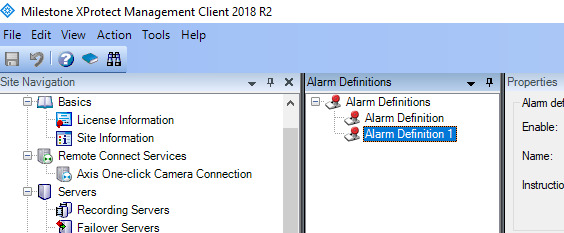
No stack trace on the innerException. I can provide a remote connection if you want…
If there is a stack trace on the innerException, I don’t know how to get it.
There is something wrong with the Management Server ↔ EventServer communcation. Can you restart Mgt Server, and see if it helps - otherwise we need to get all logs from Mgt Server and check for NullReference exception
Yes, I restarted several times. I think it’s maybe problem with custom alarm definitions and custom MIP items. Is there an SQL script to reset all the alarm config?
What log would you check first?
I can delete all the logs before I trigger the exception.
I dont know what log file this might be in, but any of the ones located under [C:\ProgramData\Milestone\XProtect](file:C:/ProgramData/Milestone/XProtect) Management Server\Logs
Not a single error appearing in those logs.
I will have to try this next week. Do you use 2018R2 for both Corporate and MIPSDK?
Also, what kind of user do you login with (AD / Basic) ?
Yes and yes. I tried with both user types.
It will probably work on a new installation. I just find it weird that it’s not working on mine. I actually did see it work like a month ago on the same installation. I tried deactivating all the third party plugins but changed nothing.
Should I wait until you have a look before re-installing Corporate on my machine?
hmm, I will not be able to look at this today. You can try re-install it.
ok thx