Configuration information in "SiteFolder" is empty

Hello,

The SDK describes an “Upcoming breaking change” that SiteInfo.xml is replaced by the “SiteFolder” path in the configuration service.

It also says that only the new variant should be used for new developments.

The path “/SiteFolder” exists in my system but does not contain any other data.

Is this function already functional?

If the old function should no longer be used, how should I implement it now?

Or something has to be done so that information appears in the configuration tree ?

Thank you for the explanation

Thomas

Yes, this function is enabled if your server is XProtect Corporate 2020R2. If it is empty, the simplest explanation is, that you do not have any child sites to the site you are logged in on.

Does this fit or do you have child site that you expect to see but does not see?

Do you see a child site if using the Management Client Federated Site Hierarchy tab (the tab is found in lower left corner of Management Client)?

Hello,

Many thanks for the answer.

It is an XProtect Corporate 2020R2 system and I also see the children in the Management Client.

When I read the SiteInfo.xml, the children are also listed in it.

Only the access via the ConfigurationService does not deliver children.

We use directly SOAP with a basic-user.

The other queries of the nodes in the ConfigurationService work.

Thomas

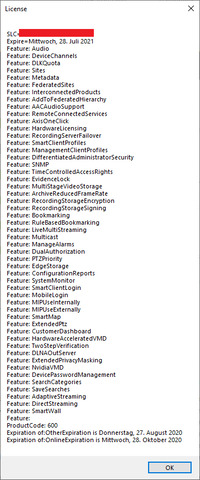
We have one theory on what might go wrong. Please build and run the ConfigAccessViaSDK sample, push the Show License button, take a screen capture of the resulting window, modify the picture to conceal the SLC (alternatively maybe your capture tools allow you to omit the first line with the SLC) and then upload it for us to see.

Attached the desired license information.

I am a developer and we use test licenses.

Your picture shows that our theory what might go wrong does not fit, so we can focus on something else.

We tried to reproduce your symptom but no success so far.

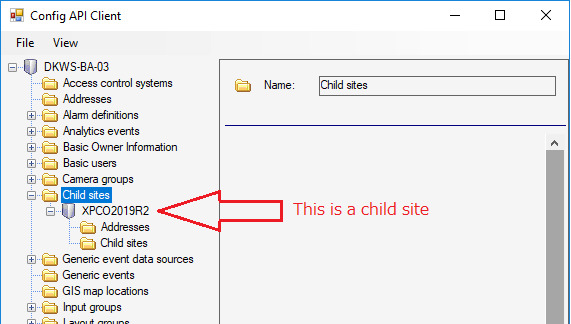
Please see what we did and please test this -

Make MFA (Milestone Federated Architecture): parent site is XPCO 2020 R2 and child site (older version; the version should be irrelevant for the issue).

Start ConfigAPI Client and log in to parent site with 2020 R2 SDK

Click child site (see below)

Can you please provide what you did for reproducing it (if not the same)? Please verify that you use the newest MIP SDK (that is currently 2020 R2).

It works with a Windows user. It does not work with a basic user.

If I am not mistaken, basic users cannot view/access child sites in a federated hierarchy. Can you verify that you’re also unable to see the child site(s) when logged in to Management Client or Smart Client with the same basic user?

Where is that. The SDK says:

Upcoming breaking change: Milestone VMS products today support responding to SiteInfo.xml (e.g. http://localhost/RCServer/SiteInfo.xml). …

The SiteInfo.xml request is today only useful for AD users since basic users are considered site private. …

The same information can be retrieved using the Configuration API. This will also work with future authorization methods, including basic users. …

We just need the structure information with name and address. Then we make access to the children directly.

But you are right. The ConfigAccessViaSDK program works with the Windows user.

This is not a solution for us. These users cannot be used from Java. See https://developer.milestonesys.com/s/question/0D53X00006K5rdnSAB/different-soap-versions

Unfortunately, basic users cannot see any child sites – basic users does not support site.

This is a big problem for us.

At our customer, the clients are operated via Windows AD users.

However, our software must also communicate with all servers to control some devices and trigger custom events.

In our software we are currently using a Windows AD user to download the siteinfo.xml file and a Basic user for the SOAP interface to the individual systems.

To use 2 user accounts are ugly, but it works.

If the reading of the siteinfo information is only possible via SOAP, then it no longer works from Java.

Unfortunately, Basic users are not supported in Milestone Federated Architecture systems. This is not an issue introduced with the older XML feedback pages, the MIP SDK or Configuration API, but more a design choice pertaining to the VMS as a hole. You will find it stated in the documentation (Administrator’s Manual and help system):
https://doc.milestonesys.com/latest/en-US/feature_flags/ff_federatedsites/mc_configuringmilfederatedarc.htm

I know that.

However, it was also possible to query the XML from non-Windows systems via AD user. It was a normal web download.

On non-Windows systems, only basic users can be used on the SOAP interface.

We have therefore used a combination of both user types. That is no longer possible and we have no solution for our and also your customers.

According to the Internet, the WCF framework could also be configured so that AD users can also be used without using WCF.

Why can’t you do this universally? Windows is also one of our target platforms, but there are others.

A developer colleague ask..

What “content type” did you specify in the HTML header, looks like ”text/xml” – have you tried ”application/soap xml”?

I can not say that.

We tried the two usual frameworks used in Java: Metro and Apache CXF.

Both work for basic authentication.

The connection with the BasicHttpBinding is encrypted so that I cannot look into it.

And the WSHTTPBinding uses the Microsoft WCF attachment, which is not supported outside of the .NET world.

The authentication fails somewhere before.