After successfully creating an ImSourceToolkit with the desired XML config, I set up my request variables like so:
set<utf8_string_t> reqPropertyNames, avPropertyNames;
reqPropertyNames.insert(“Prev_Begin_Time”);
reqPropertyNames.insert(“Next_Begin_Time”);
p_srcToolkit->Connect(reqPropertyNames, avPropertyNames);
if (reqPropertyNames == avPropertyNames) { //EXCEPTION UNHANDLED HERE
cout << "\\nSUCCESS";
}
I get Unhandled exception in MilestoneDemoTest.exe: Microsoft C++ exception: NmToolkit::CmInvalidArgumentError<0> whenever I try to access or use reqPropertyNames
What could be the error? The XML config?
Are you using Visual Studio 2013? I believe this is a requirement, so it might be a explanation.
I’ve just ported my solution to Visual Studio 2013 and I’m still getting the same error. NmToolkit::CmInvalidArgumentError<0> at memory location 0x000000000018D3E0. Any help?
Could you let me have a minimal project showing the issue? I could debug here and possibly show it to a Milestone developer.
Here you go. Its a paste bin link. https://pastebin.com/Ppce3GyY
I edited out the IP for security reasons.
Quick question: What is the XProtect VMS (model, version)?
The XML using basic user might only work with the basic user implementation in XProtect Enterprise, Professional and Express. I believe the MediaLiveServiceJPEG sample holds a hint as what to do differently if using basic users in XProtect Corporate or Expert.
I believe he is using Milestone XProtect Essential 2017 R1 30 Day Trial.
Can you supply a ready project we can debug trying to reproduce the issue?
XProtect Essential is not open for integrations, I do not think it is the issue though.
It’s a very simple project I’m not sure why it’s not working. I am using the Debug dlls. I’m on Windows 7 64 bit
https://drive.google.com/open?id=0B79ts76Xb0bfbE8zNUs5clo5Z0U
I had a colleague look at this, he thinks this will work. Let me know if it does.
            utf8_string_t config = "<?xml version='1.0' encoding='utf-8'?>"
                         "<toolkit type='source'>"
                         "           <provider>is</provider>"
                         "           <config>"
                         "                        <server_uri>107.184.56.7</server_uri>"
                         "                        <device_id>458</device_id>"
                         "                        <authorization method='basic'>"
                         "                                    <user_name>demo</user_name>"
                         "                                    <password>demo12345</password>"
                         "                                    <protocol>HTTP</protocol>"
                         "                        </authorization>"
                         "                        <media_type>VIDEO</media_type>"
                         "                        <compression_rate update_key='compression_rate'>100</compression_rate>"
                         "           </config>"
                         "</toolkit>";
BTW. I am curious if the MediaLiveService C++ sample works for you if you run it?
I finally got it working. It must have been an error with the information I was supplying. I fixed it by using the MediaLiveService example and porting code from there.
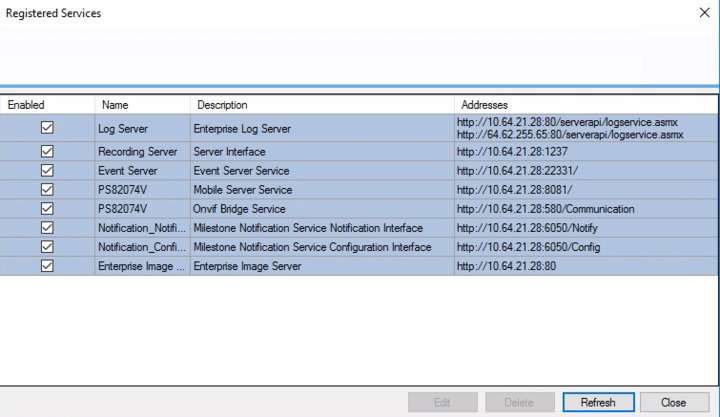
Last question however, is what does an example URI for a camera look like in the SystemInfo.xml? I see guid info but no tags for or related. Or could it be referring to the recording server in the registered services window as shown here? Because if that’s the case, it didn’t work.
In the SystemInfo.XML you find a “hostname”, this is the recording server a Milestone client should connect to in order to get the camera footage. (Note it is the recording server.)
Example from an XProtect Corporate to illustrate -
c7190df5-aeda-41b9-ac28-fb2a0dc209b3dkws-ba-03.milestone.dk7563
..
Apparently its hostname is set to 127.0.0.1 meaning it hasnt been port forwarded yet? Is there an option in the Milestone Management to do so? Essentially I am remotely connecting to it but not from the computer hosting the management application.
Strange, we’ve already setup our service with the “Internet” checkbox and I am able to login to our Milestone server and the Management App says it is connected to the Recording Server. Shouldn’t I be able to connect to the camera once it is hooked up to the Milestone server using the IP here?
Upon every camera I connect to, the LiveService sample try and catch ‘cerr<<“\n”<<error.GetSpecificError();’ always spits out “00000000000000” which I assume is a timeout since it waits a little bit.
No. What you show here is the IP used by the recording server to contact and communicate with the camera. A Milestone client does not contact or communicate with the camera, a Milestone client contacts the server and all communication is with the server. When routing for external access you can ignore the cameras themselves (if they are in the LAN with the server) and concentrate on opening the communication with the server.
Perhaps now you can see this with new eyes.. In the SystemInfo.XML you find a “hostname”, this is the recording server a Milestone client should connect to in order to get the camera footage.
I hope this makes sense (and I hope I have understood what you have been trying).