Connection to Milestone server suddenly lost

Hello Milestone Community,

I have a small exe application (c#) that export clips from milestone.

The application is on a server that remotely connect to Milestone

It worked well for few day (5 actually), and suddenly, there is an error “server not found”.

It worked well at 9:30am and at 10am the connection is lost.

With the Network admin we tried to remove all firewall/antivirus and no way to connect.

It is the same with the “Export Sample” from Milestone Sample.

We reboot the Milestone server, still the same.

We manage to have this working on some server, but some doesn’t…

Do you have an idea of where we should continue our investigations ?

The milestone version is 2022 R2.

The SDK version I used is from the Nugget Packages, so it should be the latest.

Thanks,

Jeremy

EDIT:

After some debugging session I have this message (translated from french) :

Internal error connecting to: XX.XX.XX.XXVideoOS.Platform.MIPException: There was no endpoint listening on http://XX.XX.XX.XX:8081/ManagementServer/ServerCommandServiceOAuth.svc that could accept the message. This is often cause by an incorect adress or SOAP action.

But again, from my local computer (remotely connecting to Milestone) it’s working. And on some server I have this error

EDIT 2:

Testing the Milestone “Export Sample” windows form sample:

With the SAME login info, sometimes it connect, sometimes it doesn’t find the server

What can cause such opposite results ?

Do you see any video on Smart Client without the issue?

Hello !

Yes, In the Smart Client everything is fine.

I have the issue of connection only on some server, but I don’t know why (and network team neither)

The error does indicate a network issue. For us it does not make sense that your application fails but the Smart Client on the same PC works. If you retry your application, will it then work again? It is important that you test with the Smart Client the moment you see the error, on the same PC using same credentials etc.

Are you sure to use port 8081? Because port 8081 is normally for mobile server’s port number and you got a message

http://XX.XX.XX.XX:8081/ManagementServer/ServerCommandServiceOAuth.svc”, that sounds a little bit strange to us. Why do you use this port number? Did you set up the Management Server to use this port?

If you see the issue in the MIP SDK based app but not in Smart Client, please try to do a Wireshark trace and compare what happens when it works with when it doesn’t work.

There can be temporary outages on your network and we have no better explanation.

Hello,

My bad I tested wrong last time.

On the exe server, the SmartClient CAN connect and see videos.

But i still can’t connect with the export sample from milestone or my exe.

Although, with the SmartClient, I have a message, regarding security, asking me to authorise the connection (something about a certificate)

Maybe this is the reason with my exe cannot connect ?

In my code I specify “false” to the secure connection.

Maybe there is somethign else to do ?

On the server no certificate is confirured. in the Management Configurator all “cryped” option are “off”

Guid integrationId = new Guid(“7b8fbfbe-6a48-424c-8cd3-a86ed255c1a4”);

    string integrationName = "ExportMilestone";

    string manufacturerName = "GEA";

    string version = "1.0";

    VideoOS.Platform.SDK.Environment.AddServer(false, "[http://XX.XX.XX.XX](http://XX.XX.XX.XX)", new NetworkCredential(userName, password));

    VideoOS.Platform.SDK.Environment.Login(uri, integrationId, integrationName, version, manufacturerName);

To answer you about the port 8081 : I didn’t mention it myself, in my understanding it was the SDK that add this port.

Thanks again :slight_smile:

The unmodified Export Sample does not use the code you mention here! Does the unmodified sample work?

If you need a coded login, please use the AddLayout sample and see if you can login.

Please try with a basic authentication users (with the login code from samples) as well as Windows/AD users, the same user that works in Smart Client should work here.

Indeed, the code here is from my app.

The unmodified version of export sample use a login popup and I don’t know where to find the code of this one.

The unmodified export sample doesn’t connect the first time I try to connect. If I retry immediately after the first try, It success. (I know, it’s weird…)

If I close the export sample, and reopen, it will fail again. (and work the second time…)

I’ll try what you suggest and let you know, thanks !

I copied the login logic from AddLayout and it don’t connect neither

I try with Windows and Basic authentication.

I tried with “secureOnly” set to true or false.

My Milestone server dosn’t use any certificate. I think this is why I kave this message with the SmartClient :

Can it be “secure” related ?

Does my server needs to be on https to accept the sdk login ?

(for recall I use the 2022 R2 version of Milestone)

This is really a mystery; we do not see any possible scenario where Smart Client works but MIP SDK fails in the way described on the same PC and using the same address and credentials.

Hopefully I can ask the right questions and figure it out from the answers.

In the Management Client, in the lower left find the Federated Site Hierarchy tab, right-click and choose Properties. Make a screen capture of the Site Properties Dialog and let us see it. Does it introduce any port 8081?

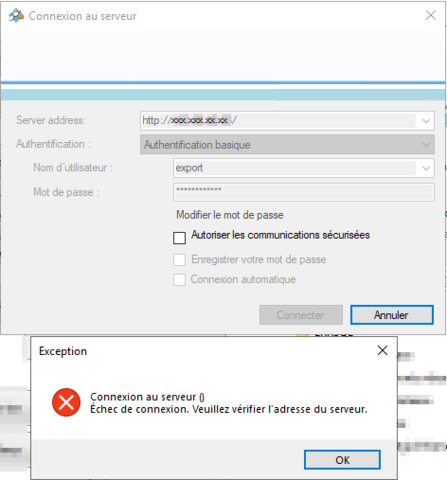
What exactly do you put as server address and as user? (Maybe add a screen capture of the login dialog.)

Please make Wireshark traces so that we can see the client’s communication with the XProtect Management Server. One trace with the Smart Client successfully logging in. One trace with unmodified Export Sample, trying twice before succeeding. One trace with the AddLayout failing.

Please share the MIP SDK logs from the client machine. You find them at [C:\ProgramData\Milestone\MIPSDK.](file:C:/ProgramData/Milestone/MIPSDK.) Make sure you use the same user credentials in all these traces so that we can compare.

Note. When you have not configured encryption in the XProtect, you will get the warning in Smart Client, you will have to deselect “Allow only secure communication” in the MIP SDK Login dialog, and you will have to set “SecureOnly” to false when doing MIP SDK login through code. It is OK not to have configured encryption in the XProtect, for now please troubleshoot without changing this.

Hello,

For the first point, we don’t use Federation.

We have one Milestone server, and we try to connect to it from another server on the network. But on this server we only installed the SmartClient as ou ask for debugging purpose.

Here’s how I type in the infos in the ExportSample provided “as it” by Milestone:

I also tried with Name of the server instead of IP (with and without http:// prefix) but the output is the same:

First time I connect I have this error (in the picture) and the second time I try (without closing the ExportSample windows) it work, with same informations.

In attachement you’ll find the 3 wireshark traces, and the only log file in MIPSDK log folder.

IP of Milestone server : 133.38.40.33

Server that try to connect to milestone : 133.38.200.187

Thanks again for your help

Jeremy

Hello,

I’ve looked into the wireshark captures, and as far as I am able to tell, it looks like each attempt to login succeeds. Is it possible that this is network specific, or have you been able to reproduce this with another host?

Best regards,

Simon

We thought about network issues at first too, but we installed both “ExportSample.exe” and my custmom exe on the Milestone server of our client (so no more remote machine) and it’s the same issue.

On our “test” server, it works on the Milestone server.

Maybe it is a component that needs to be installed ? do you have a full list of what is needed (like a checklist) ?

Regards,

Jeremy

If the Smart Client can login the MIP SDK based applications can login. This could be the first case where that is not true in my long time of working with this!

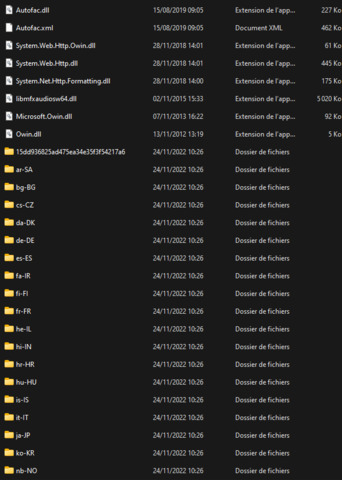
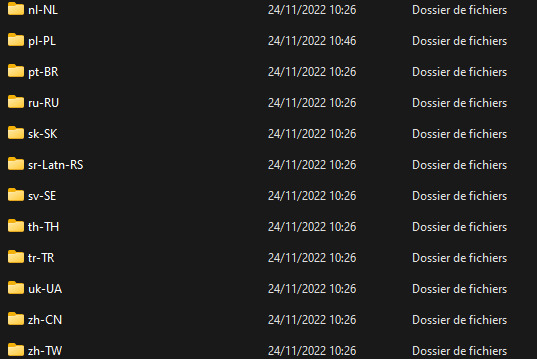
How do you deploy? Are you sure you get the full target folder (from your development build) copied so that you have the dependent dlls.

For deployment, I build my solution, and then extract all that it’s in my “bin” generated folder and copy all the content on the server.

Here are screenshots of all Dll + folder that is generated :

2022-11-25 10_09_58-Debug


Hi Jeremy, could I get you to attach the MIP log file?

Best regards

Simon

Hello simon,

Here it is,

Regards,

Jeremy

There is a test application in the Support Case we opened for a deeper investigation. Please check it out.

Please try to include and manipulate this setting.

EnvironmentManager.Instance.EnvironmentOptions[EnvironmentOptions.ConnectionCheckTimeout]

Set it to a value greater than 5, 5 is default, and means a time out of 5 seconds.

Try to add this code after the initialize statements -

EnvironmentManager.Instance.EnvironmentOptions[EnvironmentOptions.ConnectionCheckTimeout] = "20";

please check the support case