Regarding xpmobileserver web video sample.
Everything connects great when launching edits to the original sample locally, double clicking on the html. However when loading the JavaScript into a session running on ip:port of the machine, there is a message that says cors request is not configured for the ip port.
I recall the edit to the milestone management server machine was per the hostname. The message refers to the ip. Or perhaps the port is leading to the error?
Is there a way to edit where it sends the machine name instead of the ip please? And/ Or if the port is leading to error, is there a solution to enable cors request succeeds from any port of a specific machine?
Thomas
More specifics include:
In functional, double click on html example,
window.location.origin returns “file://”
This one connects ok.
In the aim functionality revision,
window.location.origin returns “http://ip:port”
This one doesn’t connect ok.
Thomas
Hi Thomas,
As far as I understand you question is how to host you page on different server than mobile one.
There is an article in the Knowledge base especially about that:
https://developer.milestonesys.com/s/article/XProtect-Mobile-Server-app-on-different-server-CORS
In addition, if you want to use IFrame you could check here:
https://developer.milestonesys.com/s/article/Display-video-from-XProtect-Mobile-Server-in-an-iframe
Hello Petar,
Regarding the first link,
“Up until the release of XProtect Mobile Server 2017 R3 (11.3a), it has been a requirement that a web server utilizing the Mobile Server had to share the same physical server as the Mobile Server. The Mobile Server did not support CORS (Cross Origin Resource Sharing) prior to 2017 R3 (11.3a).”
in context of the second link First Published: 2016-9-16, I’m wondering if the Iframe solution has adapted in 2017 R3 (11.3a) and >?
Yes regarding goal is hosting page on different server than mobile one. Local functions ok, however from http://ip:port, no luck.
Yesterday I worked through a couple iterations of the iframe route.
In summary, base function app works ok from different server than mobile one, however when configured so app is accessible by others in network then functionality breaks. Ideally aiming to pass update time stamp in session, rather than constructing a pairing mechanism regarding message passing with the iframe solution.
I’ll troubleshoot a bit more and try and produce a couple specific questions to bring more context to the aim function.
Thomas
At the moment, i’m wondering if the sample app’s format of referring to the directory location of scripts, XPMobileSDK and XPMobileSDK.library is an obstacle when hosting a page from an ip/port. In terms of the framework that is being referenced only has reference to files that are in the www of the launched working directory.
A prior solution was hand copy/paste loading the libraries into console after the session launched.
However, a guess is that something like a timeout, or order of events may be leading to the error of app not launching when from ip/port vs local file://.
A solution at the moment includes revising where XPMobileSDK and XPMobileSDK.library is called.
Ideally moving to include the load include scripts in the header, outside from within sample app.
Thomas
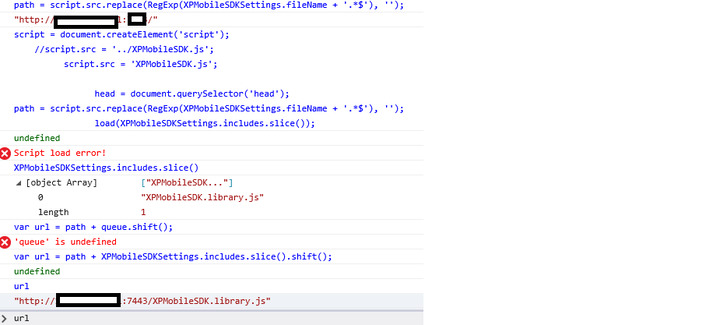
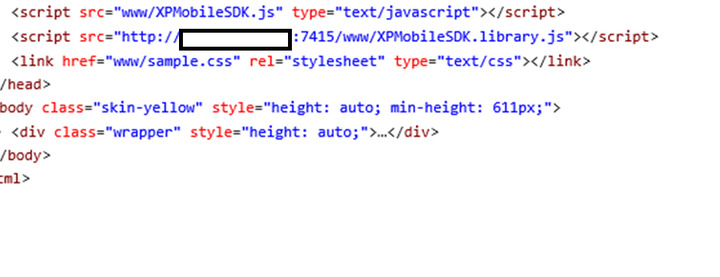
Attached image are edits in initialize in the sample video app.
Still returning script load error from 'http://ip:port/XPMobileSDK.library.js"
Thomas
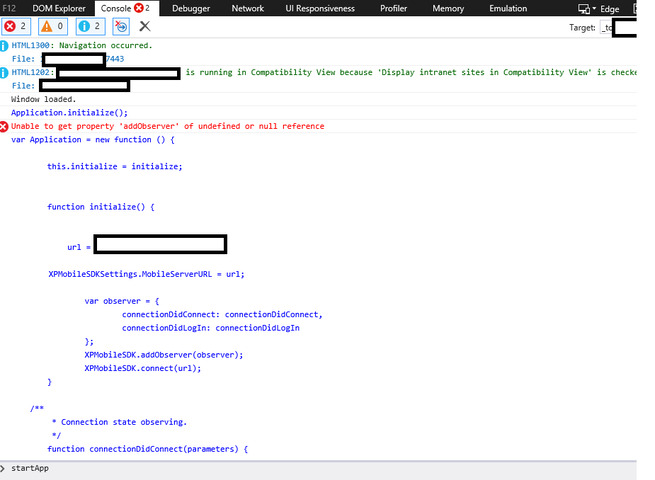
Including scripts XPMobileSDK and XPMobileSDK.library into the session through referencing in html head, loads the libraries into session. Then removing the load of xpmobilesdk.library in xpmobilesdk and xpmobilesdk in the edit to sample app leads to attached screenshot. Libraries load ok, however app doesn’t start. Any solutions on how to instantiate the app after the session loads please?
Thomas
Update,
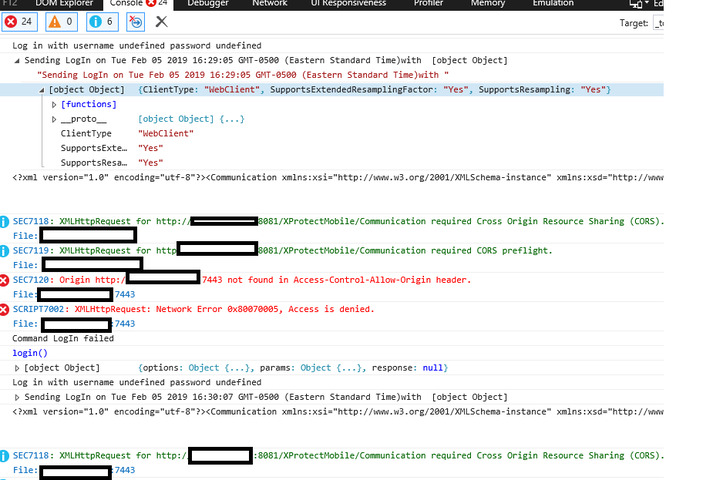
Through loading the functions XPMobileSDK.library.Connection = new Connection(); and Login() after session loads, the following screenshot results. Didn’t enter credentials this round however error similar as the edit where credentials entered prior Login().
The host name that corresponds with the ‘different mobile server machine’ that is intending to host the process is defined ok on the milestone manager server machine.
Idk what to check next.
Thomas
Hi Thomas,
If you have troubles loading SDK from the Mobile server, you can host it at the place where you host your sample/page.
Also when trying to do such changes please make them step by step - first naje CORS working, afterwards try IFrame.
I’ve tested CORS setting few days ago, and they worked fine (I was able to make Sample running/hosted on one Mobile server to connect to another Mobile server).
So please check your configuration.
Update,
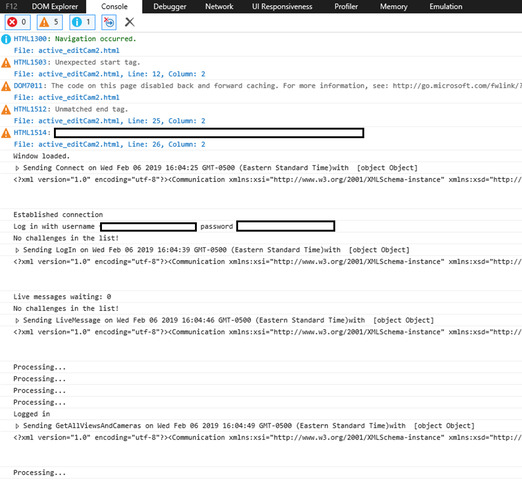
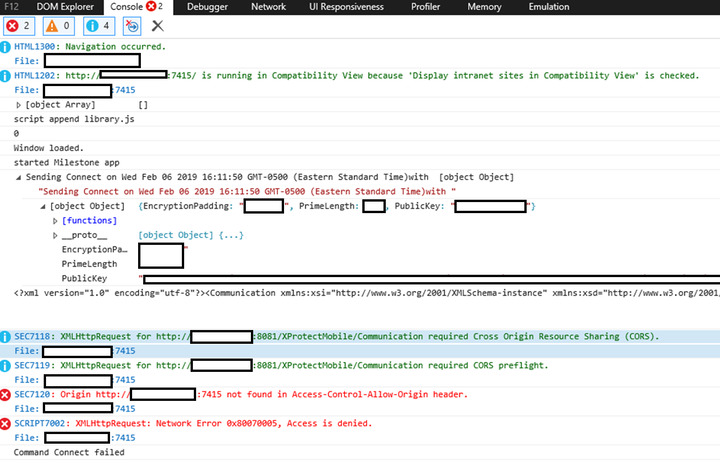
A couple attachments include screenshots ‘connectsOk’, ‘doesntConnectYet’, and the html head scripts.
All the libraries and functions loaded ok, and are visible through ip:port/www.
SDK is installed on the server other than the milestone management server.
Internet explorer login and connection to cams works ok on this remote server from local, no luck yet with loading the same app through ip:port in the browser on the same remote server however.
Same cors request error as before, however this time everything loads ok up to that point, no in console edit checking.
A similar cors request occurs from chrome browser in the sample.html that opens ok in internet explorer.
Thomas
A lead at the moment is ‘command connect failed’.
Also I’m googling how to check if the ip:port returns ok for the cors request through another way. The ip is the same for the host name specified on the management server machine, which lead to the local html sample functioning ok in internet explorer.
Thomas
A couple more notes:
Session has error before the login prompt.
Digging through at the moment to determine where the cors request error may be originating, to place a console log right before.
Thomas
Public key is created per console in the ‘notWorkingYet’ screenshot, checking XPMobileSDK.interfaces.ConnectionRequest next,
function Connect(params, successCallback, failCallback ) {
params = params || {};

params.PublicKey = XPMobileSDK.library.Connection.dh.createPublicKey();
if (XPMobileSDKSettings.primeLength) {
params.PrimeLength = XPMobileSDKSettings.primeLength;
}
if (XPMobileSDKSettings.defaultEncryptionPadding) {
params.EncryptionPadding = XPMobileSDKSettings.defaultEncryptionPadding.toUpperCase();
}
var connectionRequest = XPMobileSDK.library.Connection.Connect(params, successCallback, failCallback);
return connectionRequest || XPMobileSDK.interfaces.ConnectionRequest;
}
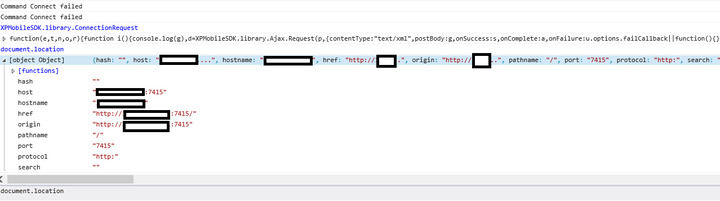
The first of the last two screen shots is console log out of document.location for the sample video web app that has the cors error on the remote server.
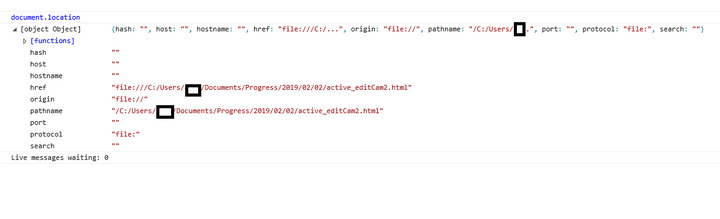
The second is the same sample web app from html file in directory on the remote server.
Before the CORS was configured on the Milestone management server, the html had the cors error, but after edit, functions ok from internet explorer.
Another note, login from html launched in ie browser from directory, has activex allow pop up that needs to be cleared before login prompt appears. In the ip:port version, the activex pop up doesn’t appear yet.
Thomas
Thomas,
honestly I’ve lost a lit bit with all the information you have provided.
Could you please summarize it a little bit, especially in terms or problems that you have and are not solved.
Thanks in advance !