Hi
Would it be possible to get some example code on creating a TCP Transact connection from an external application like the point of sale test system in Article 000001009? I’ve looked at the SDK Transact example but this is a plugin using a different connection method by the looks. Its just the connection details I’m after.
Thanks
Thanks Bo, I did see that but when I read through it again it put me on the right track. I’ve now created the test TCP connector app I was after. Cheers Ian
For anyone interested in another example of a Transact Connector plugin, I have released my own TCP server connector plug-in on GitHub here
https://github.com/cascadia-technology/TxnServerPlugin/releases
Hi Josh,
How different is this TCP connector plug-in compared to the one we have natively ?
I am working on a Transact integration and keen on evaluating both. so would like to know the difference if any.
Thank you
Srini
XProtect Transact includes a TCP client connector which means your POS must accept an inbound TCP connection.
In some cases the POS software or whatever is generating the data you want to capture will want to push data out to an ip/pport as an outbound connection to a server. This is what my version of the connector does - it enables you to listen for incoming connections within the event server plug-in. So it’s a TCP server plug-in instead of a TCP client plug-in.
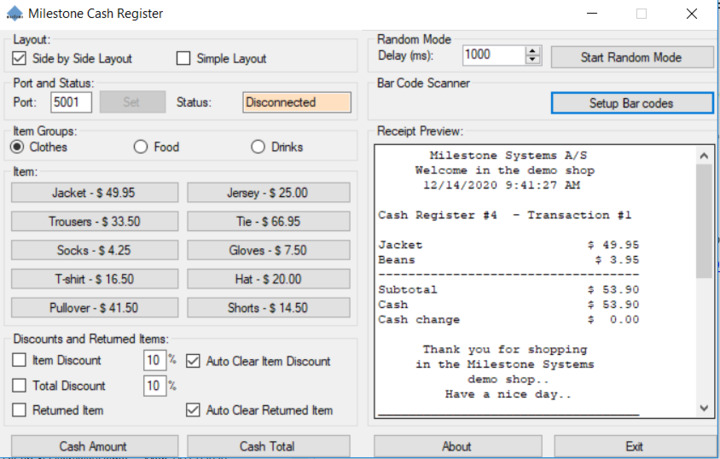
Ah I see. The Transaction documentation doesn’t say that clearly . Even the diagram is kind of misleading. So technically if we use the Cash register simulator as seen in the screen shot, it acts as a server component and the TCP connector in our system connects to it on port 5001 and extracts the data. I was under the impression the data is being pushed into our connector as it listens on 5001.
Now it makes sense. Thanks much, I will test both.
Regards
Srini