I’m trying to create a Rule using the ConfigAPI service.
When an event occurs the rule changes the camera in a VideoWall monitor in the actual layout in a defined position.
I’m following all the procedures to create the Rule and I’ve checked an existing Rule Item Properties, to see how to create it correctly.
When I try to get the Rule or when I try to create it, there is always an exception that occurs while using the ConfigAPI, only when I’m trying to change the camera in the same layout.
The error:
System.ServiceModel.FaultException`1: ‘VMO61030: The view layout does not exist.’
The workaround I found is to create a new layout everytime, but that’s not optimal.
How can I solve this?
When I wrote this question I hadn’t tested with using the layout Id for the same layout that was shown in the VideoWall. Doing this works as expected.
It is only because when we choose the option “Use the actual layout” the layout Id in the Rule appears as: Layout[00000000-0000-0000-0000-000000000000] in the database and I thought it was the Id to use.
Although for the rule creation the problem is solved, the problem still happens when trying to get an existing Item that has the layout Property set as Layout[00000000-0000-0000-0000-000000000000].
We would like to investigate a bit deeper and would like a bit more information in order to do that.
I assume thet same rule can be made manually in the Management Client, how does the rule look like?
Can you please share the snippet of code creating the rule so that we can directly reproduce the issue?
Sorry for the late answer.
So I’ve figured something else. The XProtect version I was working on was 2022 R1, and when I retested in a 2022 R2 version it didn’t have any issues to get the Item. So I guess it was patched up in the next MIP SDK version.
Anyway, here is what you asked:
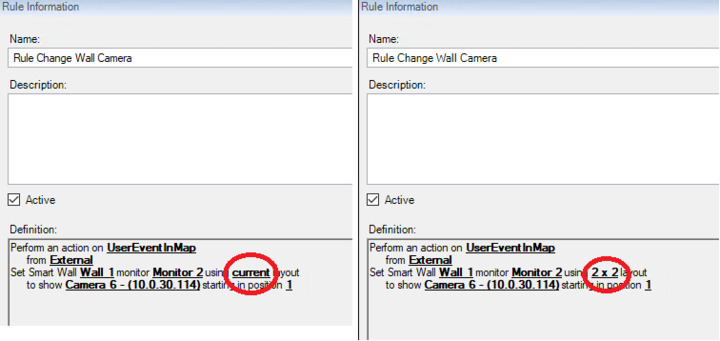
- The two rules side by side. The one on the left is the one who doesn’t let me get the item.
string ruleId = Guid.NewGuid().ToString();
            string rulePath = string.Format("Rule[{0}]", ruleId);

            var rule = new VideoOS.ConfigurationApi.ClientService.ConfigurationItem();
            rule.ItemCategory = VideoOS.ConfigurationAPI.ItemCategories.Item;
            rule.ItemType = VideoOS.ConfigurationAPI.ItemTypes.Rule;
            rule.ParentPath = "/RuleFolder";
            rule.Path = rulePath;
            rule.EnableProperty = new VideoOS.ConfigurationApi.ClientService.EnablePropertyInfo { Enabled = true };
            rule.Properties = new VideoOS.ConfigurationApi.ClientService.Property[14];
            rule.Properties[0] = new VideoOS.ConfigurationApi.ClientService.Property { Key = "Id", Value = ruleId };
            rule.Properties[1] = new VideoOS.ConfigurationApi.ClientService.Property { Key = "Name", Value = "GeneratedRule" };
            rule.Properties[2] = new VideoOS.ConfigurationApi.ClientService.Property { Key = "Description", Value = "An automatically generated Rule" };
            rule.Properties[3] = new VideoOS.ConfigurationApi.ClientService.Property { Key = "StartRuleType", Value = "Event" };
            rule.Properties[4] = new VideoOS.ConfigurationApi.ClientService.Property { Key = "StartEventGroup", Value = "UserDefinedEvents" };
            rule.Properties[5] = new VideoOS.ConfigurationApi.ClientService.Property { Key = "StartEventType", Value = "018efa94-677c-452c-9031-a3d35bb4b02a" };
            rule.Properties[6] = new VideoOS.ConfigurationApi.ClientService.Property { Key = "StartEventSources", Value = "External[e8bd6cee-1119-4296-ba91-e3803e2c591e]" };
            rule.Properties[7] = new VideoOS.ConfigurationApi.ClientService.Property { Key = "Always", Value = "True" };
            rule.Properties[8] = new VideoOS.ConfigurationApi.ClientService.Property { Key = "StartActions", Value = "VideoWallSetToCameras" };
            rule.Properties[9] = new VideoOS.ConfigurationApi.ClientService.Property { Key = "Start.VideoWallSetToCameras.DeviceIds", Value = "Camera[85f11058-4199-4222-ad95-ea7542f86cc0]" };
            rule.Properties[10] = new VideoOS.ConfigurationApi.ClientService.Property { Key = "Start.VideoWallSetToCameras.LayoutId", Value = "Layout[6f499fd2-fddc-4f55-820a-47eaae4f853a]" };
            rule.Properties[11] = new VideoOS.ConfigurationApi.ClientService.Property { Key = "Start.VideoWallSetToCameras.MonitorId", Value = "Monitor[7790a1aa-4451-4f2e-9f7c-0790bd332b1f]" };
            rule.Properties[12] = new VideoOS.ConfigurationApi.ClientService.Property { Key = "Start.VideoWallSetToCameras.Position", Value = "0" };
            rule.Properties[13] = new VideoOS.ConfigurationApi.ClientService.Property { Key = "Start.VideoWallSetToCameras.VideoWallId", Value = "VideoWall[6cee0724-d20f-4c9e-a66d-d9faa97bc691]" };
I would like to clarify. You do not need to use the MIP SDK that fit the version of the XProtect VMS. So when you say it might be fixed in a newer MIP SDK I think you should try with the newer MIP SDK.
The recommendation is in fact to use the newest available MIP SDK even if you VMS or customer’s VMS is a little older. Ref.: https://developer.milestonesys.com/s/article/about-MIP-SDK-compatibility-with-XProtect-product-versions
Please clarify. Does it work as expected? (or do you have a setup/version that you need to use where you cannot get it to work?)
Note. If using the NuGets you might automatically build using the newest MIP SDK.. https://www.nuget.org/profiles/milestonesys