We have integrated the latest version of Milestone SDK v22.3.0 via nuget package and are seeing an issue connecting to Milestone 2020R3 systems.
Here is the code we’ve tried to use for login:
VideoOS.Platform.SDK.Environment.Login(uri);
VideoOS.Platform.SDK.Environment.Login(uri, IntegrationId, IntegrationName, Version, ManufacturerName);
Stack Trace
at VideoOS.Platform.SDK.EnvironmentService.Login(Uri serverUri, Boolean masterOnly)
at VideoOS.Platform.SDK.EnvironmentService.Login(Uri serverUri, Boolean masterOnly, Guid integrationId, String integrationName, String version, String manufacturerName)
at VideoOS.Platform.SDK.Environment.Login(Uri serverUri, Guid integrationId, String integrationName, String version, String manufacturerName, Boolean masterOnly)
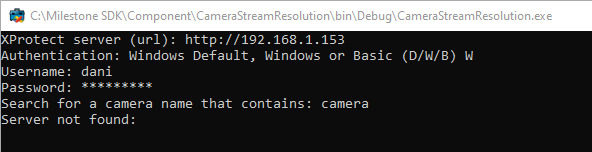
Component Sample CameraStreamResolution Result
Do you have a workaround for this?
Thanks,
Dani
Please note this line of code in the sample:
static bool _secureOnly = true; // change to false to connect to servers older than 2021 R1 or servers not running HTTPS on the Identity/Management Server communication
(CameraStreamResolution -Program.cs -line 26)
As the comment explains older servers do not have the secure functionality, and with the secure-only flag set it cannot work.
I hope this explains the issue you experience.
Hi Bo,
Thanks for the response.
We were able to find a workaround by changing the VideoOS.Platform.SDK.Environment.AddServer to use the URI instead of passing in VideoOS.Platform.Item object. Also, instead of using the Item.FQID.ServerId.Uri we use the URI passed in from our login server address. It looks like Item.FQID.ServerId.Uri resolves the address to either the hostname of the computer or IP address even if you pass in “localhost”.
This however does not work on 2021/2022 version of Milestone. We’re seeing the following error:
"Item has already been added. Key in dictionary: '[18]:https://localhost/:Negotiate' Key being added: '[18]:https://localhost/:Negotiate'"
Stack Trace
at System.Collections.Hashtable.Insert(Object key, Object nvalue, Boolean add)\
at System.Net.CredentialCache.Add(Uri uriPrefix, String authType, NetworkCredential cred)
at VideoOS.Platform.SDK.Util.CredentialUtil.UpdateCredentialCacheUri(Uri oldUri, Uri newUri, CredentialCache credentialCache)
at VideoOS.Platform.SDK.Config.SystemInfo.ConstructLoginServer2()
at VideoOS.Platform.SDK.Config.SystemInfo.ConstructLoginServer()
at VideoOS.Platform.SDK.Config.SystemInfo.Login()
at VideoOS.Platform.SDK.Platform.SDKConfiguration.TryLogin(Uri uri, Boolean masterOnly)
at VideoOS.Platform.SDK.Platform.SDKConfiguration.VideoOS.Platform.SDK.Platform.ISDKConfiguration.Login(Uri uri, Boolean masterOnly)
at VideoOS.Platform.SDK.EnvironmentService.Login(Uri serverUri, Boolean masterOnly)
On our end, we’ll add handling for different versions of Milestone for now. If you have a better solution for calling AddServer & Login methods that works on all versions, please let me know.
Thanks again for your help!
-Dani
I cannot reproduce the issue using the CameraStreamResolution sample. Is there anything you do differently in your code? If yes, please share a snippet of the code so I can reproduce.
It is important for me to note that you will have to support two schemes for your customers, there is no way to avoid that. (Unless of course you want to document for your users that you cannot guarantee secure usage.)
- In a secure setup disallow insecure connection and login. (SecureOnly = true)
- In an insecure or old setup allow insecure connection and login.
If you implement only option 2 it will work for every setup but will not guarantee that the secure way of using certificates is used.
Hello
I am experiencing the same error while logging to 2022R2 (sdk 22.3.0, mPSTools 22.2.0) . The same script executed from the 2022R2 environment against milestone mngmt server v2018 works fine.
I use the following:
Connect-ManagementServer -Server $servername -IncludeChildSites -AcceptEula -ErrorAction Stop
the default value for -SecureOnly is false (and the value should be false when there is no https, which in my case is)
when I use:
Connect-ManagementServer -Server $servername -IncludeChildSites -AcceptEula -SecureOnly -ErrorAction Stop
it works only on 2018
when I use:
Connect-ManagementServer -Server $servername -IncludeChildSites -AcceptEula -SecureOnly true -ErrorAction Stop
i am getting
Cannot bind parameter ‘Credential’. Cannot convert the “true” value of type “System.String” to type “System.Management.Automation.PSCredential”."