I keep on getting the below when passing the camera feed via H264 to XProtect as a MIP Driver.
2025-04-03 08:53:56.886+02:00 [ 70] WARNING - f8ffb3e1-0370-44b4-85b6-83b0683c0024 Yulong 2 Pipeline YulongDT video stream in overflow. QueueCount=200, BytesInQueue=4327670
This happens after a while only, and the timing varies. The stream is of a 20fps H264 type.
The feed shows up on a local Smart Client if opened, but not on a remote networked one. The feed records while it is not in overflow and I can playback it, once again, on the local Smart Client but not on the remote Smart Client.
The local Smart Client can also export footage correctly, while the remote Smart Client cannot.
Other cameras on the system work as expected, so it seems to be a problem with the driver itself that we developed.
What could cause these issues?
I have checked the CPU use, the feed rates, the timestamps of the frames, the harddrive usage level, replaced the magnetic drive with an SSD just in case it would help, and a few other things.
Help?
Kind regards,
Peter Peiser
Edit:
Testing on Milestone 2025 R1 Corporate Test
I have managed to grab diagnostic information from the Smart Client. It simultaneously overflows and underflows?
Edit 2: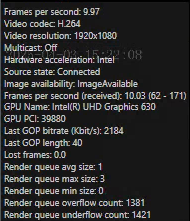
It seems there’s a lot of interframe jitter, so I smoothed it out a bit, without much luck
Edit 3:
I see the Recording Server CPU bursts really high when this feed starts, which is a high-ish movement H264 stream. Also the Smart Client on the remote machine which does not work does not have hardware acceleration. The recording server has hardware acceleration on which the Smart Client works. Switching off hardware acceleration seems to stop the server from decoding the stream completely for some reason.
Edit 4:
Removing motion sensing from the camera fixed the Recording Server CPU spikes.
Edit 5:
The video (after the above) decodes on any machine with hardware decoding, but shows nothing where there is no hardware decoding.