Based on the Sensor Monitor sample, I’ve implemented a similar item hierarchy for my plugin. The structure is visible in the Admin tree, and behaves as expected in terms of registration and rendering. Here’s what I’m seeing:
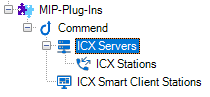
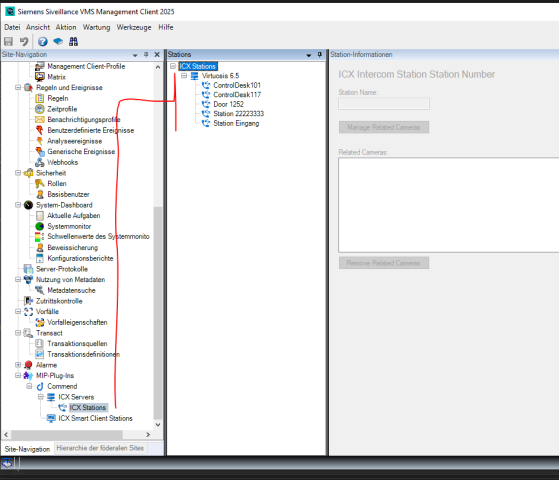
When clicking on the “ICX Stations” node, the tree expands to show both the ICX servers and their corresponding stations.
However, my goal is different, I want it to appear as shown here
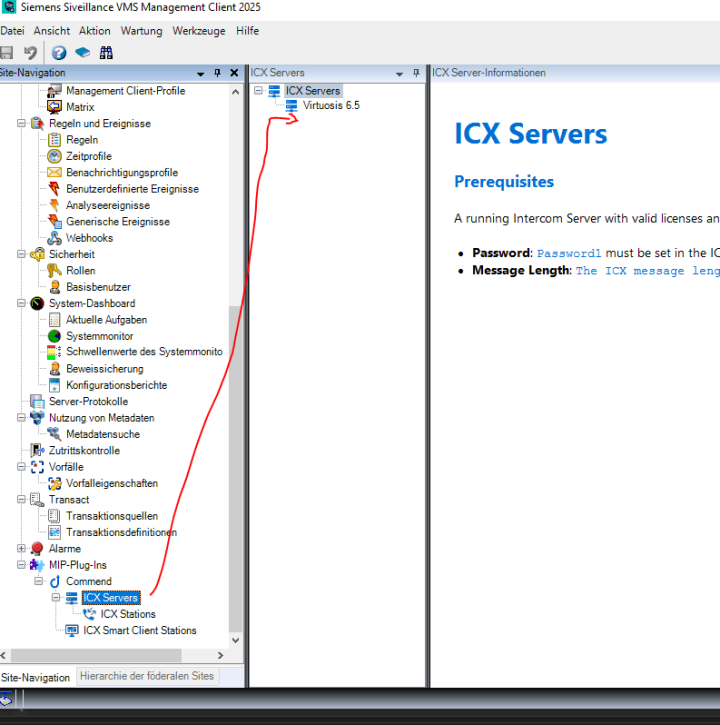
In other words, I would like the ICXStation items to appear directly under each ICXServer item, not grouped under a shared “ICX Stations” node.
Is this possbile ?
Thats my current ItemNode
var serverItemNode = new ItemNode(
    ICXServerKind,
    Guid.Empty,
    "ICX Server",
    _serverIcon,
    "ICX Servers",
    _serverIcon,
    Category.Text,
    true,
    ItemsAllowed.Many,
    new ICXServerItemManager(ICXServerKind),
    new List<ItemNode>
    {
        new ItemNode(
            ICXStationKind,
            ICXServerKind,
            "ICX Station",
            _stationIcon,
            "ICX Stations",
            _stationIcon,
            Category.Text,
            true,
            ItemsAllowed.Many,
            new ICXStationItemManager(ICXStationKind),
            null
        )
    },
    null
);