DBExporter Fails

Starting new thread as Bo suggestion.

It is same problem of https://developer.milestonesys.com/s/question/0D53X00005zmlRqSAI/recorder-offline-message-when-mkvexport-starts-export

This is my code.

_exporter = new VideoOS.Platform.Data.DBExporter(true)
            {
                Encryption                 = true,
                EncryptionStrength  = VideoOS.Platform.Data.EncryptionStrength.AES128,
                Password                   = ExportPwd,
                SignExport                 = true,
                PreventReExport       = false,
                IncludeBookmarks    = true,
                IncludePlayer             = true,
            };
 
            _exporter.Init();
            _exporter.Path               = destPath;
            _exporter.CameraList   = Common.SelectedCameraList;
            _exporter.AudioList      = new List<Item>();
 
            try
            {
                isStarted = _exporter.StartExport(DateTimeFrom.ToUniversalTime(), DateTimeTo.ToUniversalTime());
            }
            catch (Exception ex)
            {
                  // Exception Message is "Recorder offline - "
            }

Environment:

  • SDK 2019R2
  • 6 x StableFPS cameras
  • XProtect Corporate (stand alone) 2019R2

Many Thanks,

Freddy

You had a headline saying something about MkvExport, I could only make sense of it as a typo. I have changed the headline to DBExporter. Please verify that you, as the code you shared indicate, uses the DBExporter class (NOT MkvExporter).

If there is not a mix of classes causing this I suspect something specific on your Recording Server. Please see if the logs, Recording Server logs at [C:\ProgramData\Milestone\XProtect](file:C:/ProgramData/Milestone/XProtect) Recording Server\Logs and MIP SDK logs at [C:\ProgramData\Milestone\MIPSDK,](file:C:/ProgramData/Milestone/MIPSDK,) includes information about errors happening during export.

Please do an export using the Smart Client, in the same PC, using the same user and see whether the Smart Client is capable of doing the export or shows the same issue.

OK Bob, but actually I can’t 'till next week

Thanks,

Freddy

Bo, I have collected various information on the strange behavior found which I describe below.

A. Test on active System with XProtect Corporate 2018R2

I used the program I am developing requesting the video export of 6 cameras for a time interval of 1 hour; the test was successful, but there are 2 things that are wrong:

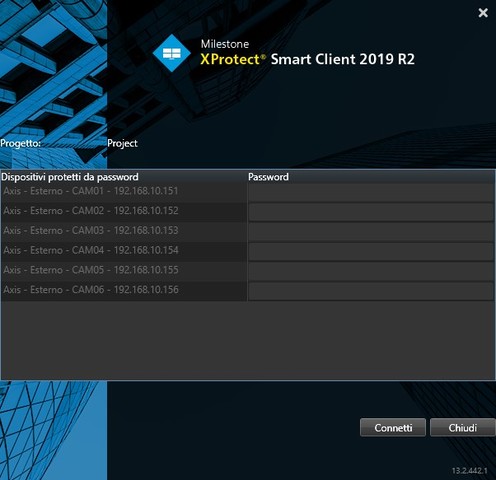
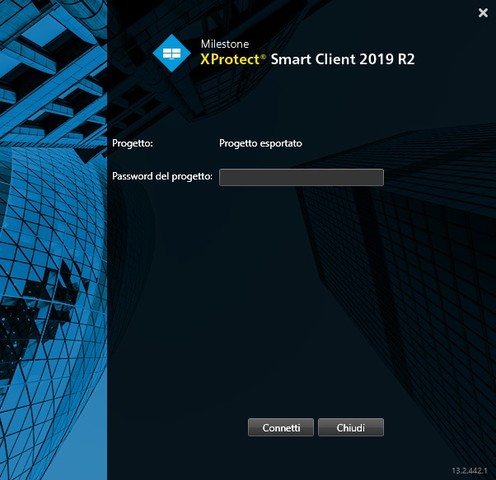
  1. Starting the Smart Client by clicking on Project.scp appears a window with the list of the 6 cameras and for each line I was asked to enter the password; the client for which I am developing the application wants to export all the cameras simultaneously which are 52 … it is not possible to enter the same password 52 times. On the contrary, if the video export is done via Smart Client, only one password is requested …
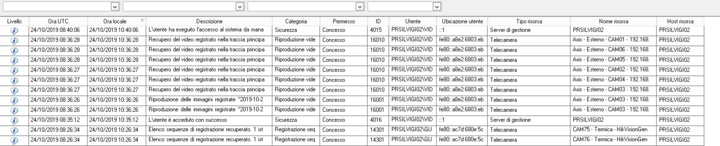
  2. My Client wants the operations carried out through the program to be recorded on the Audit Log, if I use my develop platform with 2019R2 the operations are recorded, as you can see (sorry for Italian, but also this is a Client’s request)

a

VideoExport is the App name and the records of the register are consistent with the operations carried out …

On the XPCO 2018R2 platform the App log messages are completely ignored without any error message …

There is only information on the recovery of the 6 cameras (AXIS) streams but not the log messages generated by the App … do you have any idea why this happens? my Client has Professional+ 2018R2

B. Test on development system with 2019R2

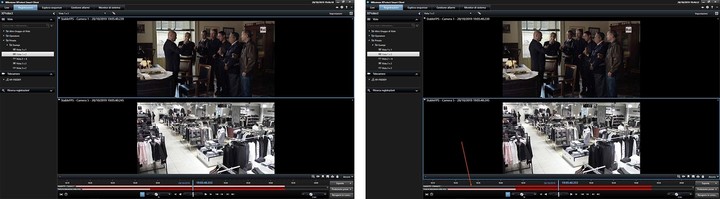
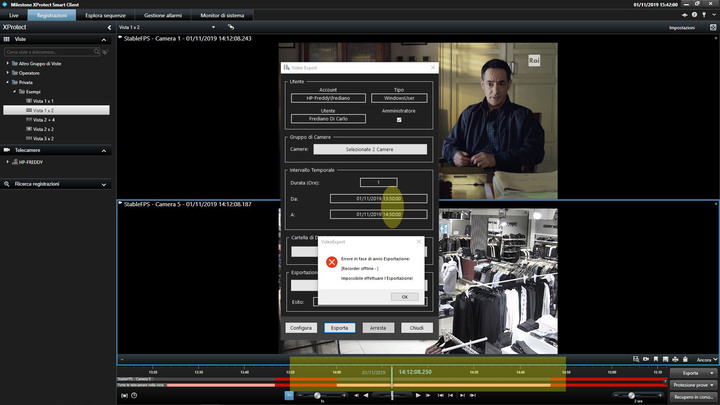
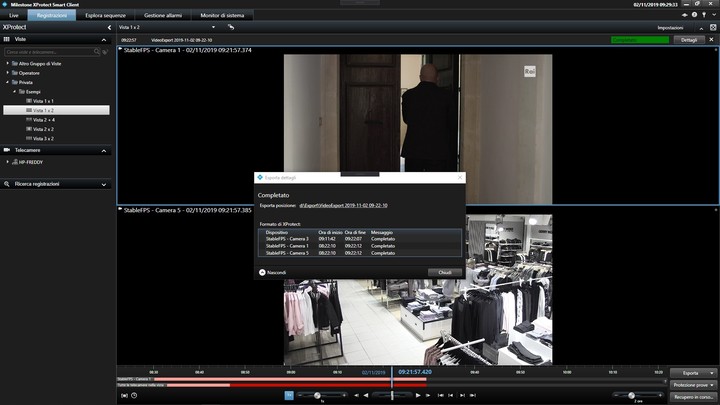
Looking at the Recording Server logs I understood why the export crashes; this happens because in the selected time interval some cameras (all StableFTP) have recording holes … here is the status of the recordings of cameras 1 and 5 …

If I repeat operation using only Camera 1, or reducing the time interval, the export is successfully carried out (with all operations logged). However, the same thing does not happen using the Smart Client procedure, the export is performed correctly with the playback containing the recording holes.

Any system with a large number of cameras may have registration holes, perhaps due to failure, so the procedure performed by the SDK is NOT usable …

It does not seem to be possible to include the Player in the record folder, even with the request flag active and providing the correct path of the Player … if I understand correctly some things only work if you use a plugin, which does it means? that in this case it is not practically possible to use Component Integration?

Many Thanks,

Frediano

A guess on (A2)

One possible explanation is that you do not have the same settings on logging. In the Management Client, Tools - Options, on the Server Logs tab, verify that the settings for Audit log is the same in the two systems.

A guess on (B)

The export should work even if there are periods with no footage, but it is known that it will fail if a camera has no recorded footage at all. Please check and comment on this.

(A1)

The observation on the requirement of entering the password multiple times, one for each exported camera, is something I will consult Milestone Development about. I will get back on this.

To answer on A2 I have to go where XPCO 2018R2 is, I will answer asap.

For B please look next image, it’s self explained …

This image is for A1 …

This is the export I take from XPCO 2018R2 … 6 passwords

Is it possible to include player?

Many thanks,

Frediano

Sorry, I forgot Recording Server log for B …

Bo,

I have quickly rearranged VideoExport App in a plugin module and now it is almost working fine.

Next Image is after plugin exporting with recording holes …

… only one password …

… but exported recording are not signed!

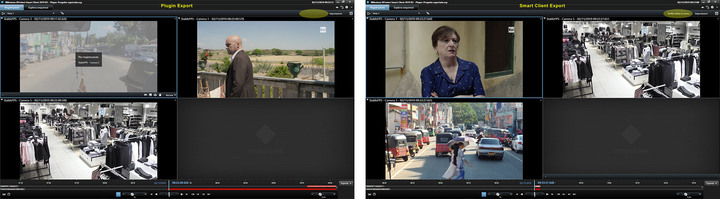
Next image shows players from plugin export and from SC export (same cameras but different time interval), as you can see in first case there are any indication on sign verify, do you have an idea why? It is very important to have signature

Many thanks,

Frediano

I will experiment. I will let you know if I can observe the same behavior.

Please note that I had the understanding that this was component integration (standalone application) but from the last updates you made I now understand that you are doing a plugin integration.

Did you use the SCExport sample as a starting ground? Did you modify the SCExport sample to include multiple camera items in one export job?

Dear Frediano,

I would like to dive into that, but need to set up a development environment first (mine has turned out to be non-working). I will get back here within 1 or 2 days.

Rgds,

Torsten

Sorry, I was delayed. I am now ready to have a closer look. Will get back here soon.

Bo, sorry for the late reply.

I started development as Component Integration but, due to the problems I encountered, and having read that some operations are only possible with Plugin Integration, I did a test using this technique.

I didn’t start from SCExport but I copied the code I posted to another plugin I’m developing.

Regards,

Frediano

Nice to hear. Can you confirm that you started your work based on the “SCExport” plugin sample? /T