Hello,
We recently upgraded to Milestone 2019 R3 for testing and noticed an issue with exporting over the MIP SDK. When attempting to export multiple cameras using the DBExporter, we kept receiving the following Recorder Offline exception, even though the recording server was online and working.
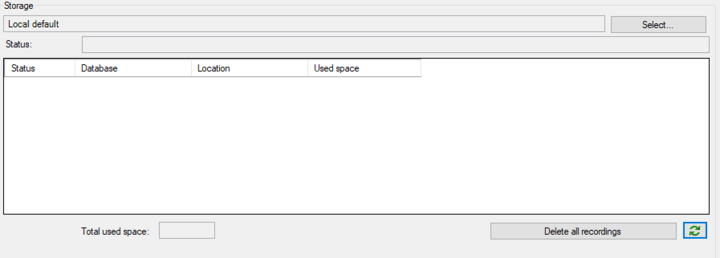
After some trial and error we discovered that the exception only gets thrown when attempting to export a camera that has no entry in the recording database. The camera was previously disabled, and after enabling it no entry was made in the storage area of management client as follows:
Not including the camera in the export does allow the export to start, however our default is to export all cameras on the recording server as this was handled by the MIP SDK previously.
Performing the same export via the Smart Client 2019 R3 works correctly.
We have just tested with 2019 R2 SDK connected to a 2019 R2 server and have encountered the same errors.
Thank you for any help,
Andrew
This might be valuable information for the debugging efforts. You say this was handled by the MIP SDK previously, can you tell me which version you used (when this worked)?
Hi Bo,
I have tested 2019 R1, R2 and R3 of the SDK with both a 2019 R2 and 2019 R3 recording server and had the same error in all cases. It looks like it might not have been working in previous versions, but we just had no cameras in that state.
Even though there is no entry shown in the management client for the camera, I can see that the two folders for the camera (normal recording and EDGE recordings) have been created and populated on the recording disk.
As an extra note, the StartExport() function is taking upwards of 2 minutes before it errors/returns. When the camera with no recordings is not included in the export, the StartExport() function returns much quicker.
Thanks,
Andrew
My deeper investigation show that it has always been like this. You could actually say that this is how it is designed to work.
Your report here is in the best possible way showing the fact that the way it works is not ideal and I will based on this request Milestone Product Management and Milestone Development to make an enhancement for future versions that improves this functionality.
I am thinking that for now you need a workaround. One suggestion for a workaround is that you for each camera see if there is anything recorded.
You could for each camera either see if you can retrieve a picture using the JpegVideoSource class (see the Camera Stream Resolution sample) or see if you can retrieve sequence information (see http://download.milestonesys.com/MIPSDK/Samples/Sequences.zip
)
Thank you for looking into it. Will we use one of your suggested solutions to make sure we are not attempting to export a camera without recordings.
I was having a look through our logs and noticed the following error right before the StartExport function throws its exception:
“MIP: Error: VideoOS.Platform.SDK.Export.MediaDataInspector.TrimStartAndEndTime ():Unable to connect to toolkit! -”.
I’m assuming this is where StartExport is actually failing within the MIP SDK.
It would be useful for us if the exception thrown was something more specific than the current Recorder Offline exception, or even if the export function did not return, and carried on exporting the rest of the valid cameras.
Thanks,
Andrew