![totemapp]() We have a custom application that was developed by our dev team using Milestone MIP SDK. This windows App is being used mainly to show live video on a screen.
We have a custom application that was developed by our dev team using Milestone MIP SDK. This windows App is being used mainly to show live video on a screen.
The App has been up and running in production for some time and it was working fine with cameras using H.264 codec.
Now, we are trying to optimize bandwith so we switch our cameras to H.265 codec. Proble is that our application now is showing a black screen for this cameras. We enable Diagnostic Overlay within our App, and it says “decoding failed” while the camera is configured with H.265. On the other hand, if we switch the same camera into H.264, it works fine.
If we open Smart Client in the same machine, the live video works fine, either for H264 or H265. Different for the case of our App that only works for H264.
Is there anything we need to take into consideration while developing with MIP SDK in order to use H265 cameras?
Thanks in advance.
Regards.
Pablo.
Please make sure you use the newest MIP SDK , please confirm.
I think there is a difference between the capabilities when using 32 bit and 64 bit. Is your MIP SDK based application 32 or 64 bit?
Hi. Thanks for your quick answer. We are using 12.1 MIP SDK (I am almost sure it’s 2018R1 but not sure where I can confirm that). On the other hand, our App is 64 bits.
The Smart Client we’ve used for testing was in 2018R3 and as I said before, it works fine.
Regards.
Please switch to the new MIP SDK and rebuild.
Hi, I’m Pablo’s coworker.
In the Production environment the codec 265 does not work, but in the QA and DEV environment it works correctly, with the same cameras.
What should I verify so that the same code works in all environments? with codec 265.
Our app is 64 bits.
Have you switched to the newest MIP SDK and still see the issue?
A guess is that the hardware acceleration is causing the issue. It could be tried to upgrade graphics cards drivers to the newest available.
But in the same computer it works fine with Milestone SMART Client 2018R3 and seeing the overlay, in this case, hardware accelaration is set to off.
Could it be possible that it works fine with SMART Client and not with our App and this be related with hardware accelaration?
We updated the drivers of the video card and the app worked.
Why did the Smart Client work without updating the drivers?
Has no sense.
Hi Bo. We did more testing from our side. I am sharing results here.
1. As Ivan has said, we updated Intel Graphics driver for one PC. This PC has Windows 10 and an Intel HD Graphics 630. After we did the update, H.265 start working well.
2. We tried upgrading driver for a second PC. This second PC has Windows 7 and Intel HD Graphics 4400. After doing the upgrade, H265 is still not working. We are still seeing black screen.
3. For boths machines, either before as well as after ungrading the Video Card drivers, SMART Client 2018 R3 works fine.
4. Building our App using SDK 2018 or 2019 is exactly the same. We are still seeing black screen for H265.
I think we can conclude that Milestone SMART Client is doing/using something different that our App. I need your help trying to identify where the issue resides. Please let me know if you need a portion of the code.
This application is released in several houndred of remote PCs so we must avoid the Video Card upgrade as much as possible. Even more when SMART Client is working fine. We should be able to find a solution from code.
Thanks in advance.
Regards.
Hi @Bo Ellegård Andersen (Milestone Systems), my apologies for the rush. Have you been able to check my last question? We really need to find a solution that works for all PCs that we have on production right now with our App.
Thanks.
I have contacted a developer colleague and do not have anything back yet.
What I can tell you is that today Windows 7 is not supported. I suspect you are aware of this as you are testing using an old Smart Client. What I suspect (awaiting Development verification) is that the early adoptions of the Smart Client, while hardware acceleration was being introduced, was capable of software h.265 decoding in a way that the MIP SDK never was on Windows 7. I strongly suspect that the answer will be that this never worked on a Windows 7 and it is not something Milestone will work on for Windows 7.
Thanks. We will wait for more info from the dev collegues then.
Regarding W7, sounds reasonable, nevertheless please let’s know when you have confirmation.
Nevertheless, keep in mind that the difference between SMART Client and MIP was not only for W7. In Windows 10, before upgrading Video Card Driver, SMART Client 2018R3 works fine while our App didn’t. As I said before, upgrading driver for several houndreds of PCs will not work for us, and considering SMART client is working fine, we would like to know where the difference resides so we can implement it ourselves in our App. So please, check also that with Dev team.
Thanks again.
Hi again @Bo Ellegård Andersen (Milestone Systems) :). Any news on this? Have developers been able to figure out where the difference resides?
Hi Pablo,
Win7 is not supported or troubleshot, this is a discontinued product.
The driver update is a reasonable fix as we always start any troubleshooting with that with our customers.
As you mentioned the SC shows HardwareAcceleration OFF when it “works”. this is due to the software fallback in the SC.
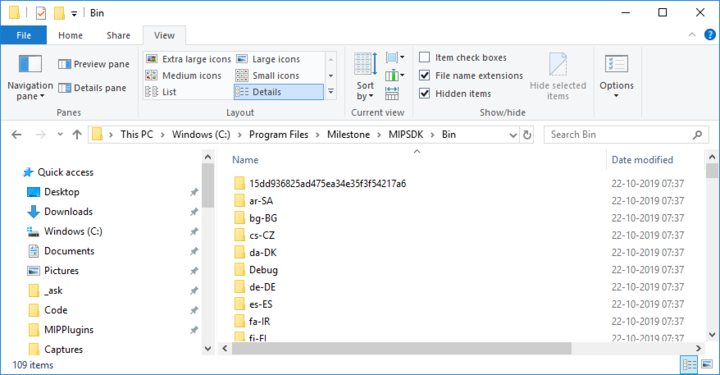
In MIP there should be folders including a “weird” named folder containing the software fallback decoder, it should start with “15… GUID like name” .. this must be present with your application as well if it should work without HA.
Reason it worked in your app as well after updating the intel drivers is that you then enabled the HA, so if you look in SC it will most likely also say HA=Intel.
So driver update is a must if you want hardware acceleration, this is not something we can do from our product.
Artur.
Just to clarify, my suggestion to you is whenever you want to use h265 you must use HA otherwise the processing will be too slow. 
Hi Artur. Thanks for your comments.
Could you help us to implement the fallback in our App as well?
I took a look at the folder where Milestone SMART Client is installed and I didn’t see anything like you have mentioned (“15… GUID…”). Where is this folder located?
As it’s today, it’s really difficult to update several houndreds of PCs with the new Driver so we would like to implement this fallback for our installed based and then make sure to update the driver for new installations.
Looking forward for your help.
Best Regards.
Looking at the MIP SDK Bin folder.
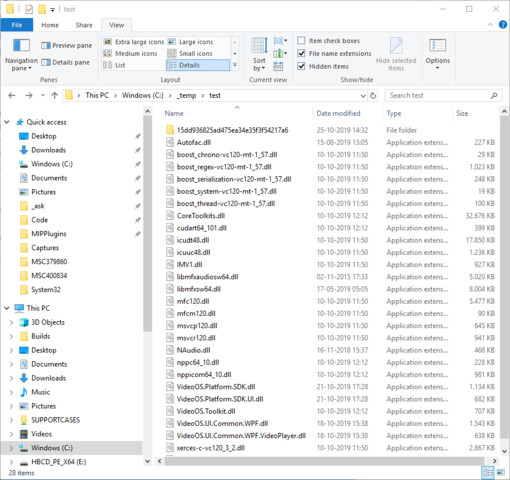
It is important for you to copy the folder without modifying it.
The recommended mechanism is to use the copy*.bat files to do the copy. I did a small test and it seems to work correctly, this is what I see when I have tried to use CopyUIFiles.bat to copy the files.
Ref. https://doc.developer.milestonesys.com/html/index.html?base=reference/architecture/net_library_initialization.html&tree=tree_2.html
@Bo Ellegård Andersen (Milestone Systems), we tried replacing the folder within our app root folder and it works fine with H.265. Although we still need to test with more machines, it seems to be a feasible solution. Thanks a lot for your help.