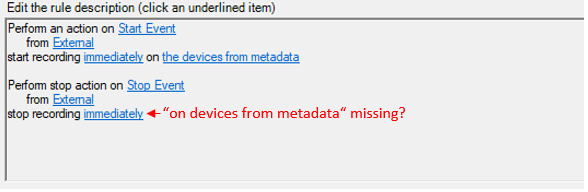
Defining rules to start and stop camera recording (from metadata) always stops recordings on all cameras (independent from metadata of stop event)

Hi everyone,

I created a plugin integration which provides events that can be used in the rule engine to e.g. start and stop recordings on cameras.

In order to specify the cameras to start the recording on I add the camera-FQIDs as reference in the triggering event definition (inside the plugin).

In the Management Client you can then use the “use devices from metadata” option to start the recording on the cameras specified as references in the triggering event.

For starting the recording this works fine.

For stopping the recording I created an event which also adds cameras as reference in order to stop the recording on these specific, referenced cameras.

Nevertheless the rule always stops recording on all cameras that have been started recording by this rule, independent of the referenced cameras specified in the triggering stop-event.

This behaviour goes as far as the stop event is triggered without any camera references definied but it still stops recording on any cameras which has been previously started recording.

As I’m taking a closer look into the rule definition there might be missing a “use devices from metatada” in the stop-action definition for stopping recordings.

Is there any way to only stop recording on cameras referenced in the stop event?

Thanks in advance and best regards,

Simon

If you want to use Rules in Management Client, then it is impossible to do it. This is by design.

When a rule has a start action, this action must be reversed in the stop action. The rule system must be enforce this. For this reason, it is designed so that stop action is unconditional and cannot be on metadata.

when you start recording cameras by triggering a rule, the rule needs to stop all action.

- -

As a workaround, you can use StartRecordingCommand. There is a VideoViewer sample -

https://doc.developer.milestonesys.com/html/index.html?base=samples/componentsamples/videoviewer/readme.html&tree=tree_2.html

You can start a camera with sending message MessageId.Control.StartRecordingCommand (see OnStartRecording1 method in the sample) and stop recording a camera (also see OnStopRecording1 method in the sample), it is not necessary to be the same camera that you started, so you can select any cameras that you want to stop. Please explore the sample.

Note – It is important to verify that “Default Record on Request Rule” (one of the default rules) is active, otherwise the above messages would not work and you cannot start/stop recording using the messages.

Thanks for the answer!

I tried out the VideoViewer sample and the start/stop recording works fine.

As I implemented the logic for my plugin integration, the start/stop recording is not working and an exception is logged into the EventServer-MIP.log:

2022-04-12 15:01:01.905 UTC+02:00 Error StartRecording Message ************** Inner Exception **************

Exception source: VideoOS.Common.Integration

Exception type: System.NullReferenceException

Exception message: Object reference not set to an instance of an object.

Exception target site: EventTriggerWithMetadata

at VideoOS.Common.CommandApi.CommandService.EventTriggerWithMetadata(Guid eventId, KeyValue[] metadata)

************** Outer Exception **************

Exception source: VideoOS.Common.Integration

Exception type: VideoOS.Common.CommandApi.CommandAPIInternalException

Exception message: Object reference not set to an instance of an object.

Exception target site: EventTriggerWithMetadata

at VideoOS.Common.CommandApi.CommandService.EventTriggerWithMetadata(Guid eventId, KeyValue[] metadata)

at VideoOS.Event.Server.MIP.Environment.ESMessageManager.StartRecordingHandler(Message message, FQID dest, FQID source)

The corresponding code looks like this:

EnvironmentManager.Instance.SendMessage(new VideoOS.Platform.Messaging.Message(MessageId.Control.StartRecordingCommand), referencedCamera.FQID);

(I doublechecked that the FQID is not null and compared the FQIDs which are used in the VideoViewer-Sample and my integration - they are the same)

Is there a difference in the functionality dependent on the execution environment? My plugin is running in the Eventserver and the VideoViewer-Sample is a component integration.

There is a sample called ConfigDump, please explore the sample.

https://doc.developer.milestonesys.com/html/index.html?base=samples/pluginsamples/configdump/readme.html&tree=tree_1.html

The sample has Admin, Client and Background and you might be interested in Background plugin. So please see if the Run() in BackgroundPlugin in ConfigDump sample works for you or you see the same issue.

I tried out the StartRecording/StopRecording with the ConfigDump Background Plugin and it behaves just like my plugin - the same exception is thrown like mentioned above.

The strange thing I noticed is that the first StartRecording/StopRecording within the first 30 secs of the Eventserver startup seems to work. After that period every further execution fails.

If you use 2022 R1 server, then please see this article and I hope the hotfix in the page could help you.

https://supportcommunity.milestonesys.com/s/article/XProtect-2022-R1-cumulative-patch-installers?language=en_US

Sorry for the delayed response.

I was trying with the Hotfix for 2022 R1 but it didn’t help.

By now I installed the 2023 R1 and tested again with my plugin integrations and it turns out, that the same behaviour still exists.

The first execution of the Start or Stop Recording command works properly but afterwards there is the following exception in the MIP-log:

2022-12-02 15:52:03.775 UTC+01:00 Error StartRecording Message ************** Inner Exception **************

Exception source: VideoOS.Common.Integration

Exception type: System.NullReferenceException

Exception message: Object reference not set to an instance of an object.

Exception target site: EventTriggerWithMetadata

at VideoOS.Common.CommandApi.CommandService.EventTriggerWithMetadata(Guid eventId, KeyValue[] metadata)

************** Outer Exception **************

Exception source: VideoOS.Common.Integration

Exception type: VideoOS.Common.CommandApi.CommandAPIInternalException

Exception message: Object reference not set to an instance of an object.

Exception target site: EventTriggerWithMetadata

at VideoOS.Common.CommandApi.CommandService.EventTriggerWithMetadata(Guid eventId, KeyValue[] metadata)

at VideoOS.Event.Server.MIP.Environment.ESMessageManager.StartRecordingHandler(Message message, FQID dest, FQID source)

My code for starting or stopping the recording looks like the following line:

EnvironmentManager.Instance.SendMessage(new Message(MessageId.Control.StartRecordingCommand), camera.FQID);

I tried on different installations and with different Plugins (also with the ConfigDump example) but the behaviour is always the same.

You say the FQID is the same. If you do a

Item item=Configuration.Instance.GetItem(fqid);

does it give an Item or does it also result in an exception?

If you test and the FQID seem valid also used like this, -

Could you share the code for us the reproduce and debug?

I imagine a small snippet of code you put in the ConfigDump background plugin would be perfect for us.

Hi Bo,

sorry for the delay.

If I execute “Item item=Configuration.Instance.GetItem(fqid);” I get the Camera Item, so it works.

Here is an example in the ConfigDump sample. This example starts an TcpListener which listens to a TcpClient (code for the client is attached aswell) and starts/stops recording on a camera in my system.

The code is part of the “BackgroundDump.cs”-Class:

=================================================================================

private void Run()

{

  Thread.Sleep(30000);

  Task.Run(() => StartListener());

  while (!\_stop)

  {

    //Do some work here

    Thread.Sleep(15000);

  }

}

private void StartListener()

{

  TcpListener server = null;

  try

  {

    Int32 port = 13001;

    IPAddress localAddr = IPAddress.Parse("127.0.0.1");

    server = new TcpListener(localAddr, port);

    server.Start();

    Byte\[\] bytes = new Byte\[256\];

    String data = null;

    while (true)

    {

      try

      {

        Console.Write("Waiting for a connection... ");

        using (TcpClient client = server.AcceptTcpClient())

        {

          Console.WriteLine("Connected!");

          data = null;

          NetworkStream stream = client.GetStream();

          int i;

          while ((i = stream.Read(bytes, 0, bytes.Length)) != 0)

          {

            data = System.Text.Encoding.ASCII.GetString(bytes, 0, i);

            if (data == "startRecording")

            {

              //Replace Guid with CameraObjectId of existing camera in your system

              Item cameraItem = Configuration.Instance.GetItem(new Guid("66911d2d-eaf5-4768-827c-c4dfcfefa928"), Kind.Camera);

              EnvironmentManager.Instance.SendMessage(new Message(MessageId.Control.StartRecordingCommand), cameraItem.FQID);

            }

            if (data == "stopRecording")

            {

              //Replace Guid with CameraObjectId of existing camera in your system

              Item cameraItem = Configuration.Instance.GetItem(new Guid("66911d2d-eaf5-4768-827c-c4dfcfefa928"), Kind.Camera);

              EnvironmentManager.Instance.SendMessage(new Message(MessageId.Control.StopRecordingCommand), cameraItem.FQID);

            }

          }

        }

      }catch(Exception ex) { }

      Thread.Sleep(100);

    }

  }

  catch (SocketException e)

  {

    Console.WriteLine("SocketException: {0}", e);

  }

  finally

  {

    server.Stop();

  }

}

=================================================================================

And here is the code i use for the TcpClient (.Net 6, Console Application) which sends “startRecording” or “stopRecording” commands to the TcpListener running in the Background Plugin of the DonfigDump sample:

=================================================================================

using System.Net.Sockets;

Console.WriteLine(“Tcp Client started!”);

var stop = false;

do

{

var command = Console.ReadLine();

if (command! != null)

{

if (command == "stop")

{

  stop = true;

}

else

{

  Connect("127.0.0.1", command);

}

}

}while(!stop);

static void Connect(String server, String message)

{

try

{

Int32 port = 13001;

using TcpClient client = new TcpClient(server, port);

Byte\[\] data = System.Text.Encoding.ASCII.GetBytes(message);

NetworkStream stream = client.GetStream();

stream.Write(data, 0, data.Length);

Console.WriteLine("Sent: {0}", message);

}

catch (ArgumentNullException e)

{

Console.WriteLine("ArgumentNullException: {0}", e);

}

catch (SocketException e)

{

Console.WriteLine("SocketException: {0}", e);

}

}

=================================================================================

Best regards

Simon