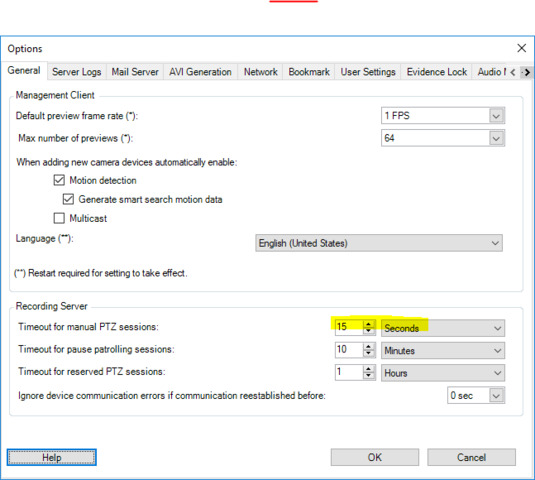
From my video management software (integrated with Milestone via SDK).
I am moving a camera without problems and here everything is fine, but when I want to move another camera, when trying to move it it does not do so until several seconds have elapsed, I see in the SDKs that the order goes correctly to the Milestone server and returns me OK, but it does not move, it does not matter if I send N commands more, that it still does not move, until a while passes, and then it does move normally … Even if from my software I keep pressing the PTZ button (without releasing it ), the camera does not move until X seconds pass.
It is as if this behavior was configured in Milestone, is it possible? Why is it due?
I think the problem is because we are accessing the same camera from two different PCs:
1.- Workstations: If from this equipment I move the camera through our software using the OCX (“ImageViewer” from Milestone), the camera moves,
2.- But if from the other computer (which is a server), when I try to move the same camera through our software using SDK (C ++ Maneged) for them, it does not move,
3.- and vice versa. If the camera is moved from the server first, it cannot be moved from the workstations (for a while).
That is, depending on who is the first to use the camera (from the workstations or server), it is locked for approximately 15-20 seconds for the other … After that time, the camera is free to be used again by the First you want to move it.
I think that this blocking logic is being done by Milestone, would there be any possibility of disabling it or shortening that blocking time?
I don’t know if I’ve managed to explain myself well.