Is it possible to disable live video with an overlay button
I’m in doubt what you are asking for.
If the current user in the Smart Client don’t want to see live video he could use the Independent Playback button to achieve that.
If the current user want to make sure nobody can view live video, but the camera is still being recorded in the recording server, I do not see a way.
If you have envisioned something that is not any of these two options please elaborate on the question.
What I’m chasing is a simple toggle—like an overlay button straight in Smart Client—to turn live video on and off for cameras that aren’t recording. Less about playback, more about killing the feed instantly.
It would be possible the develop a button that can disable the camera but then all Smart Clients views that use the camera will have an error that say that the camera is not available. I would advise against using this.
I found another way and it involves no development.
In Management Client - Rules there is a Default Start Feed Rule, you can disable this rule and use other rules to start the feed.
A popular replacement for this rule is:
-
Start Feed On Request Rule
--
Perform an action on Live Client Feed Requested
from All cameras
start feed on the device on which event occurred
Perform stop action on Live Client Feed Terminated
from All cameras
stop feed immediately
-–
But you could also replace it with a rule like:
-
My Feed Rule Camera One
--
Perform an action on Start Feed On Camera One
from External
start feed on test Camera 1 test test
Perform stop action on Stop Feed on Camera One
from External
stop feed immediately
-–
(Create the user-defined events before you create the rule.)
If you have this rule and these user–defined events in place you can in the Smart Client, in setup mode, create a overlay button by dragging the event onto the camera view, like this:
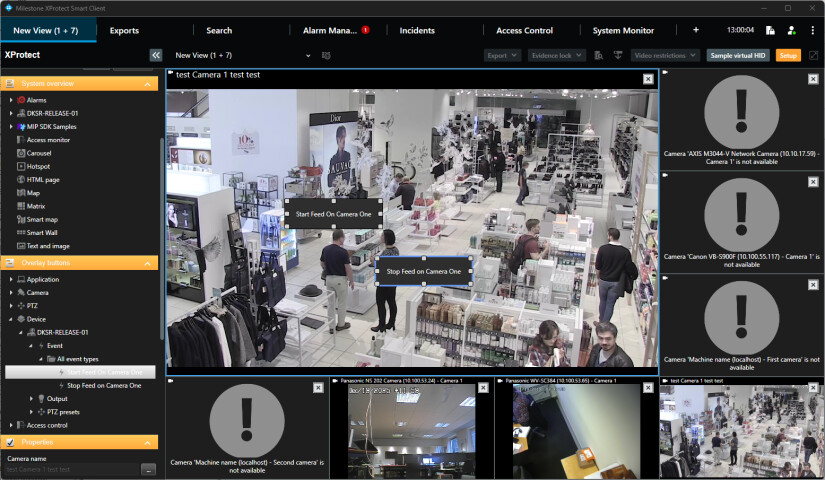
Giving this answer I fear it might not work if you have many cameras and/or many users, that users might interrupt each other. But maybe it is just what you require. As you can see there was no development work, just setup.