Hello everyone, I have a pure IPv6 setup here and am currently trying to connect between an AI Bridge 1.7.3 and the process plugin. The containers can ping the VMS server and a basic user with admin privileges has been created. The only thing I notice in the logs is the “Unauthorized” note in the aibridge-connector.
connector.log:
2025-03-27T11:09:03Z Error adding endpoint: 401 Unauthorized
<s:Envelope xmlns:s="http://schemas.xmlsoap.org/soap/envelope/"><s:Body><s:Fault><faultcode xmlns:a="http://schemas.microsoft.com/net/2005/12/windowscommunicationfoundation/dispatcher">a:InternalServiceFault</faultcode><faultstring xml:lang="de-CH">Value cannot be null.
Parameter name: parameters</faultstring><detail><ExceptionDetail xmlns="http://schemas.datacontract.org/2004/07/System.ServiceModel" xmlns:i="http://www.w3.org/2001/XMLSchema-instance"><HelpLink i:nil="true"/><InnerException i:nil="true"/><Message>Value cannot be null.
Parameter name: parameters</Message><StackTrace> at System.ServiceModel.Dispatcher.OperationFormatter.SerializeReply(MessageVersion messageVersion, Object[] parameters, Object result)
at System.ServiceModel.Dispatcher.DispatchOperationRuntime.SerializeOutputs(MessageRpc& rpc)
at System.ServiceModel.Dispatcher.DispatchOperationRuntime.InvokeBegin(MessageRpc& rpc)
at System.ServiceModel.Dispatcher.ImmutableDispatchRuntime.ProcessMessage5(MessageRpc& rpc)
at System.ServiceModel.Dispatcher.ImmutableDispatchRuntime.ProcessMessage11(MessageRpc& rpc)
at System.ServiceModel.Dispatcher.MessageRpc.Process(Boolean isOperationContextSet)</StackTrace><Type>System.ArgumentNullException</Type></ExceptionDetail></detail></s:Fault></s:Body></s:Envelope>
2025-03-27T11:09:08Z Error adding endpoint: 401 Unauthorized
...
It looks like this error message comes from the authentication with the VMS and has nothing to do with your IPv6 setup. Apparently the user you have setup has no permissions to connect to the VMS. Can you please check the user is well configured? You can visit this entry to read more about this setup.
Can you please provide what version of the VMS and AI Bridge you are using?
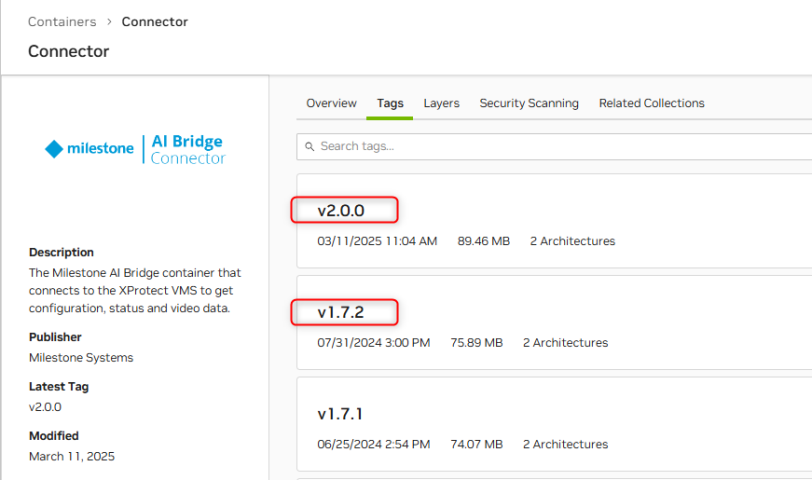
AI Bridge 1.7.3 does not sound like a valid AI Bridge version, in NGC they are v1.7.2 and v2.0.0.
The basic user with administrator rights has been created as described in the link. I can also log in to the VMS with this user. I have double checked that the user/password details in the env file are correct. I have also tried other passwords.
But when I start the containers, I get the “unauthorized” message. And I see in the VMS log that the user logs in with an “invalid password” and the account is locked after 5 attempts.
There is also no MasterKey set in the env file.
You are absolutely right, I made a typo, it is the AI Bridge 1.7.2 and the VMS is 2024 R1
That is weird, apparently the provided password is not valid and the VMS is rejecting you.
I’d suggest, to continue this troublesthooting, to move your AI Bridge to the 2.0.0 version, ensure the password is the correct one, unblock the VMS user through Management Client and start AI Bridge 2.0.0.
MasterKey setup will not affect the authentication with the VMS, appart from that, an empty master key is a valid value as well.
In the meantime, I installed the latest process plugin on the system and updated the AIBridge to 2.0.0, adjusted the configuration and enabled the test user again, and again I got exactly the same error message.
More out of desperation, I chose a different password with different special characters. And I could connect with it?! I changed the password again and the error message appeared again. So is it the password?
Which surprises me now. My local test installation had the same password and it works there too. I have a pure IPv4 network, so I cannot test if this could have an effect?
Could it be that the $ sign does not work with an IPv6 login?
I’ll take notes about the password problem you had and check if it was an IPv6 problem or what is the source of it. Could it be the dolar symbol needed to be escaped with a backslash?
Thanks for comming back, feel free to let us know how is your experience with integrating AI Bridge. All feedback is always welcome.
You’re absolutely right, if I escape the dollar sign, I can also connect with the password.
It’s so easy once you figure it out So far the integration is going well.

 So far the integration is going well.