Our project need a function to lock/unlock a specific camera at backend. Once the camera is locked, only system backend can PTZ move the camera through MIP SDK, the PTZ control function to same camera at all smart client should be disabled. Would you please let me know if there is any solution for this feature? Thank you.
Unfortunately the PTZ locking as it can be used in the Smart Client is not supported by the MIP SDK.
Please note that if two users attempt to do manual PTZ at the same time, they will be blocked from doing so, this is governed by the Tools - Options - General - Recording Server - Timeout for manual PTZ sessions. The user with highest priority gets the right.
You might be able to use this for a workaround while the ability to lock the PTZ is not supported in the MIP SDK.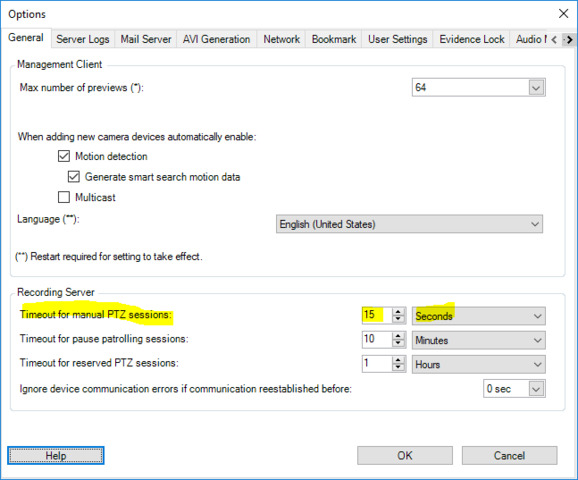
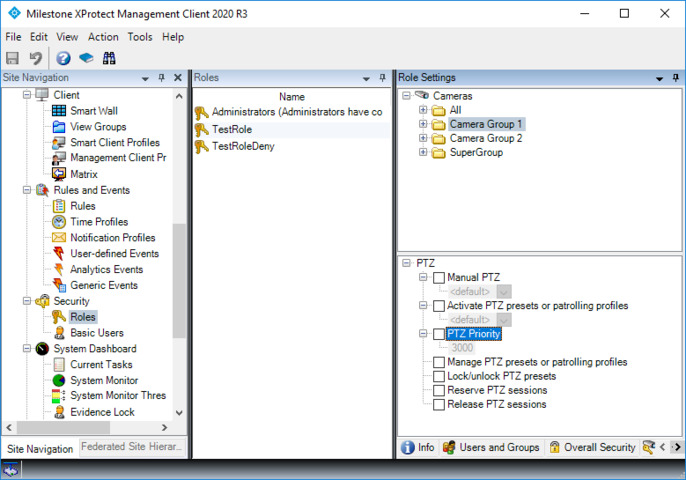
Thank you Bo for your reply. It is a good idea, but I noticed ‘Timeout for manual PTZ sessions’ is a general setting and it will apply to all users and all devices. If I set a big value, it means once a user PTZ move camera at smart client, the camera also will be locked for this user only and other same priority user cannot move it in a long time. Is there any other suggestion? Thanks.
Your comment is correct. So unless you can use a timeout value which would also be generally acceptable this is not a good workaround.
Unfortunately I do not see a good workaround as the “Reserve PTZ session” functionality is not supported by the MIP SDK.
To develop this support is on the wish-list for future enhancement development work, but so far it has not been prioritized. It is impossible to say when, or even if, this will be developed.
Noted. Thank you very much.
Hi Bo, possible to call SDK function to real time change system configuration such as device access permission? so that normal user cannot see or PTZ control the camera at smart client when it is using at our system backend.
Our project requirement is that normal user cannot PTZ move the camera when it is used in video analysis. But administrator still can use it.
No, unfortunately it will not work, let me explain why:
If you change the configuration and disallow a user to make PTZ, the user when logging in anew in the Smart Client will be unable to do PTZ. If the user is already logged in a cached set of configuration and permissions will be in use. In order for this to work for you as you require you would need the configuration change to take effect immediately but it does not.
“Reserve PTZ session” is implemented to use functionality beyond a configuration change, with different means of communication between the clients, but unfortunately it was implemented without MIP SDK support.
Noted. Thank you very much for your clarification.