EnvironmentManager.Instance.PostMessage taking over 5s to execute

We are running the MIPSDK inside of a standalone service application. We are using EnvironmentManager.Instance.PostMessage to move PTZ cameras.

For some reason, on a particular server these commands are taking anywhere from 5s to 25s to execute. We have put Stopwatch before and after the call to PostMessage.

On other servers we have tested, it is very fast.

What is interesting is that while we see this issue, we can run the “PTZAndPresets” sample at the same time, and the sample is able to call the same commands very quickly with no latency.

Our standalone service is doing several other things including fetching PTZ positions regularly for all cameras and calling MultiEnvironment.ReloadConfiguration every few minutes to check for configuration changes and we are also using SystemStatusClient to get camera state updates.

When we fire the commands to move the PTZ camera, we are doing it from a UserContext which has been obtained using MultiEnvironment.CreateSingleServerUserContext.

It seems like there is some odd behavior, almost like if the EnvironmentManager.Instance.PostMessage has its own messaging queue per application and something we are doing is making those commands very slow.

How can we investigate the cause of this issue?

Before we investigate deeper we have a question: If you disable the functionality of doing ReloadConfiguration do you then observe the same wait?

We have a suspicion that it is not PostMessage that takes times but is not ready to run because of reload. At any rate it would be beneficial for us to know if this makes a difference. If you do not know the answer without doing further testing please test and let us know what you observe.

OK, we are going to test this now. I will active trace logging on the event server to see if we see any more clues

We have found the issue!

I added allot of code to make sure we don’t send ContinousMove commands too fast and I can chose how fast we allow move commands to go through.

This way, I was able to track the time each request took to execute.

The ReloadConfiguration had no negative effect on the speed of the PostMessage.

The issue is directly related to calling SendMessage with PTZGetAbsoluteRequest.

When the GetPTZAbsoluteRequest fails for a given PTZ camera, it slows down all the continuous move requests and PTZGetAbsoluteReques for other cameras.

We found that if there was a single PTZ camera that was not able to give a PTZ position, all the other ones would suffer.

It could be either because an ONVIF PTZ camera was added which does not actually support PTZ, or because the camera itself was not responding properly.

We are doing more tests to understand when this happens exactly but we narrowed it down allot.

Our workaround has worked, PTZ control is very fast as long as we leave the faulty PTZ cameras alone.

I can try to modify the PTZ sample app to reproduce but it might be a few days before I can spend time one this.

If you can provide a modified sample we would love to test and reproduce this in the Milestone test lab.

I have spent some time modifying the PTZandPresets sample to try and reproduce this issue but I have not been able to reproduce the lag with a modified sample. Whatever the problem is seems related to the customers hardware. I have been able to reproduce what seems like a bug on a Dahua driver, where I need to send a move stop command before I can send a move start command in a different direction. We are forwarding PTZ continuous move commands from the client application which uses a virtual joystick similar to what we see in the smart client (camera moves faster the further away you are from center). I need to be able to send a move start with different values quickly and this does not work on some camera drivers like Dahua.

I noticed they had a few cameras (Dahua, Hanwha, Axis, HikVision and other models) added with the ONVIF driver, and they enabled PTZ on all of them even though the cameras were not actually PTZ.

In my test on my local server, I added 4 cameras from different brands using the ONVIF driver, and one actual PTZ cam also with the ONVIF driver. No issues with my cameras.

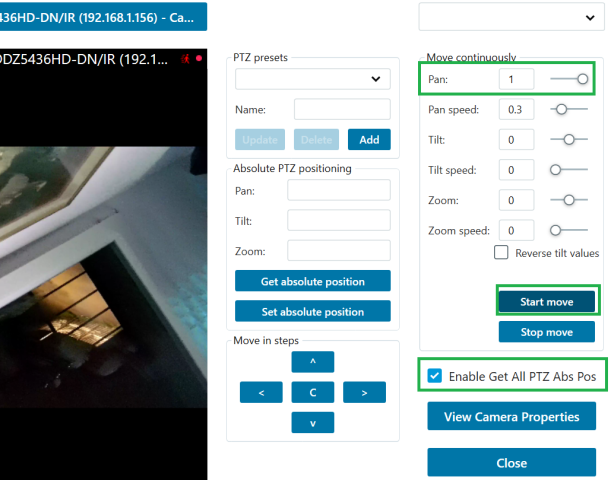
Here is the modified sample, perhaps you will have more luck in your environment.

There is a checkbox to start polling the PTZ positions from ALL the cameras (not filtering by PTZ to have better chance to try and break it).

My guess at this point is that some device(s) on the customer site is slow to reply to the get absolute postion and perhaps that could be slowing down all the other commands?

To run the test, choose an actual PTZ camera, enable the new checkbox, and modify the Pan from -1 to 1 and click start after each time you change the pan value. Even without using the stop command, you should be able to send multiple start commands in a row in different directions and the camera will cooperate.

On the client system, if we send a start command on the dahua camera, flip the pan value and send another start command in the oposite direction, the camera will just stop and the following start commands in the same direction do not work.

If however you fire a stop command in between, the camera will change directions.

I do not have more ideas to reproduce the lag effect I was seeing in my standalone service code. Altough a difference is that in my code, I wait for the PTZ move command to return before I can fire the next one.

I did not know this behavior with Dahua cameras, this was perhaps throwing us off a bit but now I know the issue so I can try to code around it by sending a stop command before a new start command.

Edit: Also, when spamming PTZ commands, the Dahua camera crashes and restarts lol. Dahua DH-SD49225XAN-HNR
The way MessageCommunication works there is one message queue, if a message hangs subsequent message will be waiting until that message is done. So if a PTZGetAbsolute message hangs all other PTZ commands or other messaging will be waiting, or if there is a slow replying on a PTZGetAbsolute message everything be waiting. I think we can confirm your suspicion on this. We will at Milestone take into consideration alternatives for future development work.

What you are describing, your observations with the Dahua camera, seems like buggy behavior. I would like to report this to Milestone Development for them to evaluate and investigate. I will create a support case for you and ask for the firmware version, I can better handle this sort of issue as a support case.