We are trying to retrieve recording from camera using “RetrievalTask” and “RetrievalTaskManager”.
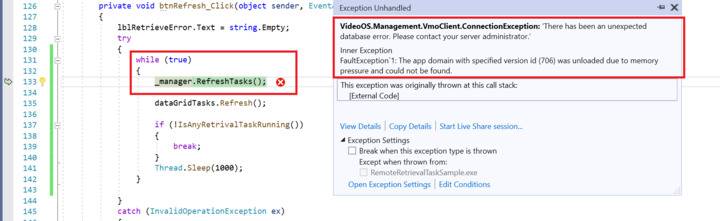
We are checking progress of the task but sometime it is giving “There has been an unexpected database error. Please contact your server administrator.” into “Refresh”
Please find error details and Stack Trace as below
I had an expert developer and colleague her at Milestone looking into this. Please see if his troubleshooting tip leads to a solution for you:
This one is very strange – my investigation shows that the memory pressure exception normally happens in relation to CLR usage in the SQL queries. The specific task query that causes the exception does not use any CLR, so it must be something else executing in the server.
It is not a exception that we have seen, so I think it is specific for the way the customer is using the system or the SQL server setup or an environment problem.
I found this post that might could help for troubleshooting - Troubleshooting SQL CLR memory pressure (sqlserver-dba.com)
I have checked suggested things but nothing works. We have tried to install milestone on fresh machine. where only SQL server and Milestone is installed and SQL server only connected with Milestone but observed same error.
SQL Server version: Microsoft SQL Server 2019 (RTM) - 15.0.2000.5 (X64) Sep 24 2019 13:48:23 Copyright (C) 2019 Microsoft Corporation Express Edition (64-bit) on Windows 10 Enterprise 10.0 (Build 19043: )
Milestone Version: XProtect Corporate 2021 R1 Test
Please suggest your feedback and let us know if any information required
No, we are not getting this error when we Retrieve Manually from Playback Tab.
We are only got this error when we try to retrieve from plugin which we have implemented (Retrieve implementation same as RemoteRetrievalTaskSample available in mipsdk-samples-component repo)
If we run the unmodified sample, standalone sample, Remote Retrieval Task sample then issue is not reproduced as we need to call refresh manually to see the progress
I have modified some code to update the progress status automatically ( Same we have implemented in our plugin to display overall retrieval status). and I am able to reproduce the issue into sample standalone application
We have have tried to reproduce the issue in standalone, but are unable to. The snippet of code did not do the job for us and it was suspected to cause blocking of the UI thread. We would like to reproduce the issue in standalone and if you could supply further information, perhaps a file with the changed code for the Remote Retrieval Task sample, we would like to investigate further.
I am sorry for delayed reply. I tested your standalone application and it works fine. I could see video through the retrieval jobs from the application. Basically, I followed your instructions but let me tell you what I did - ran the sample, selected around 20mins for retrieval. The sample added camera and microphone. During retrieval, clicked refresh several times. I tested several retrieval jobs with the sample but I could not see the issue. Am I missing something in the test? It would be great if you could point out what I am missing for further investigation.
thanks @Rie Kiuchi (Milestone Systems) for the feedback.
Steps are correct. I have few queries. Please suggest
How many cameras are connected to Hardware ?
How much it is taking for retrieval for 20 mins complete video?
Wait till all tasks completed
Please note: run this application from Visual Studio, if you direct run from the EXE, it will not display error as refresh logic under separate thread and under try cache
When you press refresh button, it will automatically update the progress in grid.
I am trying with 4 cameras and 4 microphone in single Hardware.
I used a hardware which has 1 camera and 1 microphone and it takes about a few minutes to complete a retrieval task (actually, the retrieval time depends on how busy a test machine is). I ran the application from Visual Studio.
I have consulted Milestone development and he is wondering what driver you are using and suspecting if you use your own driver, this means you implemented the driver. If so, the issue might occur due to the driver. So please check what driver you use.