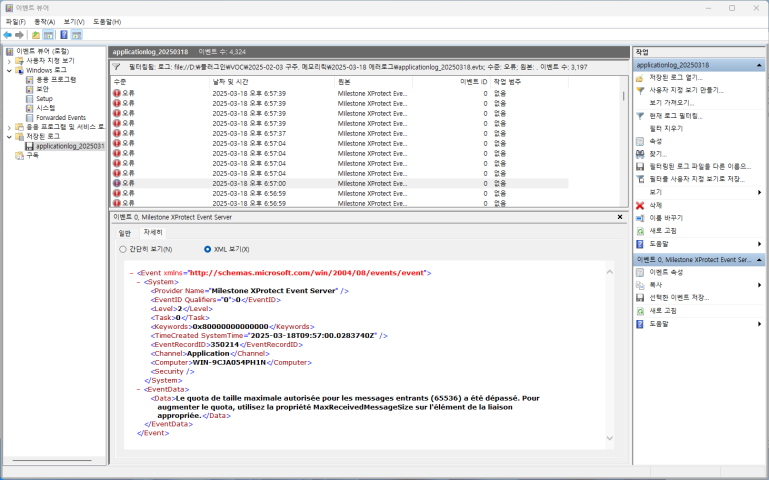
which means The maximum message size quota for incoming messages (65536) has been exceeded. To increase the quota, use the MaxReceivedMessageSize property on the appropriate binding element.
Searching the support community, it says that Online license activation failure could cause this error message(Online license activation fails). What I would like to know is:
Which MIP SDK could lead to the online license activation
Did you develop an integration that you believe is causing this?
If yes, please describe your integration, what is does and perhaps even the SDK functions or API calls it uses.
If no, as this does not pertain to development but to a general situation you will most likely get better help from the partners active in the Support Community - https://supportcommunity.milestonesys.com
You are saying your plugin. This shouldn’t be a plugin because you are using VideoOS.Platform.SDK which is not supported for a plugin. Do you have a plugin in Smart Client, Management Client, Event Server or do you have a standalone app or service?
If you don’t run your app or service do you still see the event viewer errors? Or vise versa, do you see the event viewer errors coincide with things you know you do in the app or service?
Sorry for the confusion. My event server plugin executes a standalone app, so what I am talking about is a standalone app. I will check if this issue is reproducible on my machine because the error logs were from the customer site. However, I couldn’t see the error logs while our app is not working. If it is relevant to the size of the message transferred, because one of our logic is transferring the search result from server to client, it could be over 2000KB at once.
2025-08-22 15:13:48.203+02:00 [ 50] ERROR - SystemMonitorStatePusher For (1) time(s) - The maximum message size quota for incoming messages (2097152) has been exceeded. To increase the quota, use the MaxReceivedMessageSize property on the appropriate binding element.
We have an theory that the issue is that you are sending a very large chunk of data, in this case the status object. That the chunk of data exceeds 2 MB.
It would be possible to increase the data size limit by Milestone developing a fix. We are however concerned if this might be bad for performance. Do you think you would be able to workaround in a way where you use smaller data chunks?
So, the data I’m getting would be the same every time, but I only receive this message on a server with approximately 1,000 cameras, not on the one with about 3-4 cameras. I will serialise the object and log the size to see whether the size might be changing, and also confirm if it is less than 2MB.
Sending smaller data chunks would be kind of difficult since the object only has 4 properties (each no longer than 10 characters).