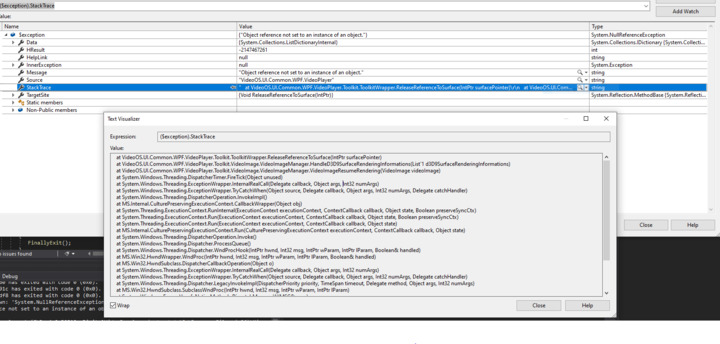
I do not know exactly how this occurs however. I see this happen occasionally and it is unclear how it happens. What we are doing is performing some stress tests that will create a new ImageViewerControl and connect and display video and then after a few seconds, disconnect/close it, and immediately create a new one and connect to the same video. Perhaps it has something to do with constantly trying to re-create the same video over and over again too quickly? Can you please advise?
Here is the relevant code to create a new ImageViewerControl:
Most important first - have you updated to the newest graphics driver?
It is critical to have the drivers for the graphics cards in your test PCs (or customer site PCs) up to date. We see many issues of Smart Client or ImageViewerControl based client application leaking or malfunctioning in other ways and a graphics driver update makes the issue go away.
Please tell us which product and version of the XProtect VMS you use.
Yes, the graphics driver is updated to latest. It happens on multiple developer machines so it is not just my own system.
We are using VMS XProtect Essential+ 20.2a and MIP SDK 2020 R2. We can try release 3 but the SDK release notes do not mention fixing any memory issues.
Looking at task manager, I do not see User Objects or GDI objects leaking so as far as I can tell, I do not think there is a memory leak anywhere.
I did find the cause of the exception and it appears to be because of the call: imageViewerControl.Close(). If I do not call that when disposing of resources, I don’t get that exception anymore. Even after not calling this, I do not notice any resources being left over.
We have looked further into the code and this is clearly a problem on our side, and we honestly don’t believe the right solution is to stop calling Close(). For now the best you can do is to reuse the ImageViewerControls instead of disposing and creating new, but the team has also started looking into how to fix the problem, and we hope we can have a preliminary version ready within a few days, which we then hope you will test for us? If it solves the problem the next step will of course be that we provide an official hotfix.
We have now analyzed the code further and we think that we understand why the exception is thrown. We have however not yet been able to reproduce the issue in-house so there is some element of uncertainty here.
We only believe that the exception you see can happen if the ImageViewerControl is constructed and hosted on a UI thread other than the applications main UI thread. Is your application creating new UI threads and creates the ImageViewerControls on these?
Also we will like to know what UI technology is used by the application. Is it a pure Windows Forms or WPF application or a mix? And if it is a mix, is the application type then Windows Forms of WPF?
Finally I have attached a dll where the issue you see hopefully is solved. Can you please try to reproduce using that dll? Please note that the dll is a local untested build and should NOT be distributed elsewhere.
I have tried the latest dll and it appears it no longer causes the exception.
To answer your questions, as far as I know, there is only 1 UI main thread so I don’t know how it can be on another UI thread. This is also a pure .NET Windows Form application.
Since this works, do you know when an official SDK will be available with this fix? I would like to update our application install bundle to include the official fix.
This fix is in the from of a new Smart Client installer not a new MIP SDK. You will need to persuade customers that see the issue to update their Smart Clients.
I’m confused. The previous temporary fix provided by Jimmi was in a dll that we incorporate into our application that we need for our integration of the component libraries to address the problem. We are NOT using the Smart Client at all. How does this address our issue?